
kohejinncbalnjieimddpleeaklmmhhd

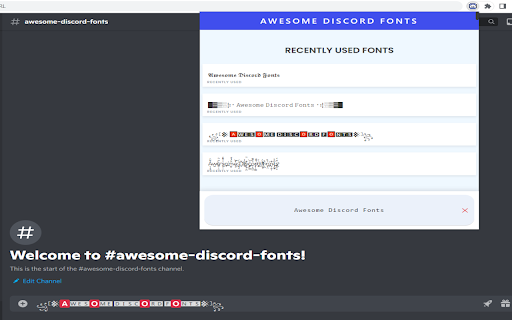
Generate cool, stylish and strikethrough fonts for Discord - Discord text formatting - Discord font generator Awesome Discord Fonts allows you to generate awesome fonts that you can use in your Discord chats. Using this discord text formatting extension you can you can post more than just bold and underlined text in your discord chat messages. Using the above forms you can convert text into all sorts of different fonts including Old English / medieval / gothic style text, cursive text, double-struck, strikethrough and many more. You can also use these fancy stylish text fonts on : Discord Fonts Facebook name, messages, comments, Bio, description Instagram Bio Whatsapp messages And other social media platforms Awesome Discord Fonts - ᐈ #1 Discord Font Generator - ς๏๏ɭ & 🅂🅃🅈🄻🄸🅂🄷 Fonts Best 𝐹𝒶𝓃𝒸𝓎 𝒯𝑒𝓍𝓉 For Discord - ⓢⓣⓨⓛⓘⓢⓗ Discord Font Generator Online - Discord 𝕮𝖔𝖔𝖑 Fonts.

Discord Voice Messages
The Discord Voice Messages extensions adds the ability for google chrome users to send voice messages directly from the browser, The functionality is provided through the addition of a record icon next to the emojis icon, the record icon looks like a native element of the page, which makes the usage of the extension quite easy.

Discord Batch Deleter
Batch Delete your Discord channel or IM messages This extension is a life saver for Discord admin, which hep you to batch delete the discord app messages. As we know, the discord channel may generate lots of messages, e.g. from Discord Bot or members. Since Discord app deleting message require you to double confirm (which make sense), this will make Admin not easy to delete massive messages . Just install this extension, then goto your channel, then open the extension, select some users or delete all, click, then leave. Then this extension will delete the message one by one (about two per second). The deleting progress can be found in the bottom bar. You can also stop the deleting session by click the closed button or refresh the web page. Enjoy and have fun! 🏝

SpoPlus - Edit Spotify Theme & Settings
2026 Spotify extension that allows you to set up new themes, fonts, remove annoying notifications, popups, and more! Hide Spotify "Now Playing" View, disable albums, change themes, fonts, or block images / videos to reduce bandwidth usage with SpoPlus. Take control of your Spotify experience and customize it according to your preferences. Features: 1. Focus Mode: Enable this mode to make the Spotify interface more compact, focused, and minimalist. 2. Element Visibility Control: Hide the header buttons to create a cleaner interface that focuses solely on your music. 3. Navbar: Make the Navbar bigger for improved visibility and easier navigation. 4. Static Aside Menu Width: Keep the width of the aside menu static, ensuring a consistent and comfortable browsing experience. 6. "Now Playing" View Control: Disable the "Now Playing" view to simplify the interface and focus solely on your playlist. 7. Choose from a range of themes and fonts to further customize your Spotify experience: * Themes: - Default - Light Green - Dark Purple - Kittens - Dark Blue - Dark Yellow - Dark Red - Light Pink ... and more * Fonts: - Noto Sans - Pixelify - Montserrat - Poppins ... and more 8. Square Mode: Apply a square design to Spotify elements for a consistent, visually appealing aesthetic. 9. Traffic Optimization: Block videos and/or images to reduce bandwidth usage. ----- Note: Spotify is a registered trademark of Spotify AB. This extension is not affiliated with or endorsed by Spotify AB. ## Version 3.1.0 - Stable Release - Fixed `Focus Mode`: top bar, aside section, and other related issues - Fixed `Fullscreen` navigation bar and `Make navbar bigger` option clipping - Fixed DOM changes in (`Light Purple`, `Light Pink`, `Light Pink Dimmed`, and other themes) - Updated `Bring back classic heart button` option states (like, unlike, on-unlike, on-like) masks and fixed disappearing icons in lists and modals - Updated `premium-page` styles in **light-type** themes - Added support for new modals (add button, blend playlists) - Fixed placeholder images in **light-type** themes - Added two new features: `Hide Video Cards` and `Hide "Episodes you may like"` - Added `Friends Activity` button hiding to the `Hide Header App Buttons` option, as it’s **not supported in the web version** - Fixed shadows and dark placeholder user profiles in **light-type** themes - Improved style injection time - Fixed `Queue` and `Connect to a device` not working properly when the `Disable Now Playing View` option was enabled - Other minor improvements and fixes **Full Changelog**: https://github.com/ptjaworski/spoplus-extension/compare/v.2.8.0...v.3.1.0 ## Version 2.8.0 - Stable Release - Fixed aside menu modal window in light themes. - Fixed Focus Mode issue where aside menu items were misaligned. - Fixed Lyrics page background and contrast across light themes. - Fixed navigation bar visual issues on themes: Kimbie Dark, Comfy Red, Light Green, and others. - Improved fullscreen mode behavior on desktop viewport. - Fixed “For Fans” blocks section in light mode. - Other minor improvements and fixes. Full Changelog: https://github.com/ptjaworski/spoplus-extension/compare/v.2.7.0...v.2.8.0 ## Version 2.7.0 - Stable Release - Fixed the aside menu overflow issue. - Fixed footer styling in themes: Kimbie Dark, Comfy Red, and others. - Resolved a visual bug causing the collapsed menu to appear unevenly aligned. - Updated the Bring back the classic heart button feature. - Fixed the Support popup appearance frequency and delay, as some users reported it appeared too often. - Added support for new features: Clips, Fullscreen mode. ...and other changes Full Changelog: https://github.com/ptjaworski/spoplus-extension/compare/v.2.6.0...v.2.7.0 ## Version 2.6.0 - Stable Release - Fixed "Keep Aside Width Static" option (#11) not working properly - Fixed incorrect tone in (#9) skeleton loader - Resolved visual bug causing (#4) incorrect tone in aside menu on press state - Fixed incorrect tone in (#3) "Add to Playlist" modal - Adjusted (#10) Kimbie Dark on-hover slider colors - Fixed (#8) scrollbar appearing on some elements (Windows) - Resolved (#7) overflow in Focus mode - Corrected (#6) incorrect tone in Search modal - Fixed (#9) incorrect tone in "Now Playing" section > "Connect to a Device" Full Changelog: https://github.com/ptjaworski/spoplus-extension/compare/v.2.5.2...v.2.6.0 ## Version 2.3.0.0 - Current Release - Fixed heart button: Improved visibility for pending requests and resolved related issues. - Light themes: Enhanced shadows and fixed several bugs. - Updated Focus mode (Search bar, Navigation bar). - Fixed an issue where the rate-me popup appeared more than twice. ## Version 2.2.0 - Stable Release - Fixed multiple issues in Focus Mode, including compact view and transcript display errors. - Resolved problems with heart icons feature not functioning correctly. - Fixed progress bar issues in "Your Episodes" for light themes. - Fixed fullscreen mode issues across light themes. - Corrected overflow issues with some tippyjs tooltips. - Fixed layout issues on the Premium page when using light themes. - Updated placeholders to reduce GPU usage. - Resolved resizing problems when the "Aside" section is set to static. - Fixed color issues with lyrics display in light themes. ...and other minor improvements ## Version 2.1.0 - Stable Release - Fixed the issue where Inter font was not displayed properly on some devices. - Updated light themes: Light Green, Light Purple. - Fixed the issue where active buttons were baseline color in active or mixed state. - Improved general stability and state validation. - Added low-end PC optimization feature. - Added new themes (x4): Kimbie Dark, Comfy Red, Light Pink, Light Pink Dimmed. - Added better SVG animation color-swapping support. - Added changelog button functionality. ...and other changes ## Version 1.2.4 - Stable Release - Added Belarusian and Arabic i18n support - Improved themes: Dark Purple, Dark Red, Dark Yellow, Light Purple and Light Green - Fixed the issue when aside "collapse" in Fixed Mode - Added "Contribute" menu option - Fixed window.reload issues caused by a faulty event handler - Added better "Add Button" animation & color - Fixed Amoled Theme issue when the old background persist - Fixed the overflow issue in aside when "List mode" view was selected - Fixed "Hide header buttons" functionality - Added RTL Support - Improved "Focus Mode" ...and other changes ## Version 1.2.0 - Stable Release - Added i18n languages (x7) support - Added new themes: Amoled, Amoled Night - Improved themes: Dark Purple ...and other issues ## Version 1.1.7 - Stable Release - Improved themes: Dark Purple, Green Light, Kittens - Fixed Welcome page appearing at every update ...and other issues ## Version 1.1.5 - Stable Release - Added Firefox & Microsoft Edge Support - Extension Popup Dark Mode - Toggle-All Functional Button - Added New Fonts (x6) - Imp. Support page & Others - Fixed: Light theme, Cyrillic Support, Re-render bugs, etc. ...and other issues ## Version 1.0.4 - Stable Release - Stability Improvements - Better popup visuals - Added license changes ...and other issues ## Version 1.0.2 - Stable Release - Stability Improvements - Fixed font issue after "Classic mode" toggle ...and other issues ## Version 1.0.0 - Stable Release - Added Themes: Light Green, Dark Purple, Kittens - Added Fonts: Poppins, Playfair, Noto Sans & others - Fixed Aside collapsing - Fixed "now playing view" app crash ...and other issues ## Version 0.2 - Beta Release - Added Classic Mode - Fixed Aside width functionality - Images disabling to reduce bandwidth usage ...and other issues

Roblokis
Customize Roblox the way you want it. Roblokis is extension to enable or disable custom features and design your own custom theme for roblox website. please open a github issue for any in-consistencies rather than rating the extension 1 star and stating the problem in the rating. Roblokis has; - the best roblox site designer - better servers, badges, menu, icons, colors, game cards, avatar designs and more - create custom personalized themes using a theme editor - quick game join buttons on home page, joining a game is literally a click away - small servers section for easy access to servers with few players - set game's banner as a page background to make every game page feel unique and more features.
