
lgmnomldfahgdpkbmlegninjpokgmoob
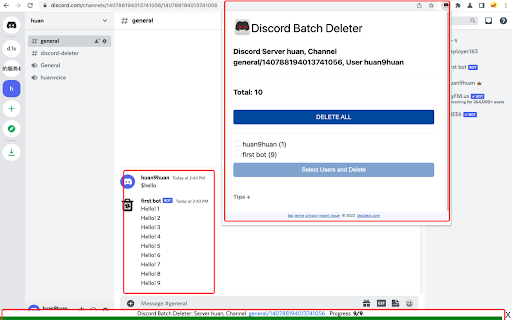
Batch Delete your Discord channel or IM messages This extension is a life saver for Discord admin, which hep you to batch delete the discord app messages. As we know, the discord channel may generate lots of messages, e.g. from Discord Bot or members. Since Discord app deleting message require you to double confirm (which make sense), this will make Admin not easy to delete massive messages . Just install this extension, then goto your channel, then open the extension, select some users or delete all, click, then leave. Then this extension will delete the message one by one (about two per second). The deleting progress can be found in the bottom bar. You can also stop the deleting session by click the closed button or refresh the web page. Enjoy and have fun! 🏝

Discord Blur
Blur and Hides your messages on Discord until you hover over them. Blur and Hides your messages on Discord until you hover over them. To increase privacy in public spaces the Discord Blur Extension For Discord Web blurs your messages as well as other content. And only reveals one when you hover over it with your mouse cursor. Additionally, you can quickly toggle all effects by using a keyboard shortcut (Alt+X) or by clicking the toggle button in the extension menu. It adapts to your needs by letting you decide which elements you want to blur. Your options: - Blurs all messages in the current chat. - Blurs all message previews on the left. - Blurs all images, videos, stickers, ... in separation from the text. - Blurs all small icons of images, videos, ... while viewing an image, video, ... - Makes the color in your input field lighter to make it hard to read. - Blurs all profile pictures. - Blurs all groups and users names. - Allows you to turn off the delay before revealing an item on hover. - Unblurs all elements when you hover over the Discord Web app

Better Discord Web unofficial
Our Chrome Extension is specially designed to enhance your Discord experience. With this extension, you can customize your Discord experience to your personal preferences. It is based on Better Discord and offers Theme customization and in the future you can add plugins. Our extension is easy to use and will take your Discord experience to the next level. Download it now and discover how simple it is to customize your Discord experience.

UnDiscord - Messages Deleter
Try the UnDiscord extension to delete all messages in Discord. A quick Discord messages history deleter. 💎 Looking for a fast and hassle-free way to delete your Discord chat history? Whether you want to clean up group chats, private DMs, or entire channels, the UnDiscord Chrome extension is the ultimate solution. In just a couple of clicks, you can delete all Discord messages and start fresh — no manual deleting needed! 🤯 With the Undiscord extension, you no longer need to scroll through thousands of messages or run complicated scripts. 🛡 This powerful Discord messages deleter helps you clear entire conversations instantly — from direct messages to server channels. 🥷 Perfect for gamers, server admins, or anyone who values privacy and order. 🌟 Key Features of the UnDiscord: 1️⃣ One-click full chat deletion 2️⃣ Supports direct messages and channels 3️⃣ Secure and user-controlled 4️⃣ No coding knowledge needed 5️⃣ Works right in your browser with Discord Chrome extensions ❓ Why Use UnDiscord? ● Quickly delete all Discord messages ● No need to go message-by-message ● Keeps your workspace clean and minimal ● Ideal for both personal and server use ● Lightweight and privacy-focused ⚡ If you’ve ever asked how to delete all messages on Discord, the Undiscord extension is your answer. ❓ How to Use UnDiscord? Using the UnDiscord extension is as easy as 1-2-3: 1. Install the Undiscord Chrome extension from the Chrome Web Store 2. 3. Open Discord in your browser Launch UnDiscord and select the conversation or channel you want to clear 💡 Just like that, UnDiscord delete all messages for you — safe and fast. 💬 Frequently Asked Questions ❓ Is UnDiscord safe? 💡 Yes! The extension operates entirely on your local machine and doesn’t transmit your data elsewhere. You stay in control. ❓ Can you delete Discord messages with one tool? 💡 Absolutely. Undiscord delete all messages from your Discord history in moments — even direct messages. ❓ How to delete multiple Discord messages with someone? 💡 Use the Undiscord and select the user DM. Click, confirm, and watch the messages disappear. ❓ Where Can You Use UnDiscord? ▸ Discord delete all messages from user in DM ▸ Delete all Discord messages from a channel ▸ Discord Chrome on PC and Mac ▸ With most Discord Chrome extensions ▸ Inside your browser — no extra software ✅ No matter if it’s a group chat or a one-on-one conversation, undiscord handles it all. More Reasons to Try UnDiscord: 🎁 Save time with batch deleting ⏰ Eliminate old chats in seconds 🔒 Boost your privacy by erasing sensitive messages 🗑 Say goodbye to clutter in Discord servers 💯 Works even if the chat has thousands of messages 🧹 Want to Clean Up Fast? If you’ve ever wondered: ● How to delete all messages in a Discord channel ● How to mass delete Discord messages ● How to delete all Discord messages from someone in DMs ● How to delete multiple Discord messages with someone 📌…then UnDiscord is built for you. 💊 Deleted Messages Discord Plugin Alternative. Think of UnDiscord as a smarter, browser-based deleted messages Discord plugin. You don’t need to tinker with settings or install third-party software — everything works from your browser via the Undiscord. Say Goodbye to Message Overload 🚨 If your messages history is out of control, now is the time to act. Whether you’re clearing chat logs before leaving a server or just tidying up your space, UnDiscord gives you a clean slate in seconds. 🚀 Try UnDiscord Now. Don’t waste time with manual deletions or risky scripts. Join thousands of users who already rely on the Undiscord to manage their conversations. ✅ Fast ✅ Simple ✅ Effective Install UnDiscord today and take full control of your Discord messaging experience.

AutoDM for Discord
Automate your Discord DMs and save time! Customize your message and member list, then let the tool do the work for you. 👋 Tired of manually sending DMs to your prospects on Discord one by one? Let "AutoDM for Discord" do the work for you! With just a few clicks, you can automate your DMs and save yourself valuable time. - 🧑💻 Customizable member list: Easily select which members you want to DM by pasting their Discord IDs into the extension, or quickly load members from your current server. - 🌀 Spin syntax supported: Use spin syntax to easily generate unique messages for each member, making your DMs more personalized. - ⏰ Adjustable interval between DMs: Set the time between each DM to avoid triggering Discord's rate limit, and ensure your DMs are delivered smoothly. 1. 🔌 Install the "AutoDM for Discord" extension. 2. 📋 Paste the Discord IDs of your target members, or load members from your current server. 3. ✍️ Edit your DM text, and add spin syntax if you'd like. 4. 🚀 Click "START" to begin sending your automated DMs. Please be aware that automating DMs potentially violates Discord's Terms of Service. Use this tool at your own risk. Start automating your Discord DMs today with "AutoDM for Discord" and let it do the heavy lifting for you! 💪
