
gdicgodoiikpogmgoihoipfagfcnfcnc

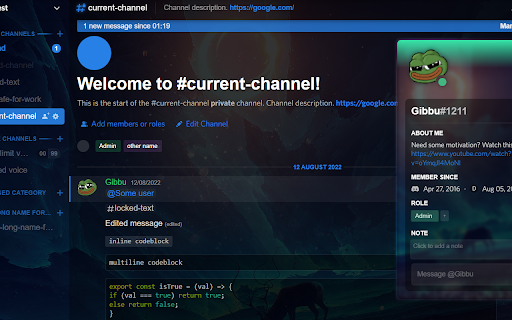

Our Chrome Extension is specially designed to enhance your Discord experience. With this extension, you can customize your Discord experience to your personal preferences. It is based on Better Discord and offers Theme customization and in the future you can add plugins. Our extension is easy to use and will take your Discord experience to the next level. Download it now and discover how simple it is to customize your Discord experience.

Discordmate - Discord Chat Exporter
The extension that can provide Discord chat log export, batch export of video, images and such attachments in Discord chat history. A practical extension that can provide Discord chat log export, batch download of video, images, audios, discord member export and such Discord attachments in Discord chat history. Feature ○ Export Discord chat log or chat history for free. ○ Export file formats include CSV, HTML. ○ Provide date and time filtering to quickly get the chat log you need. ○ Support batch download of Discord attachments, including videos, images, audios and so on. ○ Visualization of pictures and video files. ○ Discord member export, member list saver for Discord How to use 1. View the time period of the required downloads such as Discord chat logs, Discord attachments, etc. on the Discord channel page. 2. Open this Discord chat exporter, select start date time, end date and time and confirm. 3. Select the part you want to export or download and click the download button.

RoGold - Level Up Roblox
Your new and improved Roblox experience RoGold adds many features to improve your Roblox experience. With over 40 different features, there is something for both developers and players! Join our Discord for news, support, and a welcoming community at https://discord.gg/rogold You can also visit our website at https://rogold.live/ Some of our features: - Keep track of games you love by pinning them with the Pinned Games feature. - Join a small or empty server in a flash without tediously finding them with the Small Server feature. - Prioritise your best friends and see them on your Roblox home page with the Best Friends feature. - See Roblox game stats update in realtime with the Live Game Stats feature. - Get more detailed group stats with the Group Stats feature. - Get greeted when you visit the Roblox home page, just like the old days! - Bulk Unfriend. Do you have a lot of Roblox friends? Now you can easily remove some. - Improve the look of your Roblox experience, with our Theme Creator system. - Are you a Roblox developer? With RoGold you are easily able to copy item, group and game ids. - View banned Roblox accounts with our Banned Users feature. And much much more! You can use this extension with others like RoPro, BTRoblox, Roblox+, etc. Full support for these is not guaranteed.

Discord Batch Deleter
Batch Delete your Discord channel or IM messages This extension is a life saver for Discord admin, which hep you to batch delete the discord app messages. As we know, the discord channel may generate lots of messages, e.g. from Discord Bot or members. Since Discord app deleting message require you to double confirm (which make sense), this will make Admin not easy to delete massive messages . Just install this extension, then goto your channel, then open the extension, select some users or delete all, click, then leave. Then this extension will delete the message one by one (about two per second). The deleting progress can be found in the bottom bar. You can also stop the deleting session by click the closed button or refresh the web page. Enjoy and have fun! 🏝

VPN for Discord
Secure your online activity with VPN for Discord. VPN offers safe browsing and access to blocked content! 🌐 Looking for a secure and reliable VPN for Discord or a virtual private network for Chrome? Our extension is designed to enhance your browsing experience while protecting your online activity. With a virtual private network, you can browse the web securely, bypass restrictions, and enjoy our tool for all your needs. 🔓 Using a virtual private network is simple, even if you’ve never done it before. In just a few steps, you’ll be up and running. Here’s how to use a VPN: 1️⃣ Install our Chrome extension 2️⃣ Enjoy unrestricted internet access 3️⃣ Choose the server location of your choice Whether you're learning how to use a virtual private network or looking for a way to stay anonymous online. It allows you to access websites and services that may be blocked in your region. For example, our VPN for Discord ensures seamless connection to your favorite apps no matter where you are. 🚀 Our extension is loaded with features: ➤ Stay anonymous and protect your data 🔒 ➤ Access region-locked content with ease 📺 ➤ Unlimited bandwidth for a smooth experience ⚡ Still wondering how to use a virtual private network? It’s simple! Once installed, all you need to do is select your preferred server and enjoy secure internet access from anywhere. This extension shows ads for our other products. They won’t interrupt your experience or restrict anything—you can keep using all features in full.
