
pbekmccdaapjjmjomhakooboibmnlklj
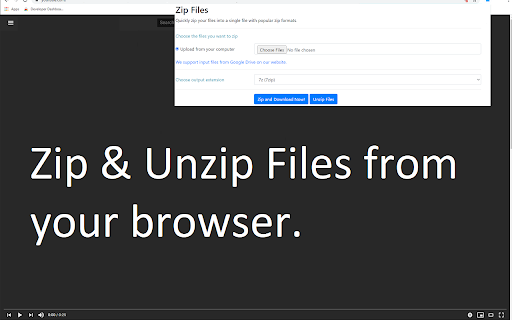


Extract zipped files and compress files with ease! Our FREE Zip app allows you to compress your files to the ZIP format. Extract ZIP files within minutes as well! Extract zipped files with ease! It helps you to extract zip/rar/7z etc and other zipped format files & access the unzipped files easily. You can choose a zipped file to unzip from your computer or from Google Drive. Our tool allows you to choose whether you want to save your unzipped files onto your desktop computer or onto Google Drive. This software is 100% free and does not require you to pay.

Zip Extractor
Use the Zip Extractor Chrome Extension to extract ZIP files. Unzip archives quickly and reliably with this zip extractor online. Unlock the power of our zip extractor Chrome extension, your ultimate tool for managing compressed files. Seamlessly integrated with Google Chrome, this ZIP extractor simplifies handling archives directly in your browser. Unpack, create, and update ZIP archives, no extra software required. 🚀Say goodbye to bulky software and embrace a fast, efficient way to unzip files online. It’s designed for users who value speed and simplicity: The extractor lets you open zip files without heavy programs. Extract zip files in seconds with a few clicks, saving time and storage. This tool supports multiple formats, making it perfect for both casual users and professionals: Our extension for Google Drive is a game-changer for cloud users. Extract zip files directly from Google Drive without downloading them first. This extractor feature streamlines your workflow, making archive management effortless: The extractor online unpacks in moments. It handles complex archives, including nested folders, with ease. This file unzipper automates the process, eliminating manual extraction hassles. It’s ideal for Chrome users: 📂 Supports nested folders 📂 Drag-and-drop functionality 📂 No size restrictions Unlike tools requiring an extractor download, our unpacker is lightweight and ready to use post-installation. It keeps your browser fast and uncluttered. Manage zip files effortlessly without slowing down your system: The extractor prioritizes your privacy. All extractions happen locally in Chrome, ensuring your data stays secure. Whether using the unpacker for personal or work tasks, your files are safe. 🛡️ 📲 Whether you're at home, in the office, or on the go, our online zip extractor is accessible from anywhere with an internet connection. Our zip file extractor supports multiple formats, including 7z file opener capabilities. Open the zip file quickly, making it a versatile tool for any user. No need for multiple apps—this is your all-in-one solution: 📄 Compatible with 7z 📄 Quick content access 📄 Easy archive navigation Unzip online with our extension for a seamless experience. The unzip online feature provides fast access to contents. 🌐 Fast online unpacking 🌐 Works with any archive 🌐 User-friendly interface 🔑The extension boasts a clean and intuitive interface, making it easy for users of all levels to navigate and use the tool effectively. The download extractor feature simplifies file access. No complex setups—just install and extract zip online instantly. It’s built for users who prioritize efficiency and ease of use: The extension offers unmatched flexibility. Extract files from email attachments or cloud services effortlessly. This tool lets you work from anywhere, anytime, with ease: 📌Our extractor is a productivity powerhouse. With support for various archive types, it handles compressed files with ease. This zip extractor is perfect for students, professionals, or anyone managing archives regularly. 🌟Our tool is designed with the user in mind. The intuitive interface and robust features ensure a satisfying user experience, making extraction a pleasant task. 💼 Multi-format support 💼 Fast archive handling 💼 Ideal for all users Experience the zip extractor’s seamless Chrome integration. No need to switch apps or download software. This tool brings everything to your browser, making it the ultimate tool for modern users: 🔗 Browser-based extraction 🔗 Handles large archives 🔗 Free to use with Chrome Get started with our zip extractor today. Whether you need to unzip or manage complex archives, this extension delivers. Install it now for the easiest way to handle zip files in Chrome. Enjoy a smarter workflow!

Merge PDF
Merge your PDF files fast and free! Free PDF File Merger - Merge PDF Files for free. •This software supports merging of PDF files •Merge 2 or more PDF files •Unlimited number of PDF mergers for free How to use this extension: - Click on the software icon - Choose PDF file you would like to merge, Disclaimer: Please note this extension is NOT made by Google and is made by an independent development team. All copyrights belong to their respective owners. Google doesn’t endorse or sponsor this Chrome extension. PDF Merge for Google Chrome™ is not owned by,it is not licensed by and is not a subsidiary of Google Inc.

Split PDF
Fast and easy way to Split PDF files online Select or drag your files, then click the Split button to download your document into one pdf file. All split files maintain the best quality which can be accepted on any web platform (when uploading to a website or attaching as email). Your files are fully secure as they are been transferred over a secure connection. We’ll permanently delete all files from our servers within a few hours after conversion.

Bookmark Import/Export
Import and export your bookmarks easily 🚀 Bookmark Import/Export: Your Ultimate Bookmark Management Tool! 📚 Effortlessly transfer, backup, and organize your bookmarks across browsers and devices. Our powerful extension makes managing your digital library a breeze! ✨ Key Features: 📤 Export bookmarks to JSON, HTML, and CSV formats 📥 Import bookmarks from JSON, HTML, and CSV files 🔍 Advanced Export for fine-tuned control over your bookmarks 🎨 Clean, intuitive user interface for seamless navigation 🌙 Dark mode support that automatically matches your system theme 🌍 Multi-language support: Available in English and Spanish, adapting to your browser's language ⚡ Lightning-fast bookmark processing with improved performance 🔗 Seamless integration with Chrome's bookmark system 📁 Preserve your entire bookmark structure, including folders and subfolders 🔒 100% offline functionality - your data stays on your device 🛠️ How to use: 1. Click the extension icon in your toolbar 2. Choose between "Export" and "Import" tabs 3. For basic exporting: Select your preferred format (HTML, JSON, or CSV) and click "Export". 4. For advanced exporting: Click "Advanced Export" for more options and control 5. For importing: Click the "Import" button, select your bookmark file (HTML, JSON, or CSV), and watch as your bookmarks are instantly added! 💼 Perfect for: - Switching between browsers without losing your carefully curated bookmarks - Creating regular backups of your digital library - Sharing your favorite sites with friends and colleagues - Organizing your professional and personal browsing efficiently 🔒 Privacy-focused: We respect your data. Bookmark Import/Export works entirely offline, ensuring your browsing history and bookmarks remain private. 🆘 Need help or have suggestions? Visit our support page: https://github.com/AndryOre/bookmarks-import-export/issues 💡 Pro tip: Regular backups can save you from losing important bookmarks. Set a reminder to export your bookmarks weekly! Download Bookmark Import/Export today and take control of your digital bookmarks! 🌟
