
paodbmenneplknjlgdbjlhgpojcngnnc

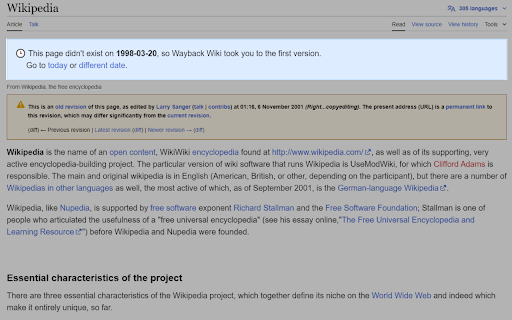


Surf Wikipedia on a specific date in the past. When surfing Wikipedia, sometimes I want to see how articles looked like on a specific date in the past. With Wayback Wiki you can choose a specific date, and every Wikipedia article you visit will automatically redirect you to the version of the article that existed on that date.

Faro
Save pages with highlighted taglines - Bookmark manager ⨯ web highlighter Chaos in your bookmarks? Can't find what you want? They end up gathering dust? Or you don't even try and end up with 100s of open tabs? Faro is made to fix that! It's the simplest way to save & keep track of pages. With it, even thousands of saves don't get overwhelming. When saving, you highlight a sentence to act as a tagline. It helps you remember what the page is about and why you saved it. If unsure - just save whatever sentence you're reading. All saves appear on your dashboard. They come most-recent-first by default, so you don't forget what you recently saved. You can pick up your reading where you left off - no need for a separate reading list. You can also pin & archive to further arrange it. Organize them with tags. Since you're reminded what you saved and why, you can do it later. It makes your saves much easier to manage than bookmarks. Faro supports nested tags (eg: recipes/vegan), so combines the best of tags and folders. Clicking a save takes you right back to your highlight - especially useful for longer articles. Also: ➣ export to bookmarks to keep them if you uninstall Faro ➣ copy links to highlights and share them or paste into Notion, Obsidian, etc. ℹ️ About your data: When installing you can read: "it can read and change all your data on all websites" The only information that ever gets uploaded (when signed in) when you use it to save: ➣ Open page address ➣ Saved highlight/quote - what's visible in the sidebar ➣ Timestamp ➣ Debug info e.g. errors The extension also keeps track the currently open tab for each window - to update the sidebar as you navigate - but doesn't save or upload that data.

404 Redirector
Redirects 404/error pages to the website's home page Are you tired of encountering 404 error pages and dead ends while browsing the web? The 404 Redirector extension is here to help! With this extension, you'll never have to worry about getting stuck on a 404 page again. Whenever you encounter a 404 error or a URL with the word "error" in it, the extension will automatically redirect you to the homepage of the website. No more frustration or wasted time! The 404 Redirector extension is lightweight, easy to use, and requires no setup. Simply install it, and it will work in the background to keep you on track. So why wait? Install the 404 Redirector extension now and start browsing with peace of mind!

YouTube Time Travel
Tired of YouTube shoving Shorts and clutter in your face? YouTube Time Travel lets you rewind and filter your feed — exactly the way you want it. Travel through time: Filter videos by the year they were uploaded (e.g., “Only show me 2020 content”). Declutter instantly: Hide Shorts, Playlists, and everything that doesn’t interest you. Focus fast: Skip the noise and discover high-quality videos from your chosen time period. 🧹 It’s like cleaning your room... but for YouTube.

Date-Time Tools
Extension to convert between time zones,Calculate Date Difference This extension has some Date-Time Tools * Convert date and time between different timezones. * Calculate difference between dates * Date calculations
