
pamhglogfolfbmlpnenhpeholpnlcclo


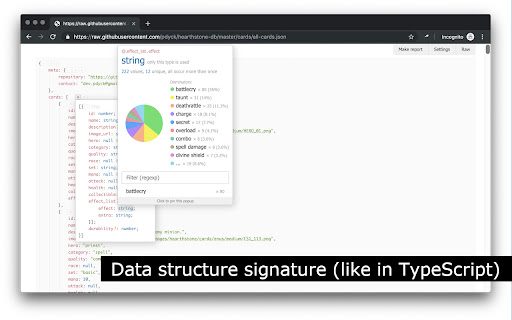
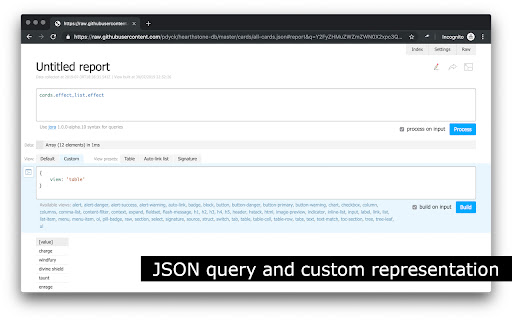
Browser extension that changes the way you're viewing JSON Most exciting features: - Show JSON as an interactive tree with highlighting - Easy an object or an array copy to clipboard - Data structure signature (like in TypeScript) - Data transformation with a query using Jora, suggestions on a query typing - Customisation of JSON data presentation (using tables, lists and so on) - Customisation (report) sharing by a link - Works on any page with a valid JSON – URL/content type doesn't matter - Works on local files, if it's enabled on extension's settings page (navigate to chrome://extensions, find JsonDiscovery, click "Details" button, then toggle "Allow access to file URLs" switch) - Works offline (doesn't perform any network request)

JSON Lite
- Format JSON/JSONP responses and clipboard - Select and format/encode/decode text on every page - Collapsible arrays, objects and long values - Collapse all childs with Ctrl(Command) + Click - Collapse property also on all sibling items with Alt(Option) + Click - Count items and properties in a collection - Show collection sizes - Do its best to show large (10MB+) JSON files - Do its best to show invalid JSON files - Do not sort objects with numeric keys - Do not round large numbers - "Save as..." saves the original JSON document - Select and copy a working JSON from the formatted JSON Copyright (c) 2016-2024 Lauri Rooden The MIT License

JSON Hero
A beautiful JSON explorer packed with features JSON Hero is an open-source, beautiful JSON explorer for the web that lets you browse, search and navigate your JSON files at speed. The JSON Hero Chrome extension allows you to quickly send JSON to view in JSON Hero. Or turn on *auto-mode and any pure JSON responses in Chrome will be transformed into a JSON Hero view. This extension will also allow you to send JSON from a Github file or a Firestore document right to JSON Hero. Just activate the extension in the toolbar whenever you are viewing a JSON GitHub file or a Firestore document in the Firestore console and they'll open in JSON Hero. * By turning on auto-mode any pure JSON responses will be automatically sent to jsonhero.io. If you are running a custom instance of JSON Hero, you can change the server URL in the extension settings.

JSON-handle
It's a browser and editor for JSON document.You can get a beautiful view. And transcoding Unicode Base64 URL with decode & encode. Edit and browse JSON document in a node tree diagram. After installed, open the URL will trigger JSON-handle: 安装后打开下面网址可以看到JSON-handle启动的效果: http://jsonhandle.sinaapp.com/demo.json

Virtual Json Viewer
JSON browser extension with virtual DOM, search and JQ filtering Features - **Extremely fast** JSON rendering using virtual DOM - Full text search - JQ filtering - JSON Lines support - Shareable URLs - Customisable theme and settings - Prettify/minify - Raw JSON viewer - Download JSON Bugs and suggestions https://github.com/paolosimone/virtual-json-viewer/issues Note: JQ filtering availability relies on WebAssembly and is subject to website Content Security Policy
