
paieadgemondfnehhihefldfgaaeofne
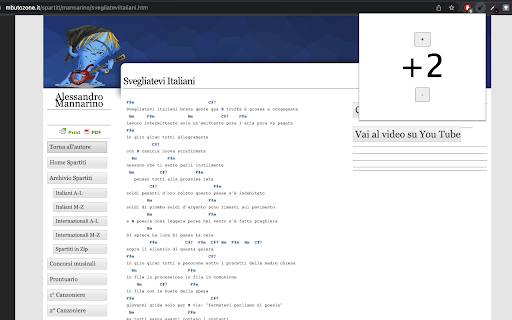
An extension that allows you to transpose chords. A chrome extension that allows you to transpose chords on any website. Transposing is the act of converting a song into a different key. You might want to do it to find a key that works better with your voice, or simply to choose a version of the song that has chords that are easier for you to play. Currently, it only works on websites with Italian chords (Do, Re, Mi etc..) and converts them into English chords so that transposition is possible. Inspired by the "transpose" functionality on the Ultimate Guitar website. How to use: - Visit a web page that contains chords - Wait for the page to load and click on the extension icon in the top right of the browser - Click 'select chords' and then click on the lyrics on the web page - Click on the extension icon and click 'enable'. This will convert the chords to links - Click on the extension icon and click '+' or '-' to transpose - Click on a converted chord to remove (in case part of the lyrics were converted by mistake)

Tab Deduper
An extension that allows the user to deduplicate tabs. Tab Deduper is an extension to find and remove duplicate Chrome tabs. Unlike other currently available extensions which dedup tabs, Tab Deduper differentiates itself in the following ways: - Duplicate tabs are not automatically closed. A list of duplicated tabs are presented, allowing for precise control over which tab gets closed. - Use of text OR regular expression based settings to control how tabs are compared, including use of title, fragment, and doing sed-like regex replacements on URLs. This last feature is very useful if you use other extensions which modify your tab URLs.

Tab Sorter
Extension for sorting your tabs. Tab Sorter Extension Organize Your Browser Tabs Efficiently Tab Sorter is a browser extension that helps you organize your open tabs using various sorting methods. Keep your browsing organized and find tabs quickly. Keyboard Shortcuts - Ctrl+Shift+Space - Sort tabs with your preferred method - Ctrl+Shift+L - Extract domain (move same-domain tabs to new window) Additional Features - Auto-sort - Automatically organize new tabs - Cross-window support - Works across all browser windows - Bilingual interface - English and French support - Privacy-focused - No data collection, local processing only 1. Install the extension from your browser store 2. Click the Tab Sorter icon or use keyboard shortcuts 3. Select your preferred sorting method 4. Your tabs will be organized instantly - Firefox - Available on Mozilla Add-ons - Chrome/Chromium - Available on Chrome Web Store - Works with all Chromium-based browsers For questions or issues, visit the GitHub repository: https://github.com/etienneschalk/tab-sorter-firefox/issues Tab Sorter - Keep your tabs organized.

Go To Playing Tab
This extension allows you to go to a tab that is emitting sound. Tired of having a hard time looking for the tab that has the playing icon to go to the thing you were watching or listening to? Sometimes you have lots of tabs open and finding the tab that's playing can be a hassle. This Chrome extension solves that problem by allowing you to go to the tab that is playing audio by simply clicking a button or with a keyboard shortcut. Simply click on the button in the toolbar and you will go instantly to the tab that is playing audio. It works with different windows too. You can be in Window A and if something is playing in Window B, Window B will be focused in the playing tab. By default no keyboard shortcuts are specified, to set them go to Settings -> Extensions -> Keyboard Shortcuts (it's at the bottom). It can also close playing tabs with a keyboard shortcut or by right clicking on the icon. When you do the command once it will close all tabs emitting sound except the current tab, do the command again and it will close the current tab (if it's emitting sound). This is good if you're watching something and want to close all other tabs that are emitting sound except the thing you're watching. I recommend using the keyboard shortcuts, I find them very useful, especially when they're set to global. Update V2: - Support for changing between 2 different playing tabs. - Added keyboard shortcut to close all playing tabs. Update V3: - Fixed a thing pertaining global hotkeys and window focus. Update V4: - Made it so it wont close a playing tab that is focused unless it's the only one left. Update V5: - Added a context menu to close playing tabs. Right click the icon to see it. - Fixed a problem with not all tabs closing. - Now it cycles through all tabs that are emitting sound not just two. Update V6: - Now with true multi window support. Update V6.3 - There are no longer default keyboard shortcuts to avoid interrupting workflows. You can set them manually in the settings. Go to tab emitting sound Change to tab with sound Show tab that is sounding Making noise Close tabs with sound Close tabs emitting sound

Discord Translator Extension
A Chrome extension that automatically translates Discord messages Discord Translator Extension allows you to automatically translate messages in Discord into your preferred language. Communicate seamlessly with global communities, understand conversations in real time, and break down language barriers. Easy to use, fast, and reliable translation experience.
