
fpcohiaaphpfoneofdlabjnpipbnkplj
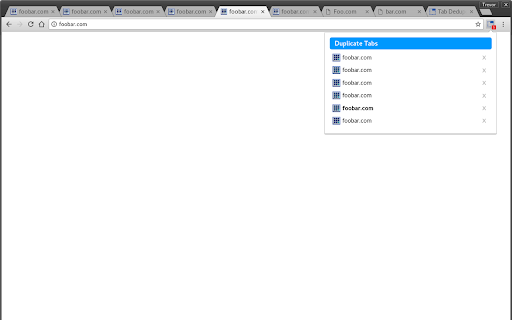
An extension that allows the user to deduplicate tabs. Tab Deduper is an extension to find and remove duplicate Chrome tabs. Unlike other currently available extensions which dedup tabs, Tab Deduper differentiates itself in the following ways: - Duplicate tabs are not automatically closed. A list of duplicated tabs are presented, allowing for precise control over which tab gets closed. - Use of text OR regular expression based settings to control how tabs are compared, including use of title, fragment, and doing sed-like regex replacements on URLs. This last feature is very useful if you use other extensions which modify your tab URLs.

Tab Sorter 2
Enhance your browsing experience, one click at a time Introducing TabSorter2 - the browser extension designed to revolutionize the way you manage your tabs! Say goodbye to tab clutter and hello to seamless organization with just one click. 🅴🅵🅵🅾🆁🆃🅻🅴🆂🆂 🆃🅰🅱 🅼🅰🅽🅰🅶🅴🅼🅴🅽🆃 [FREE]: • 💫 Quickly sort your tabs by domain and title for easy navigation. • 🔄 Merge all your windows into one streamlined interface. • 🎲 Spice things up by shuffling your tabs for a bit of fun! • 💥 Collapse: Create groups of domains with more than 2 tabs opened [NEW] 🅰🅳🆅🅰🅽🅲🅴🅳 🅵🅴🅰🆃🆄🆁🅴🆂 🅵🅾🆁 🅿🅾🆆🅴🆁 🆄🆂🅴🆁🆂: • ↔️ Split your window vertically or horizontally to tailor your browsing experience. • 🏷️ Take control with Domain Uniting, perfect for grouping or isolating tabs from the same domain. • 🧠 Optimize your memory usage with Memory Optimization, freezing and unloading tabs to save valuable resources. • 🧹 Say goodbye to clutter with Domain Cleanup, closing all tabs from a specific domain across all windows. • 🚫 Eliminate duplicates with Tab Deduplication for a cleaner browsing experience. 🅲🅾🅼🅱🅰🆃 🆃🅰🅱 🅰🅳🅳🅸🅲🆃🅸🅾🅽: • 🎯 Dive into Focus Mode to eliminate distractions and boost productivity with a clear canvas. • 📚 Easily return to your tabs with Unfocus when you're ready to dive back in. 🅾🆁🅶🅰🅽🅸🆉🅰🆃🅸🅾🅽🅰🅻 🅱🅻🅸🆂🆂 🆆🅸🆃🅷 🆂🆃🅰🅲🅺🅸🅽🅶 🅼🅾🅳🅴: • 🗂️ Keep your windows neat and clutter-free after a domain split with Stacking Mode. • ✨ Tidy up: Feeling overwhelmed? In one clean sweep, tidy up your messy tab life 🧹 [FREE - Experimental for 50+ tabs opened] Why wait any longer? Embrace the essentials for free indefinitely or subscribe to support continuous development and unlock all current and forthcoming features 🙌. Seize control of your browsing journey today with TabSorter2. Your tabs will thank you for it 😉!

Kill Clone Tabs
Find and close duplicate tabs. Sort, group, and manage tabs. Highlight text on pages. Copy tab URLs. Boost your productivity! 🎯 KILL CLONE TABS - The Ultimate Tab Manager Stop tab chaos! Kill Clone Tabs helps you find and eliminate duplicate tabs, organize your browser, and boost productivity with powerful management tools. 🔪 DUPLICATE KILLER • Instantly find and close duplicate tabs across ALL windows • Smart detection with customizable URL matching rules • Choose which duplicate to keep: oldest, newest, or active tab • Visual indicator shows when duplicates exist • Optional auto-kill mode for zero tolerance 📊 TAB ORGANIZATION • Sort tabs alphabetically by URL • Group tabs by domain (cluster related sites together) • Native Chrome tab groups with smart naming • One-click undo for any action 🔍 SMART SEARCH • Real-time search through all tab titles and URLs • Click to instantly switch to any tab • Find tabs faster than ever ✨ TEXT HIGHLIGHTING • Select text on any page to highlight all matches • Customizable highlight color • Case-sensitive and whole-word options • Match counter shows total occurrences 🔒 PRIVACY MODE • Hide Evidence feature for sensitive browsing • Closes matching tabs AND clears browser history • PIN-protected domain list • Works across all windows including incognito 1. Click the Kill Clone Tabs icon in your toolbar 2. Use Search to find any tab instantly 3. Click 🔍 to find duplicates 4. Click 🔪 to kill duplicates 5. Use Organize buttons to sort or group 6. Access Settings for customization • Ctrl+Click (⌘+Click on Mac) to select multiple tabs, then Copy Selected • Paste URLs directly into popup with Ctrl+V (⌘+V on Mac) • Red toolbar icon = duplicates detected • Enable "Allow in Incognito" in extension settings for full coverage • Undo available immediately after any action ✓ 100% Local - Everything runs in your browser ✓ No Data Collection - Zero personal data transmitted ✓ No Analytics - No tracking whatsoever ✓ No Accounts - No sign-up required Perfect for: • Researchers with dozens of open tabs • Developers managing multiple projects • Students organizing study materials • Anyone who opens too many tabs! Found a bug or have a feature request? Leave a review or contact the developer! Made with ❤️ for tab hoarders everywhere.

Duplicate Tab Helper
Duplicate Tab Helper prevents the opening of duplicate URLs at the moment new tabs are opened. If an exact duplicate is found, the newer tab will be replaced with the existing tab as seamlessly as possible. The effect is so subtle you may not even notice it happening. Duplicate Tab Helper is FANTASTIC for doing research and quietly makes your browsing experience more enjoyable. Unlike other extensions, great care is taken to make sure that when a duplicate is detected and discarded that it doesn't contain unsaved information. There is literally zero instances where this extension discards an old tab that you might have been using (unless you change your preferences.) Sometimes this means a few duplicates are ignored under specific circumstances. In cases of uncertainty, caution is favored over cleanup. Tips: * You can still create a duplicate. Right-click any page and select 'Duplicate this tab'. * Duplicate Tab Helper is not intended for web developers who frequently need new tabs to replace the old tabs each time they make a change. I love you guys and gals but this extension will drive you crazy. :) Please note there are some recommendations (ads) in the options screen to help you support my work. 1.4.4 Fixed: Duplicates are no longer matched between incognito and non-incognito ecosystems. This only became an issue when the "all windows" search feature was introduced in 1.4.2. 1.4.3 Tightened up duplicate disposal to only dispose of duplicate after active tab has been set. This is to (hopefully) address a rare bug when opening new blank tabs where focus was not properly put on the remaining tab. 1.4.2 Added option to search all windows for duplicates. No longer checks for duplicates in pinned tabs or in non-"normal" windows such as "popup", "panel", "app", or "devtools". If catching duplicates in these window types is desired please send an email and let me know some specifics. 1.4.1 Under default settings, instead of ignoring "navigation duplicates", duplicates are pulled forward to the same position as the active tab, but no tabs are removed. 1.4.0 Customization options added for how to deal with "navigation duplicates" 2019-06-17 Update 1.3.9: Can now detect duplicate URLs with a hash (#) character in them. Also if you open a blank tab and happen to type a URL that is already open into a BLANK TAB then the duplicate will be matched and handled. 2019-06-16 Update 1.3.7: Disabled notifications. On Windows 10 they are put into a notification center and must be manually dismissed. That's way too much clutter, so I disabled them. Thanks for trying them out. 2019-06-16 Update 1.3.6: Support added for bounced URLs! But only if the tab was opened in the background. I think this is a nice compromise to keep the extension lightweight but still very effective.

Simple Tab Sorter
"Simple Tab Sorter" is a free and open-source Google Chrome extension for people who want quick and easy user-customizable tab sorting and grouping. * Respects Google Chrome's Tab Groups. * User configurable sort behavior for handling tabs suspended by extensions forked from The Great Suspender (please review the User Guide under Options for configuration instructions). * Simple manual override of tab group sort order. Bug reports are welcome at https://github.com/pwhite2/simple-tab-sorter/issues. If you want additional functionality, please take a look at https://chromewebstore.google.com/detail/super-tab-sorter/jjhppbooocacaccnhjninhmigbfmpnkh instead. PLEASE READ BEFORE INSTALLING AND SUBMITTING NEGATIVE REVIEWS: 1. Simple Tab Sorter v0.4.0 and later require Chrome version 88 or later. If you're using an older version of Chrome, you can manually install v0.3.3 by following the instructions at https://github.com/pwhite2/simple-tab-sorter#install-as-an-extension-from-source . 2. "Read your browsing history" permission warning during install in versions 0.4.0 and later... Chrome changed the permissions message for "tabs" permissions for manifest v3 extensions. The new release (0.4.0) isn't doing anything with the tabs API that it wasn't doing before - i.e., it doesn't have access to your browser history, just the currently open tab URLs which are required to sort by URL. You can see the requested permissions for this extension at https://github.com/pwhite2/simple-tab-sorter/blob/master/src/manifest.json. The developer documentation for the "tabs" API (https://developer.chrome.com/docs/extensions/reference/api/tabs) states: "The "tabs" permission This permission does not give access to the chrome.tabs namespace. Instead, it grants an extension the ability to call tabs.query() against four sensitive properties on tabs.Tab instances: url, pendingUrl, title, and favIconUrl." As you'll see, there is NO mention of "history" anywhere in the "chrome.tabs" developer documentation. To have access to your browsing history, an extension would have to specify "history" in the manifest.json permissions, which you can verify this doesn't, as documented at https://developer.chrome.com/docs/extensions/reference/api/history. 2025-05-27: Version 0.4.2 released * Fix extension stuck in welcome/update message loop due to apparent browser implementation change. 2023-12-19: Version 0.4.0 released * Converted to Chrome manifest v3 * Added support for Chrome's Tab Groups 2023-04-25: Version 0.3.3 released * Fixed https://github.com/pwhite2/simple-tab-sorter/issues/21 - now compatible with Chrome's new suspended tabs. 2021-02-21: Version 0.3.1 released * Removed Google Analytics code * Added support for extensions derived from The Great Suspender now that it's been removed from the Chrome Web Store and derivative works have been submitted. Changes viewable at https://github.com/pwhite2/simple-tab-sorter/pull/12 2020-06-29: Version 0.3.0 released * Added "Sort pinned tabs" option and disabled it by default * Added short form to collect user feedback when extension is removed
