
pahnjgohnmmnpgchhheccpkihkloapdj
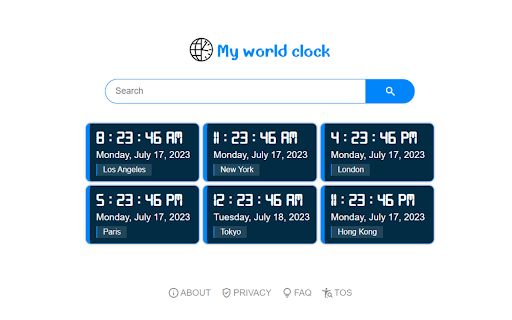
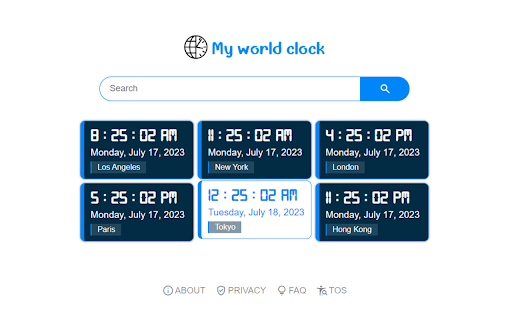
Get some major cities time on your Chrome New Tab! Introducing "My World Clock" Chrome New Tab Extension! Never lose track of time again with our beautifully designed and highly practical Chrome New Tab extension, "My World Clock." With just a glance, you can effortlessly stay in sync with multiple time zones around the world, making it an essential tool for frequent travelers, remote workers, or anyone with global connections. By clicking "Add to chrome", I accept and agree to installing the my world clock extension and setting Chrome™ new tab search to that provided by the service and the Terms of Use and Privacy Policy. Search results will be provided by Microsoft Bing. Key Features: 1. Global Time at Your Fingertips: Access real-time clocks for popular cities worldwide, including Los Angeles, New York, London, Paris, Tokyo, and Hong Kong, all conveniently displayed on your new tab page. 2. Elegant and Minimalistic Design: Our extension combines functionality with visual appeal. Enjoy a sleek and intuitive interface that seamlessly integrates into your Chrome new tab page, providing an aesthetically pleasing experience every time you open your browser. 3. User-Friendly and Easy to Use: "My World Clock" is designed with simplicity in mind. Simply install the extension, and the selected time zones will be automatically displayed when you open a new tab. No complicated settings or configurations required! 4. Stay Organized and Efficient: By having multiple clocks in one place, you can better manage your global activities, plan meetings effortlessly, and ensure you never miss an important deadline or event across time zones. 5. Reliable and Accurate Timekeeping: Our extension relies on trusted sources to provide accurate and up-to-date time information, ensuring that you can always rely on "My World Clock" for precise timekeeping needs. Upgrade your browsing experience and stay connected to the world with "My World Clock" Chrome New Tab Extension. Download it today and embark on a timekeeping journey that will simplify your life and enhance your productivity. Note: "My World Clock" is currently available for free on the Chrome Web Store.

World Clock with Sticky Notes & Calculator
World Clock with Sticky Notes & Calculator Replace Your Old New Tab with Wonderful Productive Tab Clock - Displays time and date of multiple cities and time zones - Click on the existing clock and Edit time zones as per your needs - Shows 5 Countries Digital & Analog Clock - 12/24 clocks Sticky notes Sticky notes with title and date Create unlimited sticky notes with color changing option Sticky notes data will be stored even if you exit and reopen in new tab or chrome browser Sticky notes can be resize and can be dragged to any desired place on the page Calculator - A clear display format and easy to read. - An intuitive and attractive design that facilitates calculations every day. - You can use the backspace key to correct a simple mistake. Background Color -No more boring white background! - Customize and change the background color of the page. Dark mode - Dark mode toggle for better experience. Google Search -we are also giving you an easy way to search your desired information, images, video, and more through your favorite google search.

My weather
Get weather info on your browser new tab! Introducing "My Weather" - Your Personalized Weather Forecast Extension It provides a custom search bar with Results by Microsoft Bing on the New tab page Discover "My Weather," the perfect new tab companion for Google Chrome that brings you personalized weather forecasts at your fingertips. Stay ahead of the weather with our beautifully designed extension. 🌦️ Accurate 7-Day Forecasts: Stay prepared for the week ahead with precise 7-day weather forecasts. "My Weather" provides you with detailed and reliable weather predictions, so you can plan your activities with confidence and never be caught off guard by the elements. 📍 Location-Based Weather Updates: Experience weather reports tailored to your exact location. "My Weather" utilizes advanced geolocation technology to deliver hyper-local forecasts, ensuring you receive the most accurate weather information no matter where you are. 🔍 Easy Search Functionality: Looking for weather updates in a specific city or region? With "My Weather," finding weather forecasts is a breeze. Simply use our convenient search field to get instant access to weather information for any location around the world. Whether you're traveling or keeping an eye on a loved one's area, our extension has you covered. ⛅ Sleek and User-Friendly Design: We believe in the power of a visually appealing and intuitive interface. "My Weather" boasts a sleek and user-friendly design, seamlessly blending into your new tab page. Enjoy a clutter-free experience while staying informed about the weather conditions that matter to you. 🌐 Global Coverage: Wherever your adventures take you, "My Weather" provides global coverage. From bustling cities to remote destinations, our extension delivers accurate weather reports and forecasts for any desired location. 🌈 Customizable Experience: Tailor "My Weather" to suit your preferences and make it your own. Customize the extension with different display options, temperature units, and more. Create an experience that seamlessly integrates with your browsing routine. Install "My Weather" today and unlock a world of weather insights, where staying informed is effortless and enjoyable. Be it rain or shine, our extension empowers you to plan your days better and make the most of every moment. Note: To provide accurate weather updates, "My Weather" requires location permission. Rest assured, we prioritize your privacy and only use your location for delivering precise forecasts. Install "My Weather" now and let the forecast be at your fingertips! For further assistance or feedback, our dedicated support team is here to help you every step of the way.

UTC Time & World Clock
See UTC time at a glance on the extension icon, and switch to any time zone when needed Your time, always in sight. See the current UTC time or any selected world clock directly on your Browser extension icon. No extra tabs. No searching. No friction. Built for people who work, travel, plan, and communicate across time zones, this extension gives you a faster way to stay in sync with the world. 📍 Live time on the extension badge Keep the time you need visible прямо on the extension icon. 🌍 UTC or any world time zone Track the time that matters most to you. 🌗 Day/night indicator See at a glance whether it is day or night in the selected location. 🗓️ Locale-based date and time display Use a format that feels familiar and natural. 🗣️ Multiple language support Choose the language you prefer. 🎨 Light and dark theme friendly Comfortable and readable in different browsing conditions. ⚡ Always one glance away The time is already there when you open Browser. From global teamwork to everyday planning, this extension keeps the time you need exactly where you need it: inside Browser, always in view. Install it and stop wasting clicks on checking the time.

World Clocks
Add any world clock of your choice to remain updated with the time in different locations. ⏰ A productivity booster World Clock browser extension! 🏆 Featured by Google on Chrome Web Store (since following all technical best practices, latest platform APIs, and meeting a high standard of intuitive user experience & design, among other things). 💪 Features: - All settings are kept in sync - Add, Remove, SORT, and Edit time zones - Convert time zone time to other time zones - Very easy to use - Responsive layout - Nice add/remove effect for better user experience - Select the color theme from the available presets - Set your color for the individual clock - Set font color and size as per your choice - Select 12 or 24-hour format - Turn on/off seconds display - Change the display name after adding the clock - Different sets of layouts added - Keep the settings panel on the left or right - Reset all settings --- New features are added regularly 👨💻 🏡 Home Page: https://weball.io/products/browsers/extensions/world-clocks ⭐⭐⭐⭐⭐⭐⭐ 🥂 Praise ⭐⭐⭐⭐⭐⭐⭐ If you like the extension, I would like to request you to give a 5️⃣⭐ rating, it keeps me motivated to contribute back to the community. 💓 /*****************/ 🐞 Bugs /*****************/ If you find any bugs or if you feel that some feature is missing, please send me a mail 📩 (justdecodeme@hotmail.com) before giving a bad review 🙏, and I'll fix that ASAP. 🙇 Thank you for your understanding, and enjoy the extension!!! :) 🎉 v 23.5.2 - New toggle buttons - UI/UX improvements - Optin for GA4 - Reduces overall extension size - Bug fix: Fixed some crossbrowser CSS issues v 22.11 - Manifest migration from v2 to v3 (very important update) - Size reduced (Increased performance, only ~500KB) - Few CSS updates in the Settings panel - Bug fix: Time conversion just after install v 21.12 (biggest update so far) - Timezone convert feature added (MOST REQUESTED FEATURE) - Multiple layouts added for eye-catching UI - New shades theme added - New mix theme added - Text color options added - Font size options added - Base input font size added to increase or decrease overall time zones font - Reset functionality added - Clock icons positions updated - Beautiful radial background added at loading time - Drag & Drop animation added - Settings panel slide effect added for better UX - Settings panel position can be LEFT or RIGHT - Font sizes change from px > rem and em for better usability - Settings panel now have a scroll bar for screen having small heights - Removed time value from tab - Overall user experience improved - Redundant code removed - Date format updated and the Month has also been added now - Bug Fixed: MAX_WRITE_OPERATIONS_PER_MINUTE - Bug Fixed: Error because of old and new database mismatch v 21.04 - Version naming changed - Few things improved as per the user's feedback - Thank you page will open only on the new install, not on the update - Credit section added - Button text replaced with icons - UI Improvements - Small bug fixed v 2.2 - Note able to drag at the end bug solved - Code refactoring - Thank you page message updated - Credits link added v 2.1 - Don't show the sort and delete icon for the last clock remaining while deleting - Thank you page added after installation - Feedback form added after uninstallation v 1.9 - Items can be rearranged now by drag and drop - Add timezone animation added - Delete buttons not showing up on first load bug fixed - Logic and UI updates v 1.8 - Remove timezone animation added - Can't add duplicated timezones - Default 4 time zones added on the first load V 1.6 - New Features + Bugs solved: - New Add button and Edit Button Layout. - Don't show am/pm in 24hr format. - Stop the user from adding an invalid Time Zone. V 1.4 - New features added: - CSS/Style updates. - Select 12 or 24-hour format. - Change the display name after adding a clock. Oh still here, you are super awesome! 🤘 Keep rocking!!! ❤️ You are breathtaking! ❤️ CWC is yours to keep. Forever.
