
pahjidceabkifggkmokpmlmhoaiflaeh

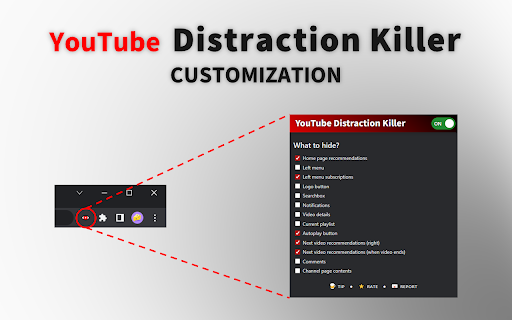
Do you find yourself watching cute kitten videos instead of educational content all the time? Get rid of all the reccomendations, suggestions, comments and other tempting buttons! Easily choose what is hidden using the options menu! If you experience any issues, please feel free to email me with a bug report.

YouTube Liberation: Anti-Distraction Skin
Chrome extension to liberate you from the infinite distraction cycle of YouTube. Like other social media platforms, YouTube is very good at showing you content that you want to watch but weren't planning to or looking for, making it super easy to get distracted and get sucked into one video after another and suddenly lose an hour of your day. Yet there are so many valuable resources and videos that you can't find elsewhere: tutorials, event coverage, specific creators you subscribe to who you know always publish high-quality content worth watching. For many of us, the value of YouTube makes it worth the sacrifice of even its most distracting possibilities, and it's impossible to just cut away. What if it didn't have to be this way? What if you could have the good of YouTube, see the content you want to see, without the platform constantly trying to drag your attention through an endless stream of productivity-draining drudgery? This is the philosophy behind YouTube Liberation. It's time to rise up, lose your chains, and join us as we march our way towards a better YouTube! YouTube Liberation works by hiding elements that lead you towards new content you don't intend to see, without compromising any core viewing features. These elements include: - The entire home page of alg-generated recommendations - Video recommendations on watch pages - Comments sections on watch pages - Extraneous UI elements, replacing the full sidebar with a much more minimal one and removing most topbar buttons YouTube liberation does not at all compromise: - Subscriptions and trending pages - Channel pages - Playlists - Video stats, description, etc. What are considered vital core features and what are considered distracting elements varies from use case to use case and person to person. For certain kinds of videos, comments might be more constructive than distracting. For creators, notifications and easy access to uploading might be important (though that's why YouTube Studio exists...). Thus, one feature I'm working on adding right now is the ability to customize what gets hidden and what is shown, with a recommended configuration as it is right now.

YouTube™ Focus Mode - Study & Work Without Distractions
Improve your YouTube™ experience with beautiful themes and a minimalist workspace. Focus better for school, work, and learning. 📌 Block distractions on YouTube and stay focused while studying or working. This extension helps you remove unwanted videos, block channels, and create a distraction-free YouTube experience with just one click. ✓ No sign-up required ✓ Completely free with premium features ✓ Easy one-click activation 🚀 Features: ✅ Distraction-Free YouTube – Hide videos from your feed and block recommended distractions. 🎯 Focus Mode – Enable study mode to block entertainment content when you need to concentrate. 🙅♂️ Block Specific Channels – Customize your feed by blocking creators you don’t want to see. 🌙 Light & Dark Mode Support – Works seamlessly with YouTube’s themes. 🔄 Quick Toggle – Easily turn on/off the blocker when you want to take a break. 👉 Install now and take back control of your YouTube experience! Perfect for: Students watching lecture videos Developers following coding tutorials Anyone learning on YouTube™ Try it now and transform how you learn on YouTube™!

DF Tube New (Distraction Free for YouTube™)
Allow yourself to focus while using YouTube™ for work, recreation or education. 📺💡 Stay Focused with DF Tube! 🚫 Tired of mindless scrolling on YouTube? 🙅♂️ Want to break the cycle of endless video recommendations and stay focused on what matters? 🤔 Introducing DF Tube, the ultimate productivity companion for YouTube! 📊 By default, DF Tube disables autoplay, hides distracting video recommendations, and removes the grid of suggested videos on your homepage. 🙅♂️ It's like having a personal assistant to help you stay on track! 🤝 With DF Tube, you can: ✨ Hide shorts videos and tab ✨ Disable autoplay and take control of your video watching experience ✨ Hide video recommendations and related videos to avoid distractions ✨ Remove the grid of recommended videos on your homepage ✨ Hide comments and disable playlists sitewide (optional) Take back control of your YouTube experience and focus on the content that matters to you! 📚💻 Whether you're a student, researcher, or simply looking for some relaxing music, DF Tube is here to help you stay focused and productive. 🎯 Try DF Tube today and discover a more mindful way to use YouTube! 🙏 How to use it? Pin the extension icon in the toolbar, click on the icon to open the settings

Zen YouTube: Distraction free youtube
Block YouTube Shorts, feed, recommendations, and comments to stay focused and reduce distractions. This open-source Chrome extension helps you block YouTube distractions by allowing you to remove shorts from your feed and block shorts in recommended videos. You can also hide shorts, along with blocking YouTube feed, recommendations, and comments for a cleaner, more focused viewing experience. Take control of your online time by filtering out unwanted short videos and distracting content across the platform. Perfect for boosting productivity, reducing screen time, and enjoying a distraction-free browsing experience. Customize your settings easily to stay focused whenever you watch videos or browse YouTube. The source code is available on GitHub: https://github.com/vishnugt/Zen-Youtube.
