
padddahlnokhndagbgpffdjiibicmcdo


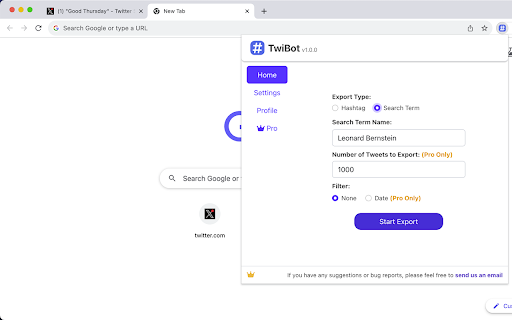

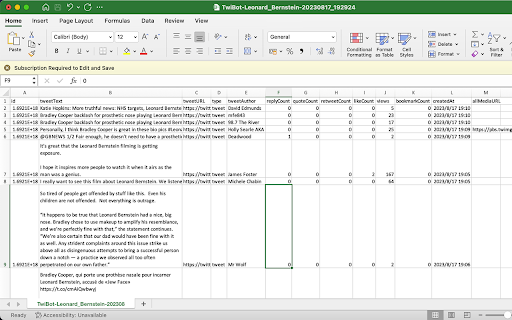
Extract historical Twitter tweets from any Hashtag or Search Term to CSV/Excel for social media analysis TwiBot chrome extension makes Twitter data a breeze. Choose a hashtag or search term, and you're set. Want more control? You can also decide the number of tweets and set a date range. Make social media analytics work for you! Please note, TwiBot chrome extension is an automation scrape tool and won't have any impact on your account. 🙂How it works: 1. Enter a hashtag or search term (e.g., hashtag: #stayhappy, search term: World Cup Final ) . 2. Enter the number of tweets you'd like to export (there's no limit to how many you can extract, but be aware that larger quantities could take a while to process. We recommend setting a reasonable number for a quicker export). 3. Optionally set a start and end date, and you're ready to begin the export. 4. Twitter has a rate limit in place, but don't worry, TwiBot automatically manages this and will pause as needed. You don't need to do anything. 🗎Sample CSV: You can view the sample CSV in the following Google Sheet document: https://docs.google.com/spreadsheets/d/19XI8zGuU9p5iceKPgR5US2YzvuQ_1S0GqI9ioGIQuf0/edit?usp=sharing 📋The exported CSV file contains the following columns: 1.ID 2.TweetText: The full content of the tweet. 3.TweetURL: The URL of the tweet. 4.TweetType 5.TweetAuthor 6.Handle: Twitter username, starting with @, like @NASA. 7.Geo: Location data showing where a tweet was posted from 8.Mentions: Other users mentioned in the tweet 9.Hashtags: All the hashtags included in the tweet 10.ReplyCount: The number of replies to the tweet. 11.QuoteCount: The number of times the tweet has been quoted. 12.RetweetCount: The number of times the tweet has been retweeted. 13.LikeCount: The number of likes the tweet has received. 14.Views: The number of views the tweet has received.(some tweets does not include views data and will be represented by a "-") 15.BookmarkCount: The number of times the tweet has been bookmarked. 16.CreatedAt: The date and time the tweet was created. 17.AllMediaURL: The URLs of any media (e.g., images, videos) included in the tweet. 18.VideoURL: If the tweet contains a video, this is the source URL for the highest quality version of the video. 19.Bio: The text the user wrote in their Twitter profile’s “Bio” section. It often contains a short personal description, interests, job title, hashtags, or emojis. 20.LinkInBio: Any URL that the user placed in the profile’s “Website” slot. Many creators use this to point to a personal site, a Linktree, a newsletter, or another social account. 21.ProfileURL: The full URL of the user’s public Twitter profile (e.g., https://twitter.com/elonmusk). It’s the page you’d visit to see their tweets, followers, etc. 22.FollowersCount: The total number of Twitter accounts currently following this user. It’s a primary measure of their audience size. 23.FollowingCount: The total number of other Twitter accounts that this user is following. It shows how many accounts they’ve chosen to subscribe to. 24.ConvertsationID: The numeric identifier of the root tweet that starts a discussion thread on Twitter/X. Every reply—no matter how deep—carries the same ConversationID, so you can treat it as the thread’s “bucket ID” for fetching or analyzing the entire conversation in one go. 📝Changelogs: 2023/8/25 version 1.1.0: Fix bug 2023/10/11 version 1.2.0: Fix bug 2024/1/8 version 1.3.0: Add fields 'handle', 'geo', 'mentions', 'hashtags', and 'videoURL' to the exported CSV. 2024/4/11 version 1.4.0: Fix bug 2024/4/30 version 1.4.1: Fix bug 2024/5/18 version 1.4.2: Compatible with X 2024/6/27 version 1.4.4: Fix bug 2025/1/3 version 1.4.7: Fix bug 2025/5/1 version 1.4.8: Fix bug 2025/7/20 version 1.5.2: add 5 fields 2025/7/30 version 1.5.3: add 1 field 2025/10/18 version 1.5.6: Fix bug 2026/2/2 version 1.5.8:Fix bug 2026/2/20 version 1.6.0:Add history feature 🔒Data Privacy: We place a premium on the security and privacy of user data, and deeply appreciate the trust our users place in us. As such, we strictly follow all privacy laws and guidelines, including but not limited to the General Data Protection Regulation (GDPR) and the California Consumer Privacy Act (CCPA). 📘Disclaimer: Twitter is a registered trademark of Twitter, Inc. TwiBot operates independently as a browser extension and holds no affiliation with Twitter. ✉️Contact us: If you have any bug reports, feedback, or suggestions for improvement, please feel free to contact us anytime at xtcodetech@gmail.com.

Export Tweets from User, Hashtag, and Search Term
Tweet Export Pro allows you to quickly extract and export tweets from any account, hashtag, or search term as a CSV file with one click. 🏆 Advantage Our extension can export more data, as we comply with Twitter's rate limits. 👨🏻💻 Features ✓ Extract and export tweets from any user to CSV ✓ Extract and export tweets from any hashtag to CSV ✓ Extract and export tweets from any search term to CSV ✓ Extract and export tweets within a selected date range ✓ Supports exporting longer tweets ✓ Automatic handling of rate limits, requiring no action from you 🟢 indicates the normal time interval for requests 🟠 indicates the cooldown period's time interval 🔴 indicates the time interval for request errors 🗂️ What You Get? - ID - Text - Tweet URL - Language - Type - Author Name - Author Username - View Count - Bookmark Count - Favorite Count - Retweet Count - Reply Count - Quote Count - Created At - Source - Hashtags - URLs - Media Type - Media URLs ❓FAQ How Can I Export All Tweets? - By default, if the date option is not selected, all of the user's tweets will be exported. In theory, this extension can export all tweets, but when exporting a large amount of data, it may trigger Twitter's limits, causing the export to be interrupted. If this happens, you can use the date option to resume exporting tweets from where the last export was interrupted. ⚠️ Caution To avoid being flagged by Twitter's risk control for frequent data exports, we suggest creating a dedicated Twitter account for exporting data. 📬 Contact If you have any questions or suggestions to improve the extension, please feel free to contact us at jfl913@gmail.com. 📃 Terms Each time, you are entitled to export up to 150 data entries for free. To export more, you need to upgrade to Pro. 🔒 Data Privacy All the data you process stays on your local computer and never goes through our servers. ℹ️ Disclaimer Tweet Export Pro is an independent third-party chrome extension and has no affiliation with Twitter, Inc., or their affiliated companies. All trademarks and brand names mentioned are the property of their respective owners.

Twitter Comment Export Tool
Easily export and download Tweets & Replies from any users to XLSX/CSV. Effortlessly export tweets from a Twitter user with one-click. Seamlessly download and archive tweets for social media analysis, comprehensive reporting, personal records, or digital marketing strategies. Our tool provides an easy and efficient way to export Twitter data, ensuring you never lose important tweets. Try our Twitter export feature today and simplify your social media data management. ⚙️ Get Started 1.Enter Username. 2.Choose export type. 3.Click the 'Export' button. 🔒 Data Privacy Your data privacy is paramount. All data processing occurs on your local machine; it never transits through our servers, ensuring no one else has access to your collected data. 👋 Contact For support or inquiries, reach out to us at lazytechofficial@gmail.com ⚠️ Disclaimer TWITTER and X are trademarks of X Corp. Twitter Comment Export Tool is an independent tool and is not affiliated with, endorsed, sponsored, or otherwise connected to X Corp., Twitter, Inc., or any of their affiliates or subsidiaries.

TwExportly: Export Tweets From Any Account
TwExportly is a Chrome extension for Twitter, allows you to export & download tweets from any account into an CSV or Excel file. 🎉 While Twitter/X only permits downloading of your own tweet archive, TwExportly enables effortless exporting and downloading of tweets from any Twitter/X account. After downloading, you can export the details of each tweet to CSV for further analysis and use. The CSV file would include finely detailed information such as the text of the tweet, the number of likes and retweets it has received, the tweet type, whether it contains rich media, and the time it was created, among other details. 🎯 How it works 1. Enter a Twitter username 2. Click the export button 🔒 Data Privacy All data is processed in your local computer, it is never passing through our web server, no one knows what you exported. 📄 Terms TwExportly is a freemium app. You can use it for free with certain limitations. You can upgrade to the Premium version on a subscription basis. 🆕 Changelog v2.26 fixed some bugs v2.25 fixed some bugs v2.23 fixed some bugs v2.7 fixed some bugs v2.5 You can now filter tweets by date. v2.3 fixed bugs v2.2 new features: - auto download - wait and retry if rate limit v2.0 fixed bugs v1.9 fixed some bugs

TwSearchExporter - Export Twitter Search Results
TwSearchExporter is a powerful tool to export Twitter search results to CSV. It supports nearly all types of search links. Simply build your search link using keywords, hashtags, or Twitter's advanced search. Then, copy the search link into our extension, and we will export all the results to CSV. This allows you to analyze tweet data, archive content, and manage your social media strategy more effectively. Features - Support nearly all kinds of search links - Export tweets from the search tabs "Top", "Latest" and "Media" - Export users from the search tab "People" - Automatically handling Twitter's rate limit - Save as CSV / Excel Note - TwSearchExporter follows a freemium model, enabling you to export up to 200 tweets or users at no cost. If additional exports are required, consider upgrading to our premium version. - Twitter imposes rate limits to manage the volume of requests to its API and prevent abuse. Typically, the most common rate limit interval is 15 minutes. However, rest assured that our app already handles these rate limits seamlessly. It will automatically pause and retry, ensuring uninterrupted exports. What type of data can you export? For the search tabs "Top", "Latest" and "Media": - Tweet ID - Tweet Text - Type - Author Name - Author Username - Creation Time - Reply Count - Retweet Count - Quote Count - Like Count - View Count - Bookmark Count - Language - Possibly Sensitive - Source - Hashtags - Tweet URL - Media Type - Media URLs - External URLs For the search tab "People": - User ID - Username - Name - Location - Category - Creation Time - Follower Count - Following Count - Tweet Count - Media Count - Like Count - Public List Count - Is Verified - Is Protected - Can DM - Can Tag in Media - Possibly Sensitive - Biography - User Homepage - Avatar URL - Profile Banner URL How to export Twitter search results with TwSearchExporter? To use our Twitter Search or Hashtag Scraper, simply add our extension to browser and create an account. Once you have signed in, you can input the search link that you want to export and click the "Export" button. The result data will be exported to a CSV or Excel file, which you can then download to your computer. Data Privacy All data is processed on your local computer, never passing through our web servers. Your exports are confidential. FAQ https://twsearchexporter.toolmagic.app/#faqs Feel free to contact us if you have any other questions. Disclaimer Twitter is a trademark of Twitter, LLC. This extension is not affiliated with or endorsed by Twitter, Inc.
