
opjlinlckmleglphamfnpagilmjmelfo
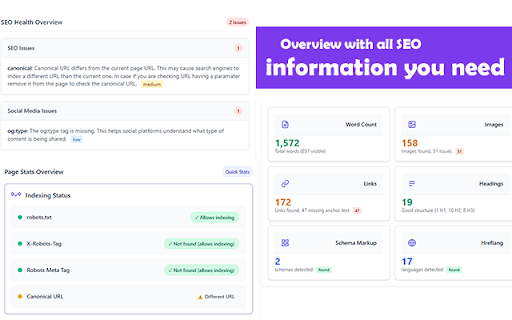


Free SEO extension for on-page SEO audits. Check meta tags, headings, and indexing status to get a detailed SEO action plan. SEO Action Plan is a SEO extension is an intuitive extension browser tool built by SEO professionals for SEO professionals to ease their daily job. The extension provides a comprehensive SEO analysis insights toolkit that covers technical SEO, content optimization, social media, performance, and international SEO requirements all in one interface with AI powered SEO suggestions. We designed it to simplify and streamline the complex process of website optimization, this Chrome extension offers comprehensive, real-time SEO insights that fit seamlessly into the daily workflows of marketers, developers, and digital consultants around the globe. In day to day life you need to check multiple tools and source code to find out the issue, using the SEO analysis extension helps you to check all of them automatically via our interface. The extension helps to deliver in-depth SEO audits, covering essential on page elements that impact a site’s search visibility by checking the meta tags, canonical etc. It also checks for the title tags and meta descriptions, identifies duplicates or missing entries, and evaluates their optimization for search engines which helps the SEOs to find out the things that they cannot find easily. Canonical URLs are also validated to prevent duplicate content issues, while robots meta tags are inspected to understand and explain the indexing behavior dictated to search engines. The extension also provides more AI SEO insights on how to improve the tags to get the page indexed. It also seemingly check the minor details, such as favicon availability, are analyzed to ensure a consistent and professional brand presentation across browsers. Based on my analysis of the SEO Action Plan Extension code, here are all the features organized by category: Core SEO Analysis Insights 1) Meta Tags Analysis: Title, description, robots, canonical, author, viewport, favicon 2) Character Count Validation: Warns when title/description are too short or too long with optimal recommendations 3) Duplicate Detection: Identifies duplicate meta tags across the page 4) Robots Meta Tag Analysis: Detailed breakdown of index/noindex and follow/nofollow directives 5) Robots.txt Status Check: Real-time analysis of robots.txt file to check if the current page is blocked from crawling 6) LLMs.txt file detection if the website does have one. International SEO Analysis Insights 1) Hreflang Detection: Comprehensive detection of hreflang tags for multilingual websites 2) Language Flag Display: Shows country flags next to language codes 3) Hreflang Validation: Detects missing or duplicate hreflang implementations Social Media Optimization 1) Open Graph Tags Detection: Complete analysis of Facebook/Meta sharing tags (og:title, og:description, og:image, etc.) 2) Twitter Card Tags: Full Twitter Cards implementation check 3) LinkedIn Integration: Shows how LinkedIn uses Open Graph tags + LinkedIn Post Inspector tool 4) Social Media Previews: Visual previews of how content appears when shared on Facebook and Twitter 5) Social Validation Tools: Direct links to Facebook Debugger and Twitter Card Validator Page Insights & Analytics a) Word Count Analysis: 1) Total, visible, and hidden word counts 2) Sources of hidden content identification 3) SEO recommendations based on content length b) Images Analysis: 1) Missing alt text detection 2) Missing title attributes 3) Broken images identification 4) Visual highlighting of problematic images on the page c) Links Analysis: 1) Internal vs external link classification 2) Missing anchor text detection (with enhanced visual content detection) 3) No-follow links identification 4) Interactive link highlighting by type on the page d) Headings Structure Analysis: 1) H1-H6 tag analysis with hierarchical tree visualization 2) Missing H1 or multiple H1 detection 3) Visual representation of heading hierarchy Schema Markup & Structured Data Analysis 1) Schema Detection: Finds JSON-LD and Microdata schemas on the page 2) Schema Analysis: Detailed breakdown of structured data properties 3) Schema Validation Tools: Direct integration with Google Rich Results Testing and Schema.org Validator 4) Schema Export: Export detected schemas as JSON files 5) Error Detection: Identifies parsing errors in schema markup 6) To avoid checking the schema validation of a cached page, we have option to check the schema via non-cache version selection in a single click Performance Monitoring (Beta) Score display: 1) Core Web Vitals: LCP, CLS, TTFB, FCP, FID measurements 2) Performance Scoring: Overall performance score calculation 3) Real-time Metrics: Live performance data from the current page 4) PageSpeed Insights Integration: Direct link to Google's PageSpeed tool 5) Performance Recommendations: Actionable insights based on metrics External SEO Tools Integration 1) PageSpeed Insights: Performance analysis 2) Rich Results Testing: Google's structured data validator 3) Schema Validator: Schema.org validation tool 4) Semrush Site Analysis: Organic traffic and competitor analysis 5) Moz Link Explorer: Backlink profile analysis User Interface & Experience 1) Tabbed Interface: Organized into Dashboard, SEO, Social, Insights, Schema, Performance, and Tools tabs 2) Dashboard Overview: Centralized view of all issues and page statistics 3) Issue Prioritization: High/medium/low priority classification for problems 4) Interactive Elements: Click-to-navigate between related sections 5) Responsive Design: Optimized for different screen sizes 6) Real-time Analysis: Live updates when re-analyzing pages Smart Features 1) Index Status Checking: Direct links to check if pages are indexed in Google and Bing (shown when no SEO issues found) 2) Cache Refresh Prompt: Smart suggestion to refresh page and clear cache for accurate analysis 3) Multi-language Support: Browser language detection for external tools 4) Error Handling: Comprehensive error messages and fallback mechanisms 5) Visual Page Highlighting: Ability to highlight problematic elements directly on the webpage 6) Robots.txt Validation: We check whether the Robots.txt rules are blocking a page from indexing or not and show the rule which blocks it. 7) LLMS.txt file checking: Show the link to the llms.txt file when the file is available on a website Data Analysis & Reporting 1) Issue Categorization: Organized problem identification with explanations 2) Progress Tracking: Visual indicators for resolved/unresolved issues 3) Quick Stats: At-a-glance metrics for images, links, words, headings, etc. 4) Detailed Breakdowns: Comprehensive analysis with actionable recommendations 5) External Validation: Integration with official validation tools from major platforms Technical Features 1) Content Security Handling: Works with various website security configurations 2) Dynamic Content Detection: Analyzes both static and dynamically loaded content 3) Cross-browser Compatibility: Works across different browser environments 4) Real-time DOM Analysis: Live analysis of current page state 5) Enhanced Visual Content Detection: Advanced algorithms to identify icon fonts, images, and visual elements

Sprout SEO Extension 🌱
Speed up your daily SEO routine, get one-click insights on any page you're on. Sprout is for marketers who take SEO seriously. Introducing the Ultimate Chrome Extension for Every SEO Expert and Web Developer: Sprout SEO Extension 🌱 Transform your Chrome browser into an SEO powerhouse with the newly enhanced Sprout SEO Extension. Say goodbye to time-draining manual checks and hello to instant insights! 🛠️ One-click validate your page's schema markup directly in your browser with our innovative extension, while direct links to schema-type documentation empower you to enrich your site's metadata. Whether you're aiming for perfect structured data or seeking to ace Google's rich results, this extension is your new go-to solution. Gone are the days of toggling between tabs and tools. 📊 Get a comprehensive view of on-page SEO elements plus Core Web Vitals at a glance – optimization has never been this straightforward. 🚀 Dive into detailed SEO analyses with one-click access to 18 essential SEO tools, from Google Search Console to Ahrefs, without ever leaving your page. 🔗 Fix faulty redirects post-migration with our archive.org CSV download feature, saving you hours of troubleshooting ✅ Instantly determine Indexability and Canonical status, which is crucial for SEO excellence. 🔗 Fix faulty redirects post-migration with our archive.org CSV download feature, saving you hours of troubleshooting. 👽 With Reddit's rising popularity in the SERP (on average, showing up 77% for all product review terms), you can view directly if your content is shared on Reddit and join the discussion, or start sharing your content straight to Reddit. In the digital age, flawless technical SEO is not just a perk – it's a necessity. It's the backbone that helps search engines easily crawl, understand, and display your content effectively, boosting your visibility and SEO performance. New in version 4.4 We've added AI Search Insights to reveal hidden queries from ChatGPT and Gemini, plus extract AI overviews and citations. Also adds Copy as Markdown for clean page content extraction. New in version 4.3 Adding JavaScript debugging tools (disable JS and view rendered source), keyword ideas from Google SERP (10/day limit), SE Ranking in quick tools and right-click menu, copy-to-clipboard for schema markup, plus cross-browser improvements. New in version 4.2 Discover how web performance impacts your SEO rankings with the Sprout SEO Extension 🚀 New in version 4.1 🖼️ Image support! Optimizing images just got a whole lot easier! Our new Images tab gives you a comprehensive overview of all images on the current page, helping you identify optimization opportunities at a glance. Sprout SEO 4.0: The Ultimate Content & Research Upgrade 🚀 We’ve listened, and 4.0 brings you three major new tools that make day-to-day content research a breeze. Say hello to: Google Trends Integration – Get live Google Trends data directly in the search results. No more toggling back and forth; just instant insights to spot seasonal trends and activity spikes in seconds. Location Changer for Google Search – View search results from any location to help you rank-check with ease, no VPN needed. People Also Asked Extractor – Uncover, export, and build on PAA questions to enrich your content and connect with your audience better. With a fresh visual overhaul and boosted speed, 4.0 is designed to make content research easier, faster, and a lot more fun! New in version 3.6 Speed improvements 🏎️, incorporated a whole bunch of caching and async loading of external checks to improve the speed of the extension opening up and showing the data you're looking for. New in version 3.5 Better robots exclusion checker 🤖, checking not only the meta robots tag, but also verifies the current page against the robots.txt and the x-robots-tag header. New in version 3.4 Better sitemaps, remove breadcrumbs from the SERP, add position numbers to the SERP. New in version 3.3: Hreflang checker. Take a readout of a URL's hreflang tags, and then crawls them to assess if they back reference your current URL, together with an http-status check on the URLs itself to see if they are redirected to their final destination or give a straight http 200 status. New in version 3.2: #1 Link sections, showing all internal and external links. Ability to export them and highlight them on the page. #2 Right-click-contextual menu to access most validation techniques straight from a simple right-click (schema validation, page speed test, SEO tools, highlighting of links) 1️⃣ On-page SEO analysis: What's the appearance of the website in Google SERP? Are there any on-page errors? 2️⃣ Instant validation of schema markup using the schema.org validator. 3️⃣ Quick checks with Google's rich results and schema.org validator for optimal SEO. 4️⃣ User-friendly interface integrated directly into your Chrome browser. 5️⃣ Time-saving and efficient, ideal for busy web professionals. 6️⃣ Instantly view all available Schema Types on a page 7️⃣ Export all Schema markup found on a page or each individual type so you can easily backup your schema or study what makes your competitors outrank you 🙃 8️⃣ See full headers of the page you're on, and the potential redirect path that took you there 9️⃣ Check how your content in shared across social platforms, and join the discussion on the most used social community on the planet (Reddit) 🔟 A quick and easy way to test the currently open tab with 18 of the most commonly used SEO tools (Google Search Console, Majestic, Ahrefs, Semrush, to name a few) 1️⃣1️⃣ Had a bad site migration? Download a CSV straight from archive.org with all the pages stored in their memory, saving you time to build that redirection map Empower your SEO efforts with the Sprout SEO Extension 🌱. Ensure your site's SEO and content is impeccable, enhancing your search presence and paving the way for rich, engaging search results. Don't just hope your technical SEO is correct – know it. Add the Sprout SEO Extension 🌱 to your Chrome browser today and take the guesswork out of SEO

SEO Analyzer: One-Click Website Audit
Quickly access your website's SEO metrics. Analyze titles, tags, links, headings, and more for a complete overview. Want to know how your site is performing in search results? Our 𝗦𝗘𝗢 𝗔𝗻𝗮𝗹𝘆𝘇𝗲𝗿 is a powerful SEO optimization checker that gives you instant insights into your website’s performance. With this website page SEO checker, you can run a complete SEO on-page analysis and identify areas for improvement in seconds. ✅ 𝗧𝗶𝘁𝗹𝗲 & 𝗟𝗲𝗻𝗴𝘁𝗵 𝗖𝗵𝗲𝗰𝗸 – Ensure your page title is optimized and within the ideal length for better visibility. ✅ 𝗠𝗲𝘁𝗮 𝗗𝗲𝘀𝗰𝗿𝗶𝗽𝘁𝗶𝗼𝗻 𝗥𝗲𝘃𝗶𝗲𝘄 – Analyze your description for engagement, length, and click-through improvements. ✅ 𝗨𝗥𝗟 & 𝗖𝗮𝗻𝗼𝗻𝗶𝗰𝗮𝗹 𝗧𝗮𝗴𝘀 – Verify main and canonical URLs to follow SEO best practices. ✅ 𝗠𝗲𝘁𝗮 𝗥𝗼𝗯𝗼𝘁𝘀 𝗖𝗼𝗻𝘁𝗿𝗼𝗹 – Check robots tags to manage crawling and indexing efficiently. ✅ 𝗛𝗲𝗮𝗱𝗲𝗿𝘀 𝗢𝘃𝗲𝗿𝘃𝗶𝗲𝘄 (𝗛𝟭–𝗛𝟲) – Get a clear breakdown of your headings for structured on-page SEO analysis. ✅ 𝗜𝗺𝗮𝗴𝗲 𝗖𝗼𝘂𝗻𝘁 & 𝗔𝗟𝗧 𝗧𝗮𝗴𝘀 – Find missing ALT attributes to improve SEO and accessibility. ✅ 𝗟𝗶𝗻𝗸 𝗔𝗻𝗮𝗹𝘆𝘀𝗶𝘀 – Review internal and external links for better navigation and authority flow. ✅ 𝗢𝗽𝗲𝗻 𝗚𝗿𝗮𝗽𝗵 & 𝗧𝘄𝗶𝘁𝘁𝗲𝗿 𝗗𝗮𝘁𝗮 – Optimize your content for social sharing and visibility. ✅ 𝗥𝗼𝗯𝗼𝘁𝘀.𝘁𝘅𝘁 & 𝗦𝗶𝘁𝗲𝗺𝗮𝗽.𝘅𝗺𝗹 – Confirm essential files for proper search engine indexing. 💡 With this free SEO checker, you’ll uncover hidden issues, fix technical gaps, and optimize your website for higher rankings. The SEO analyzer is perfect for webmasters, marketers, and businesses looking to maximize visibility and improve performance.

OnPageSEO.ai SEO Chrome Extension with Ai & Best SEO Tools
OnPageSEO.ai SEO Chrome Extension with Ai, Chosen by Best Rated SEO Companies! Optimize with the Best SEO Tools to elevate your… OnPageSEO.ai SEO Chrome Extension with Ai, Chosen by Best Rated SEO Companies! Optimize with the Best SEO Tools to elevate your website’s SEO. Install Now! Quick Breakdown of OnPageSEO.ai Features: 1. Instant SEO Analysis: One-click health score with AI recommendations for titles, meta descriptions, and content. 2. Visual Header Navigation: Jump to any H1-H6 header instantly—no scrolling needed. 3. Comprehensive Link Management: See all internal/external links with color-coded insights. 4. Smart Image Optimization: Convert images to WebP, analyze alt text, and spot improvements. 5. Intelligent Text Tools: Real-time character counter and instant text case transformation. 6. Keyword Density Export: Download a CSV to see any website’s keyword targets. 7. Google Search Console Integration: View top keywords per page and track performance. 8. Performance Over Time: Compare keyword trends (90 days vs. 30 days) via GSC data. 9. AI Recommendations: Get data-driven optimization tips for each page. 10. Time-Saving Impact: Cut SEO work from 2 days to a few hours—save 12-17 hours weekly! Why Choose OnPageSEO.ai? Think of OnPageSEO.ai as your personal SEO superhero, making optimization fast, fun, and effective. Trusted by Best Rated SEO Companies, it’s packed with the Best SEO Tools to transform your workflow. Here’s how each feature saves you time and boosts your rankings: 1. Instant SEO Analysis – Your On-Page Expert Click once to get a full health score for any page. The Ai suggests optimized titles, meta descriptions, and content tweaks that Google loves—plus, titles and meta descriptions can be quickly generated with Ai using SEO best practices and strong CTA—your shortcut to better rankings! 2. Visual Header Navigation – Teleport Through Content No more scrolling to find headers! See a map of all H1-H6 tags and click to jump to any section instantly. It’s like a GPS for your content structure. 3. Comprehensive Link Management – Be a Link Detective Get a clear view of all internal and external links, color-coded for easy understanding. Check anchor text and spot opportunities to improve your linking strategy in seconds. 4. Smart Image Optimization – Make Images SEO-Ready Drag and drop images to convert them to fast-loading WebP format. See alt text, file names, and get tips to optimize every image for better SEO and speed. 5. Intelligent Text Tools – Write Smarter, Faster A real-time character counter with color indicators ensures your titles and descriptions are the perfect length. Plus, instantly change text case (UPPER, lower, or Title) for polished content. 6. Keyword Density Export – Uncover Keyword Strategies Download a CSV file with keyword density data for any website. See what keywords they’re targeting and adjust your strategy to compete smarter. 7. Google Search Console Integration – Unlock Keyword Insights Connect to GSC to see the top keywords driving traffic to each page. Understand what’s working and where to focus your efforts for maximum impact. 8. Performance Over Time – Track Your Progress Use GSC data to monitor keyword performance trends over time. Compare the last 90 days to the last 30 days to spot improvements or areas needing attention. 9. AI Recommendations – Optimize with Precision Get personalized, data-driven suggestions for each page based on GSC insights. The AI analyzes your performance and recommends the best steps to boost rankings. 10. Save Time and Win Big! What used to take 2 full days now takes just a few hours. Optimize 15-20 pages weekly and save 12-17 hours—60% less time than traditional methods. That’s more time for your next big marketing move! Install OnPageSEO.ai SEO Extension now and join the best rated SEO companies in transforming your SEO game with the Best SEO Tools! 🚀

RankingsFactor – AI SEO & Website Analyzer
Analyze SEO, SERP rankings, and site performance instantly with the AI-powered RankingsFactor Chrome Extension. RankingsFactor is a smart, fast, and privacy-friendly Chrome extension designed to supercharge your website’s SEO and performance. Whether you’re an SEO professional, digital marketer, developer, blogger, or business owner, RankingsFactor puts real-time analysis and AI-powered SEO recommendations right at your fingertips. With just one click, scan any webpage and get instant feedback on key SEO elements including meta tags, heading structure (H1–H6), canonical URLs, keyword usage, structured data, and more. Powered by AI-driven insights, RankingsFactor doesn’t just highlight issues — it delivers actionable suggestions to fix them and boost your search visibility. Go beyond surface-level audits with Core Web Vitals (LCP, CLS, FID), load speed, and user experience metrics. The extension also checks for mobile responsiveness, accessibility, indexability, broken links, and LLM optimization — all displayed in a clean, easy-to-use dashboard. On-page keyword optimization analysis Unlike heavy SEO tools, RankingsFactor is lightweight, fast, and beginner-friendly. It’s built for performance-focused teams who need quick, actionable insights without bloated dashboards or expensive subscriptions. Whether you’re optimizing your own site or auditing a competitor, RankingsFactor gives you the clarity and direction you need instantly. 1. What is RankingsFactor? An AI-powered SEO Chrome extension that delivers instant website audits and performance analysis in one click. 2. Is it free? Yes. Core SEO features are free, with optional advanced AI insights. 3. Who can use it? SEO experts, marketers, developers, bloggers, and business owners. 4. How does it improve SEO? By scanning meta tags, headings, keywords, structured data, Core Web Vitals, and indexability — then giving AI-driven suggestions. 5. Does it track my data? No. RankingsFactor is privacy-friendly and runs locally in your browser. 7. Does it check Core Web Vitals? Absolutely — including LCP, CLS, FID, and load speed. 8. Why choose RankingsFactor? It’s lightweight, fast, AI-powered, and easy for beginners while powerful enough for pros. 10. How do I start? Install RankingsFactor from the Chrome Web Store, visit any webpage, click the icon, and run your audit instantly. 11. Can RankingsFactor check LLM optimization? Yes. It analyzes your page content and provides a clear LLM optimization status with suggestions to improve AI comprehension. 12. Why is LLM optimization important? Optimizing for LLMs ensures better AI interpretation of your content, improving automated content analysis, AI-driven suggestions, and search visibility.
