
ooefjbdchgdlfeigfhigjpffppdklnef

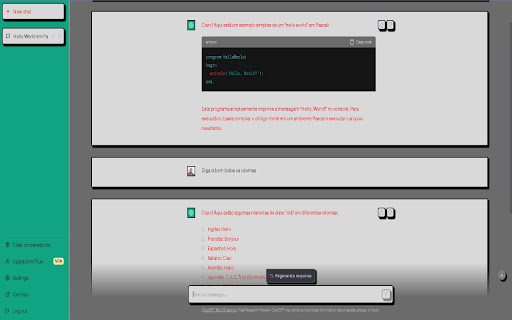


A styles and background change to chat gpt website The extension developed for the ChatGPT website by OpenAI aims to provide users with the opportunity to customize the appearance of the environment according to their preferences. With the ability to switch styles and themes, the goal is to make the environment more pleasant and welcoming, providing a more satisfying experience for users. Furthermore, the extension is open-source, which means that the community can contribute by sending their own styles, making customization even more diverse and accessible to everyone. Thus, the extension aims to offer a unique and exclusive experience for each ChatGPT user, making it even more special and tailored to the needs of each individual.

ChatGPT-theme
让 ChatGPT 页面拥有一个好看的主题 让你的 ChatGPT 拥有一个好看的主题页面,可以定制背景图以及聊天气泡的背景颜色,还能隐藏侧边栏,同时适配了明暗两套主题颜色等,现在还增加在百度页面自动同步搜索功能,需要自己的API key才行

GPT Theme Studio : ChatGPT Theme Editor
Your ChatGPT, your style. Unleash custom themes. Tired of the boring, standard ChatGPT interface? Take full control with GPT Theme Studio and transform your AI chat into a visually stunning, personalized experience! Our extension empowers you to completely change the look and feel of your ChatGPT conversations. Choose from a vast gallery of spectacular themes to create a style that is uniquely yours. Key Features: 🎨 Expansive Theme Gallery: Discover dozens of professionally designed themes on our official website. From futuristic Cyberpunk and Matrix styles to elegant minimalist designs, there's a look for every mood. Explore them all at: https://gpt-theme-studio.online/#themestore ✨ Total Visual Transformation: Go beyond simple color changes. GPT Theme Studio allows you to control every detail of the interface: change background images, gradients, and colors; customize font families, sizes, and weights; and modify message bubbles, borders, and even add futuristic glow effects. ⚡ One-Click Management: Don't bother with complex settings. Our clean and intuitive popup interface allows you to activate, deactivate, and manage your themes effortlessly with a single click. 💾 Persistent Styles: Activate your favorite theme once, and it will stay active every time you visit ChatGPT. No need to re-apply it after every page refresh! How To Use? (It's simple!) After installing the extension, visit our Theme Store at https://gpt-theme-studio.online/#themestore to browse and download your favorite themes as .css files. Click on the GPT Theme Studio icon in your browser's toolbar to open the extension popup. Click the "Select CSS" button and choose the theme files you downloaded. Activate the desired theme using the toggle switch next to its name, and you're all set! Support & Feedback Your feedback is incredibly valuable to us! If you encounter any bugs, have suggestions, or want to request a new theme, please don't hesitate to contact us. We are committed to making GPT Theme Studio the best theme manager for ChatGPT, and we can't do it without you.

Retro 80s ChatGPT Enhancer
Retro 80s ChatGPT Enhancer is a script that transforms the ChatGPT interface into a nostalgic 80s-style website. Retro 80s Style: Transforms the ChatGPT interface with a classic black background and green text, reminiscent of early computer screens. Dark Mode: Automatically forces dark mode for a consistent retro look. Improved Button Hover Effects: Enhances the hover effects of buttons, making them glow and change colors for a dynamic retro feel. Periodic Updates: Continuously applies styles to newly loaded elements for a seamless experience.

ChatGPT UI Settings
Chrome extensions for configuring and improving the usability of the ChatGPT user interface. This is a Chrome browser extension, crafted with the aim to enhance user experience on the ChatGPT website (https://chat.openai.com). It empowers users to tailor the site's interface elements to their liking and provides rapid access to vital information about the current chat and the deployed GPT model. This application aspires to elevate your comfort when interacting with ChatGPT, diminish visual strain, and imbue the interface with a more minimalist aesthetic. Enjoy a refined and engaging user experience like never before. 1. Model Information: This information is located at the top of the extension popup window and displays the current GPT model in use (GPT-4 or Default (GPT-3.5) and other potential future versions). This information is available only to ChatGPT Plus subscribers who have access to different models. The information is presented as "Model: GPT-4". For users with a free subscription, this information is not accessible due to the lack of required data on the chat page. 2. Current Chat Display: Positioned right beneath the 'Model Information' is the title of your current chat, displayed in the format 'Chat: My new chat'. This feature is especially handy when the side menu is hidden. 3. "Hide Menu" Button - Menu Visibility Control: The "Hide Menu" button allows you to hide the side menu of the site. When clicked, the button's label changes to "Show Menu", facilitating an easy reversal of this action. 4. "Hide Regenerate Button" - 'Regenerate response' Button Visibility Control: The "Hide Regenerate Button" allows you to conceal the 'Regenerate response' button and the information line beneath the input field. After clicking, the button text changes to "Show Regenerate Button", making it easy to reinstate these elements. 5. "Zoom Content" and "Zoom Out Content" Buttons - Content Scaling Control: The two buttons, "Zoom Content" and "Zoom Out Content", provide control over the page content's scale. The maximum zoom scale is 175%, and the minimum is 100%. 6. "Save Settings" Button - Settings Preservation: The "Save Settings" button enables the preservation of selected site display settings. The data is stored in the browser's localStorage. 7. Feedback: At the end of the popup window, there's a section titled "Offer and Support" where an email address for suggestions and support is provided. Instructions for Use: Install the application and drag its icon to the applications panel as demonstrated in the video. For convenience, it's recommended to position it at the beginning of the list. Clicking on the icon will open a pop-up window featuring all available functionalities. Support and Feedback: If you have any suggestions or questions, feel free to reach out to me at chursa.andrey@gmail.com. If you appreciate my application, you can support me by making a donation. The donation link can be found at the bottom of the app's pop-up window. This application does not copy or ask for any information, does not install cookies, and does not share information with third parties. My goal is to make your interaction with ChatGPT as comfortable and productive as possible. I'm confident that my application will help you focus on communicating with AI by minimizing distractions and making the content more comfortable to read. I look forward to your feedback and suggestions!
