
fjeaiokjbnimgnjmdgkoafippjanblij
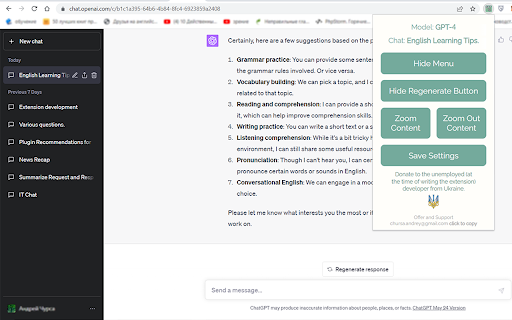
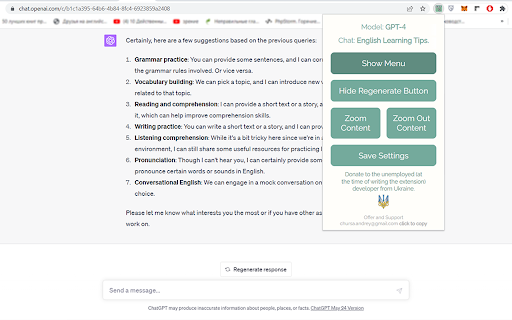

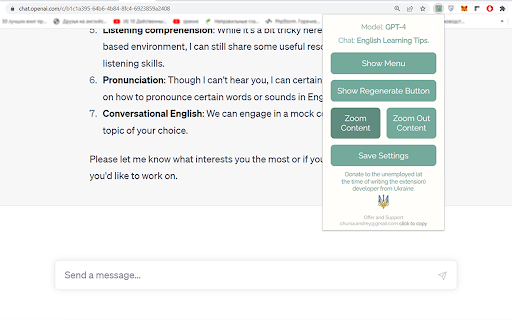
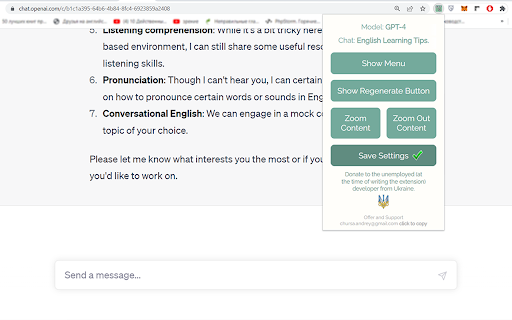
Chrome extensions for configuring and improving the usability of the ChatGPT user interface. This is a Chrome browser extension, crafted with the aim to enhance user experience on the ChatGPT website (https://chat.openai.com). It empowers users to tailor the site's interface elements to their liking and provides rapid access to vital information about the current chat and the deployed GPT model. This application aspires to elevate your comfort when interacting with ChatGPT, diminish visual strain, and imbue the interface with a more minimalist aesthetic. Enjoy a refined and engaging user experience like never before. 1. Model Information: This information is located at the top of the extension popup window and displays the current GPT model in use (GPT-4 or Default (GPT-3.5) and other potential future versions). This information is available only to ChatGPT Plus subscribers who have access to different models. The information is presented as "Model: GPT-4". For users with a free subscription, this information is not accessible due to the lack of required data on the chat page. 2. Current Chat Display: Positioned right beneath the 'Model Information' is the title of your current chat, displayed in the format 'Chat: My new chat'. This feature is especially handy when the side menu is hidden. 3. "Hide Menu" Button - Menu Visibility Control: The "Hide Menu" button allows you to hide the side menu of the site. When clicked, the button's label changes to "Show Menu", facilitating an easy reversal of this action. 4. "Hide Regenerate Button" - 'Regenerate response' Button Visibility Control: The "Hide Regenerate Button" allows you to conceal the 'Regenerate response' button and the information line beneath the input field. After clicking, the button text changes to "Show Regenerate Button", making it easy to reinstate these elements. 5. "Zoom Content" and "Zoom Out Content" Buttons - Content Scaling Control: The two buttons, "Zoom Content" and "Zoom Out Content", provide control over the page content's scale. The maximum zoom scale is 175%, and the minimum is 100%. 6. "Save Settings" Button - Settings Preservation: The "Save Settings" button enables the preservation of selected site display settings. The data is stored in the browser's localStorage. 7. Feedback: At the end of the popup window, there's a section titled "Offer and Support" where an email address for suggestions and support is provided. Instructions for Use: Install the application and drag its icon to the applications panel as demonstrated in the video. For convenience, it's recommended to position it at the beginning of the list. Clicking on the icon will open a pop-up window featuring all available functionalities. Support and Feedback: If you have any suggestions or questions, feel free to reach out to me at chursa.andrey@gmail.com. If you appreciate my application, you can support me by making a donation. The donation link can be found at the bottom of the app's pop-up window. This application does not copy or ask for any information, does not install cookies, and does not share information with third parties. My goal is to make your interaction with ChatGPT as comfortable and productive as possible. I'm confident that my application will help you focus on communicating with AI by minimizing distractions and making the content more comfortable to read. I look forward to your feedback and suggestions!

GPThemes - ChatGPT Widescreen, Fonts & Color
📝 FEATURES 📝 • 🎨 CUSTOM ACCENT COLORS – Choose any accent color with a live preview • 📐 ADJUSTABLE LAYOUT – Resize chat & chatbox widths for better readability • ✍️ TYPOGRAPHY CONTROL – Customize font family, size, line height, and spacing • 💬 CHAT BUBBLES – Toggle bubbles for better message distinction • 🌓 MODERN THEME – Light, Dark, and AMOLED-friendly Black mode • 🪟 DISTRACTION FREE VIEW – Hide disruptive elements like the header, footer and upgrade chip to maximize screen space • ⬆️ EXPAND PROMPT BOX – Increase the height of the chatbox for more typing room • 🚀 QUICK THEME SWITCHER – Floating button for instant theme changes • 🪟 SPACIOUS & CLEAN UI – Comfortable chatting with reduced clutter • ✨ SMOOTH ANIMATIONS – Subtle feedback for a polished experience • 📱 MOBILE FRIENDLY – Customize ChatGPT on your phone browser too. Available for Firefox Android and Cromite (open-source Chromium-based browser for Android) 🔒 PERMISSIONS EXPLAINED 🔒 • Storage: To save your theme preferences locally on your device. • ChatGPT access: To apply your custom themes on "chat.openai.com" and "chatgpt.com" GPThemes believe in transparency. All settings are stored locally on your machine. It does not collect any personal data. You can find the extension's source code here : https://github.com/itsmartashub/GPThemes ⚠️COMPATIBILITY ⚠️ • GPThemes is designed to provide customization experience for the core ChatGPT interface. It is optimized to work with free accounts and key features. • While the extension will likely function with a Plus subscription and Pro models, some of its styling may not be fully optimized for the advanced UI elements or features unique to that version. • The extension is built to work with all languages, but its visual appearance is currently fine-tuned for English. I'm actively removing English-specific selectors in favor of more multilingual methods with almost every update. • Regular updates to maintain compatibility with ChatGPT changes. I appreciate your patience during any brief disruptions. 🧵 HOW TO 🧵 1️⃣ Install the GPThemes. 2️⃣ On ChatGPT, there should be floating palette button (top-right) — click it to switch between Light, Dark, AMOLED, or open ⚙️ Settings to customize Colors, Fonts, and Layout. 3️⃣ Pin the extension's icon to your browser toolbar (if it's not already). 4️⃣ Click the icon to open the popup. 5️⃣ Use the toggle in the popup's top-right to show or hide the floating palette button on the ChatGPT page. 💌 SUPPORT & KEEP IT ALIVE 💌 • 🍵 If you can afford it and find GPThemes valuable, you can support its development with a pay-what-you-want contribution on KO-FI. Even small contributions help keep it alive, up-to-date and accessible. 🤝 FEEDBACK 🤝 • If you encounter persistent issues or have suggestions for improvement, please feel free to open an issue on GitHub or contact me via email. Your feedback is invaluable and helps me identify and resolve problems more effectively. Elevate your ChatGPT experience with GPThemes - where functionality meets style

ChatGPT Widescreen
Enhances ChatGPT with wide/full/tall-screen + spamblock modes. Also works on poe.com #2 UX Product of the Week on Product Hunt! ⚡ Works with: chatgpt.com + poe.com 💻 Programming code — Improves readability by preventing single lines from wrapping and obfuscating code 📃 Multi-step instructions — Keeps more steps on ONE page for easier review 📙 Long recipes — Allows you to cook without getting mouse or trackpad greasy from having to scroll • Taller Chatbox: Expand the chatbox vertically • Wider Chatbox: Expand the chatbox horizontally in Wide Screen mode • New Chat Button: Show New Chat button in chatbox • Hidden Footer: Hide site footer • Hidden Header: Hide site header • Mode Notifications: Show notifications when toggling modes/settings • Spam Block: Hide spam banners from cluttering the page • One-click button access to browse more AI extensions NOTE: Settings auto-sync to other tabs for the same site (e.g. activating Hidden Header on chatgpt.com will apply to all chatgpt.com tabs, but poe.com headers will remain visible)

ChatGPT Themes
Apply custom themes to the ChatGPT Make ChatGPT truly yours. From soothing ocean blues to warm desert tones, give your AI conversations a personal touch. 🎨 Themes Carefully crafted themes including: - Ocean: Calming blues for focused discussions - Forest: Natural greens for a refreshing experience - Sunset: Warm, inviting oranges for comfortable reading - Desert Light: Elegant sand tones for a professional look - High Contrast: Maximum readability for accessibility - Modern Nordic: Clean, minimalist design - Modern Rose: Soft, feminine aesthetics 🔨 Features - Easy-to-use theme switcher - Minimizable interface that stays out of your way - Remembers your preferred theme 💡 Perfect For - Developers who spend hours coding with ChatGPT - Writers seeking a more comfortable writing environment - Students who want a personalized learning experience - Professionals looking for a more polished interface - Anyone who wants to reduce eye strain during long chat sessions 🚀 Simple to Use 1. Install the extension 2. Open ChatGPT 3. Click the theme icon to open the theme menu 4. Choose your preferred theme 5. Minimize the menu when you're done Make your ChatGPT conversations more enjoyable with themes that match your style. Download now and transform your AI chat experience!

StylerGPT for ChatGPT
Custom Themes for ChatGPT, Prompt Manager, Prompt History, Folders, Export to PDF/DOCX, Bulk Actions, and more! StylerGPT is an all-in-one browser extension for ChatGPT, for people who want a cleaner, more personal, and more productive workspace. Customize your interface with themes, backgrounds, fonts, colors, chat folders, local exports, reusable prompts, and focused workflow upgrades. 🛡️ Privacy-focused: all your data is stored only on your local machine. Your chats never leave your device. No telemetry and no tracking. 🪄 Prompt Enhancer: rewrite the current draft in Static mode, or use Interactive mode to answer guided questions and select options before generating the improved version. 🧩 Prompt Manager: save, organize, search, favorite, archive, edit, and insert reusable prompts directly inside the ChatGPT composer. 📁 Chat Folders: organize conversations into local folders from the native sidebar. 📄 Chat Export: export conversations locally as PDF, DOCX, Markdown, TXT, or JSON. 💻 Code Block Themes: customize how code blocks appear inside your chats. ↵ Enter for new lines: make Enter create a new line and send with Shift+Enter. 🕘 Message timestamps: show the date and time above each message in the conversation. 🎨 Chat bubble text colors: set separate text colors for user and assistant chat bubbles from Chat Layout. ***** Themes and Customization ***** 🎨 1000+ ready-made ChatGPT themes for light and dark workflows, including dedicated accessibility themes for easier reading. 🖼️ 1000+ backgrounds and wallpapers, plus custom image uploads. 🔤 1000+ Google fonts for ChatGPT, with font size controls and interface or chat-message scope. 🌈 Color palettes, custom accent colors, vibrant mode, and a gradient generator for custom themes. 🛋️ Background color, gradient, image, opacity, and position controls for a more comfortable workspace layout. 📐 Chat layout controls for conversation width, user and assistant bubble backgrounds, and separate text colors. 🏷️ Brand mask controls to customize the logo area and model label in your own workspace. 💻 Code block styling for developers who spend time reading generated code. ***** Organization and Chat Tools ***** 📁 Chat Folders: create local folders, customize folder color and icon, and assign conversations from the sidebar. ✅ Bulk Actions: select visible chats and delete or archive multiple conversations at once. 📄 Chat Export: export the current conversation as PDF, DOCX, Markdown, TXT, or JSON without sending it to a remote export service. 🕘 Message timestamps: show when each user or assistant message was sent, directly in the chat. 🕘 Prompt History: use Ctrl/Cmd + Up or Down in the message box to cycle through previous prompts. 🧩 Prompt Manager: build a personal prompt library with folders, variables, favorites, archive, and quick insertion. ↵ Enter for new lines: make Enter create a new line and send with Shift+Enter. 🔄 BG Roulette: rotate workspace backgrounds automatically by interval, category, and opacity. ▶️ YT Summarizer: extract a YouTube transcript and open ChatGPT with a ready-to-send summary or highlights prompt. 📄 Chat Export: create clean local PDF or DOCX files with selectable text, code labels, emoji, dark-theme support, and non-Latin text. 🪄 Prompt Enhancer: refine the current draft before you send with a quick Static mode or an Interactive mode that asks questions and lets you choose answers, then replace the composer text or copy the improved version. 🧱 Prompt variables: turn reusable prompts into templates with fields you can fill before inserting. ⚡ Quick prompt insertion: type // or your chosen trigger in the message composer to open saved prompts faster. StylerGPT is designed for developers, writers, students, marketers, researchers, creators, and professionals who spend long sessions in ChatGPT and want more control over the interface. Use StylerGPT to make ChatGPT easier to read, easier to organize, and easier to reuse. Keep conversations clean with folders, bulk actions, and optional message timestamps. Keep your favorite prompts ready with Prompt Manager and Prompt History, and refine drafts before sending with Prompt Enhancer in Static mode or Interactive question-and-answer mode. Keep long chats portable with local PDF, DOCX, Markdown, TXT, and JSON export. Keep your workspace comfortable with themes, fonts, colors, backgrounds, chat layout controls, and separate bubble text colors for user and assistant messages. The native flow stays recognizable, with local organization, export, prompt, and appearance controls where daily users need them. 1. Install the extension. 2. Pin StylerGPT in your browser. 3. Open ChatGPT. 4. Open the StylerGPT panel from the toolbar or with Alt + Shift + S. 5. Choose your theme, background, font, folders, prompts, and tools. Free trial available: unlock StylerGPT Power features for 7 days. Privacy-friendly by design. StylerGPT focuses on local customization and local workflow tools for ChatGPT. ChatGPT is a registered trademark of OpenAI OpCo, LLC. All logos, trademarks, and registered trademarks are the property of their respective owners. This extension is not affiliated with or endorsed by OpenAI.
