
ompkjeefecnmejcmanlofimmclifefde
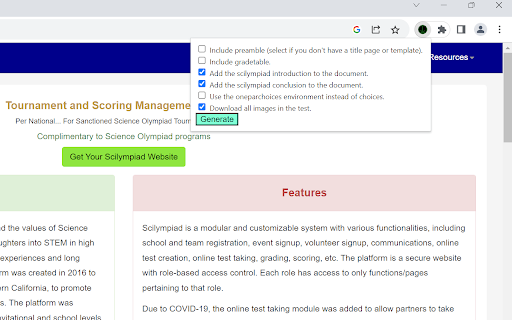
An extension that converts a test on scilympiad to LaTeX code and downloads all images in seconds. From the event supervisor dashboard, click on "Create/Update Online Tests", then click on the key icon to access the key. On this page, click on the extension in the toolbar, and click generate, and the program will download a text file with the LaTeX code for the test and all images from the test. Important notes (read before using): - Currently does not support conversion of scilympiad math to LaTeX, but you can either format manually or copy the math from the scilympiad editor. - This extension isn’t perfect and will need modifications such as page breaks or image size adjustments to be added to the files it generates, so you probably need at least a little LaTeX knowledge to use this extension. - Keep all settings as the default unless you really know what you are doing because the defaults are both most tested and adequate for most use cases. Other settings are for edge cases that might appear or personal preference (in the case of the environment for question types) - This extension truncates point values (e.g. 1.5 points turns into 1 point) because the exam class does not support decimal point values like this. Therefore, if your test includes decimal point values, you will have to manually change them in some way. - Please credit me in some way if you use the extension (this request is as of 2025, so if you used it in the past, don't think that you missed this). This extension doesn't add any watermarks or similar, as I tried to make an extension that is as useful to others as possible, so I would appreciate some form of crediting, such as a small note on the test or site. Additionally, please send an email to me or leave a review with any feedback. I read everything I receive and try to fix anything within a few months.

Mathpix Snip
Convert PDFs to LaTeX, DOCX, Markdown, and more Mathpix Snip: read, search, and convert scientific PDFs. Convert PDFs to LaTeX, DOCX, Markdown, and more. The Mathpix Snip Chrome extensions makes it possible to upload a PDF in your browser to your PDF collection in Snip instantly. It’s a key tool all STEM researchers need to stay on top of their fields. We make it easy and intuitive to create a searchable, exportable collection of PDFs from Arxiv.org and other online resources. Once in Snip, you can search and read your PDFs on any device, with the ability to export your documents to DOCX, HTML, LaTeX, and Markdown. You can also extract text from your PDFs and create research summaries via our Mathpix Markdown document editor in Snip. This Chrome extension has special features for Arxiv.org, including automatic naming of your PDF files, metadata extraction, and duplication detection to prevent adding the same PDF to your collection twice. This Chrome extension also integrates perfectly with the iOS and Android Snip apps, so that you can read your PDFs on the go, including an HTML view of the document so you can read PDFs comfortably on your phone without having to zoom into your document to compensate for small font sizes. We believe that if we make it pleasant for users to work with research PDFs, researchers will spend more time actually reading and studying them, and discover more connections, and ideas. It's frustrating enough to be a researcher, why make it harder than it needs to be by using business oriented storage software to manage your research PDFs?

LaTeX Copy
Make copying LaTeX effortless and efficient! How it works: 1.Hover Simply hover your mouse over any LaTeX expression, and it will be highlighted for easy identification. 2.Click to Copy With a single click, the highlighted LaTeX expression is instantly copied to your clipboard—no manual selection or extra steps required.

MatTalX - Write math symbols
Write mathematical expressions anywhere - Convert LaTeX commands to plain text and paste it on any platform! With MatTalX (pronounced "Math Talk"), you can convert a simple command, like e^{x} or \alpha into 𝑒ˣ and 𝛼 respectively. They can then be sent via Facebook, Twitter, Instagram, Teams, Gmail, and every other online platform. You can finally talk about physics, mathematics, chemistry, and (even) chess with your friends! There are more than 1000 commands and you can even create your own! They are quite easy to remember, especially if you are already familiar with LaTeX! If not, simply open the completion popup! Copy and paste " H(t) | \psi (t) \rangle = i \hbar \frac{\partial}{\partial t}| \psi (t) \rangle " in the upper square, click "Convert" and see what happens! Simple, free, and open-source! ** Documentation ** Full and comprehensive documentation is available if you put your mouse above the question mark (?) on the top right corner of the popup that will appear once you open MatTalX.

Chat-Math RTL Fix
Simple fix for KaTeX and code LTR rendering in RTL pages When writing in right-to-left (RTL) languages such as Hebrew or Arabic, KaTeX formulas and code lines may appear reversed, displaying right-to-left instead of the standard left-to-right direction. This makes math and code harder to read across many platforms, including ChatGPT, Gemini, Claude, and others. Chat-Math RTL Fix automatically forces all KaTeX formulas and code blocks to display left-to-right (LTR), without altering the rest of the text, without re-rendering, and without impacting page performance.
