
jllceliamggkpffccbefpefgmcigaglb
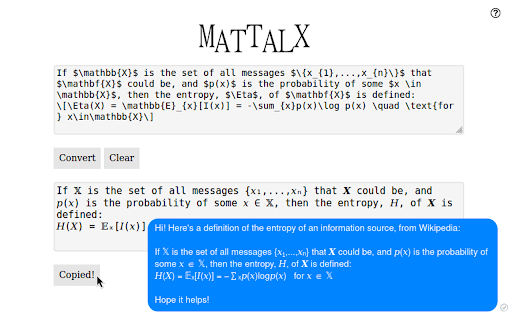


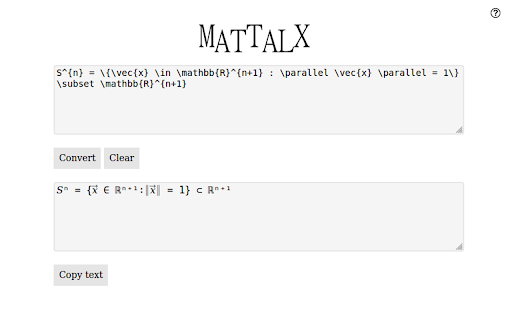
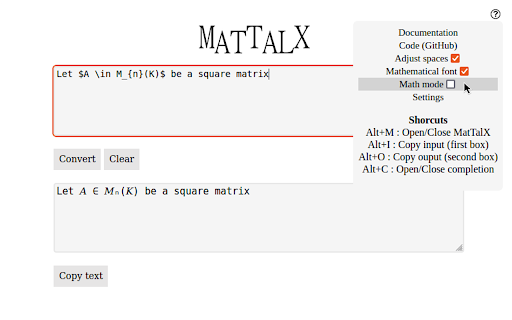
Write mathematical expressions anywhere - Convert LaTeX commands to plain text and paste it on any platform! With MatTalX (pronounced "Math Talk"), you can convert a simple command, like e^{x} or \alpha into 𝑒ˣ and 𝛼 respectively. They can then be sent via Facebook, Twitter, Instagram, Teams, Gmail, and every other online platform. You can finally talk about physics, mathematics, chemistry, and (even) chess with your friends! There are more than 1000 commands and you can even create your own! They are quite easy to remember, especially if you are already familiar with LaTeX! If not, simply open the completion popup! Copy and paste " H(t) | \psi (t) angle = i \hbar \frac{\partial}{\partial t}| \psi (t) angle " in the upper square, click "Convert" and see what happens! Simple, free, and open-source! ** Documentation ** Full and comprehensive documentation is available if you put your mouse above the question mark (?) on the top right corner of the popup that will appear once you open MatTalX.

ChatGPT Equation Renderer
The ChatGPT Equation Renderer simplifies the way you work with mathematical language in ChatGPT. Features: - Copy the LaTeX code from any mathematical expression or equation from ChatGPT with a single click. - Works with both inline and block equations. The extension has a button that writes a prompt to ChatGPT asking it to write all mathematical expressions using LaTeX. The extension is open source. You can be confident that the extension is secure.

LaTeX Editor
A lite, free & flexible LaTeX editor app for your browser. LaTex Editor is a lite and free latex editor extension for your browser. With this add-on, you can open any ".tex" file and edit the code via the built-in editor. Moreover, you can compile the code and see the rendered document (HTML5) within the app (bottom section). Currently, the latex compiler only works for basic latex commands. For complex documents, you need to install a native latex application. Once a latex code is compiled you can click on the print button to print the document to .pdf format (via the print UI). Note #1: this app uses CodeMirror (https://codemirror.net/) and LaTeX.js (https://github.com/michael-brade/LaTeX.js) open-source JavaScript libraries. Note #2 : you don't need to adjust any settings for this add-on, simply open any latex document and start working on it right away. To report bugs, please fill the bug report form in the add-on's homepage (https://mybrowseraddon.com/latex-editor.html).

Latex in Slack
If you find this extension helpful, feel free to buy me a coffee ☕ https://buymeacoffee.com/andrewsskrlv This extension changes LaTeX text in Slack channels to human readable images. USAGE EXAMPLE 1. Open Slack (browser version) 2. Send a message with some LaTeX text to other user (e.g. "$ x^{3} $") 3. The extension will replace your LaTeX math formulas with easy-to-read images

Latex Math Equations for Google Chrome™
You can edit and then save it as an image to Google Drive. Do you need to finish up some math equations/online math homework on your computer? Are you struggling to write out the correct mathematical symbols on your computer for your math homework? Try using our software Latex Math Equations for Google Chrome™ today. You can write out complex mathematical equations in a user-friendly manner once you have installed Latex Math Equations for Google Chrome™. The main purpose of this software is to allow complex latex math equations to be typed out on the computer and allow students worldwide to finish their digital maths homework. Disclaimer: Please note this extension is NOT made by Google and is made by an independent development team. All copyrights belong to their respective owners. Google doesn’t endorse or sponsor this Chrome extension. Latex Math Equations for Google Chrome™ is not owned by, is not licensed by and is not a subsidiary of Google Inc.
