
omjifoffgbnhdgcmeepmgopiopkbafio
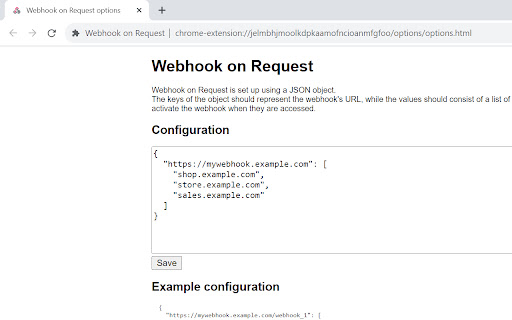
Trigger a webhook when your browser sends a request to a particular domain. Key Features: 🌐 Domain-Specific Triggers: You can specify the domains that will activate your webhooks, and the extension will handle the rest. 🔐 Secure and Private: "Webhook on Request" does not store any personal information. 🌟 Simple Setup: You can set up your webhooks and domains using a JSON file.

SignatureSync: Pro Signatures
Simplify your messaging with SignatureSync, the tool that automates your signatures, ensuring a professional touch every time. SignatureSync: Your Effortless LinkedIn Solution! Tired of typing your signature repeatedly in LinkedIn messages? SignatureSync is here to revolutionise your messaging experience, making it effortless and polished. With SignatureSync, set your signatures once, and they will automatically append to your messages in LinkedIn, ensuring a professional touch every time. 1. Effortless Signatures: Say goodbye to repetitive typing. With SignatureSync, your signatures are automatically added to your messages, saving you time and effort. 2. Total Control: Adapt your signature presence effortlessly. Enable or disable signatures with a click, ensuring your messages match the tone of your conversation. 3. Flexible Customisation: Tailor your signatures to perfection. Edit your signatures directly from the extension, ensuring they are up-to-date and relevant. 4. Open Source and Transparent: We believe in transparency. SignatureSync's source code is publicly available on GitHub at https://github.com/prvashisht/signature-sync/, emphasising my commitment to your security and trust. Elevate your messaging experience with SignatureSync. Streamline your conversations, make a lasting impression, and enjoy effortless communication every time you connect with others. Ready to transform your messaging? Install SignatureSync now and embrace a new era of professional communication!

TestFiltering+
TestFiltering+ automatically monitors your internet connection to ensure your filter is correctly blocking illegal/harmful content We work with specific partners to host test URL's on various lists and have test pages hosted where they will be blocked. This service was setup in response to the introduction of statutory guidance for schools in the UK about appropriate levels of filtering and monitoring of school internet connections. The UK Safer Internet Centre first published its filtering and monitoring definitions in 2016 to help both schools and providers understand what should be considered as ‘appropriate’.

ScrapboxQuickLink
An extension that makes it easy to copy links in Scrapbox format. Third party extension for Scrapbox users. This is a Chrome extension to easily generate links for Scrapbox. Clicking on the extension menu that appears when right-clicking within a page will copy the link to the clipboard in the following format. * Right-click within a page: [page-title URL]. * Right-click on a selected text: [URL selection-text]. Please feel free to contact us for any improvements or bugs on GitHub. Please feel free to contact us. https://github.com/okaryo/ScrapboxQuickLink

Multi Webhook Sender [Send URLs,Videos,Images,to Any Webhook like n8n]
Multi Webhook Sender - The Ultimate Professional API Testing Chrome Extension Transform Your Browser Into a Powerful REST Client & Webhook Management Hub Tired of switching between Postman and your browser for every API test? Multi Webhook Sender is the most advanced webhook Chrome extension available - a complete Postman alternative that brings enterprise-grade API testing directly to your browser. Built for developers, QA engineers, and automation professionals who demand speed, reliability, and advanced features. 🚀 Revolutionary File Upload System - Handle What Others Can't Enterprise-Grade Large File Support 20MB+ File Handling with intelligent chunking technology Real-Time Progress Tracking with cancellation capability Smart Thumbnail Preview for instant image verification Drag & Drop Upload with visual feedback Intelligent File Type Detection with custom icons for videos (📹), images (🖼️), documents (📄), and more Advanced Upload Technology Our proprietary chunking system breaks Chrome's message size limits, enabling uploads that other extensions simply cannot handle. Files are automatically split, processed in batches, and reassembled seamlessly. 🎨 Professional Interface Design - Built for Power Users Adaptive Dark/Light Theme System Instant Theme Switching with persistent storage Enhanced visibility in both light and dark modes Smooth transitions without page reloads Perfect for late-night development sessions Customizable Workspace Layout Resizable Panel Interface - drag to adjust request library width (180px-400px) Full-Screen Focus Mode - hide sidebar for maximum editing space Smart Text Field Expansion - input fields auto-expand when focused Persistent Layout Memory - your preferences are saved automatically Professional Progress Indicators Real-Time Character & Word Counter for payload optimization Advanced Progress Tracking with file size and completion estimates Visual Upload Status with animated success indicators Intelligent Error Recovery with actionable guidance ⚡ Advanced Request Management & Organization Enhanced Sorting & Search Multiple Sort Options: Most Used, Date Created, Alphabetical Smart Search & Filtering across all request names Pinned Requests always appear first Persistent Request State - automatically restore your last selection Professional Request Library Unlimited Request Storage with intelligent cleanup Import/Export Functionality for team sharing Advanced Metadata Tracking - usage counts, last used dates Emergency Data Recovery - built-in protection against data loss 🛠 Complete HTTP Request Builder - Every Method, Every Header Full Protocol Support All HTTP Methods: POST, GET, PUT, DELETE, PATCH, OPTIONS Custom Headers & URLs with validation Three Powerful Body Editors: JSON Mode: Intuitive key-value interface with validation Form-Data Mode: Complete multipart/form-data support with file uploads Raw Text Mode: Ultimate flexibility for any payload type Intelligent Features 🧠 Smart JSON Cleaning - automatically fix malformed JSON 💾 Keep Data Toggle - control workflow for rapid testing 🔍 Real-Time Validation - catch errors before sending 📊 Request Size Monitoring - optimize payloads automatically 🎯 Context Menu Integration - The Ultimate Time Saver Right-Click Webhook Sending Pin your most-used requests to your browser's right-click menu. Send data from any webpage with a single click - the fastest webhook workflow available in any Chrome extension. Intelligent Data Processing Auto-detect clipboard content and page selections Smart JSON extraction from messy text Context-aware data handling - images, URLs, text, all processed intelligently 📈 Real-Time Response Analysis & Debugging Professional Response Viewer Instant webhook response display with syntax highlighting Status code interpretation with human-readable explanations Enhanced Error Messages - get specific troubleshooting guidance Response Time Tracking for performance analysis Advanced Error Handling Transform cryptic HTTP errors into actionable advice: 413 Error → "File too large - try compressing your upload" 401 Error → "Check your API key or Authorization header" CORS Issues → "Webhook endpoint doesn't allow extension requests" 🌐 Universal Webhook Compatibility Seamless Integration Connect instantly with your favorite services: Automation Platforms: Zapier, Make.com, n8n, Power Automate Team Collaboration: Discord, Slack, Microsoft Teams Developer Tools: Home Assistant, Zabbix, Custom APIs Testing Services: Webhook.site, RequestBin, HTTPBin Any service with a webhook URL - if it accepts HTTP requests, we support it! 💪 Advanced Features for Power Users Professional Storage Management Unlimited Storage Support for large request libraries Intelligent Cleanup Systems prevent performance issues Automatic Recovery from storage quota issues Persistent Upload State - resume interrupted uploads Enterprise-Grade Reliability Multi-Layer Error Protection with automatic recovery Emergency Cleanup Systems for corrupted data Persistent Session Management across Chrome restarts Advanced Debugging Tools with detailed diagnostics 👥 Perfect For Every Use Case Developers 🧑💻 Quick endpoint testing, API integration debugging, and daily webhook automation QA Engineers 🔍 Build comprehensive test suites, regression testing, and API validation workflows Automation Specialists ⚙️ Trigger complex workflows, integrate services, and automate data pipelines Content Creators 🎨 Send media to automation platforms, trigger notifications, and manage content workflows 🏆 Why Choose Multi Webhook Sender Over Postman? ✅ Browser-Native - No separate app needed ✅ Context Menu Integration - Send from any webpage ✅ 20MB+ File Support - Handle enterprise uploads ✅ Dark Mode - Professional interface design ✅ Real-Time Progress - See exactly what's happening ✅ Smart Error Recovery - Never lose your work ✅ Unlimited Storage - No artificial limits ✅ Instant Switching - No context switching between apps 🚀 Get Started in Seconds Install the extension Click the webhook icon in your toolbar Build your first request with our intuitive interface Pin frequently-used requests to your right-click menu Send data from any webpage instantly! Transform your API testing workflow today. Install Multi Webhook Sender and experience the most advanced webhook management system available in the Chrome Web Store. ⭐ Join thousands of developers who've made the switch to browser-native API testing!
