
dmibboeahipddbmdipdhfegijemhbmek
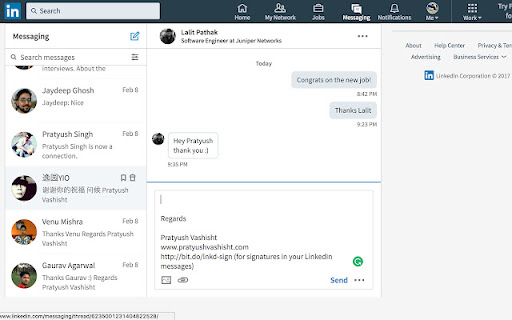


Simplify your messaging with SignatureSync, the tool that automates your signatures, ensuring a professional touch every time. SignatureSync: Your Effortless LinkedIn Solution! Tired of typing your signature repeatedly in LinkedIn messages? SignatureSync is here to revolutionise your messaging experience, making it effortless and polished. With SignatureSync, set your signatures once, and they will automatically append to your messages in LinkedIn, ensuring a professional touch every time. 1. Effortless Signatures: Say goodbye to repetitive typing. With SignatureSync, your signatures are automatically added to your messages, saving you time and effort. 2. Total Control: Adapt your signature presence effortlessly. Enable or disable signatures with a click, ensuring your messages match the tone of your conversation. 3. Flexible Customisation: Tailor your signatures to perfection. Edit your signatures directly from the extension, ensuring they are up-to-date and relevant. 4. Open Source and Transparent: We believe in transparency. SignatureSync's source code is publicly available on GitHub at https://github.com/prvashisht/signature-sync/, emphasising my commitment to your security and trust. Elevate your messaging experience with SignatureSync. Streamline your conversations, make a lasting impression, and enjoy effortless communication every time you connect with others. Ready to transform your messaging? Install SignatureSync now and embrace a new era of professional communication!

SummarAI
Introducing SummarAI, the cutting-edge Chrome extension that empowers you to quickly and accurately summarize PDFs, text, and videos using advanced AI technology. With just a click, SummarAI extracts the most important information from your content, helping you save time and stay focused in the age of information overload. Swiftly summarize PDFs, text, and videos with a single click Utilize AI-powered algorithms for precise and accurate summaries Customize summary length to suit your needs Compatible with a wide range of content types and sources Ideal for students, researchers, professionals, and anyone who values brevity How it works: Install the SummarAI Chrome extension Navigate to the content you wish to summarize Click the SummarAI icon in your browser toolbar Choose your desired summary length and let the AI work its magic Read, share, or save your concise, AI-generated summary With SummarAI, you'll never again feel overwhelmed by endless streams of content. Whether you're a student trying to digest lengthy articles, a professional seeking to stay informed, or simply someone who values their time, SummarAI is the perfect tool to help you cut through the clutter and focus on what truly matters. Join the SummarAI community today and experience the future of content summarization! Note: SummarAI requires an internet connection to function, as it utilizes AI models hosted in the cloud. The extension respects user privacy and does not store any personal data or browsing history.

Clevermail
Race through your emails with Clevermail – Your AI-powered Gmail assistant. Clevermail is an innovative AI-powered email assistant that seamlessly integrates with Gmail via a Chrome extension. It enhances your email experience by generating personalized, professional emails based on your inputs and business context. With features like multilingual support and direct email sending, Clevermail is transforming the way professionals handle their email communication

Left Unread
Show only unread conversations on Facebook, Messenger and Twitter Do you find yourself overwhelmed with countless messages and struggling to stay on top of all your unread conversations? Do you wish you could easily find your unread conversations in your inbox? Are you missing on opportunities because a conversation slipped at the bottom of your inbox? If so, then here's the good news: Left Unread is a free Chrome extension that filters your inbox and displays only the conversations that haven't been read, putting them at the top of your inbox. You no longer have to worry about missing out on important messages. As someone who relies on daily Facebook, Messenger, or Twitter conversations to engage with prospects or subscribers that enjoy freebies, you know how overwhelming inbound messages can be. With Left Unread, you'll quickly and effortlessly catch up on important messages without the distractions of old or irrelevant conversations. It's the perfect time-saving extension for entrepreneurs, founders, creators or even sales representatives who rely on DM conversations. With just one click, Left Unread can transform your relationship with inbound messages, giving you a sense of relief knowing that you can easily find unread conversations. Whether you chat with your prospects using DMs or subscribe to lots of freebies, it'll transform your relationship with inbound messages and keep you on top of your inbox. Try Left Unread today and take control of your inbox. It's free and requires no payment.

Apiary - Web Highlighter & Annotator
Highlight and take notes directly on what you read online and instantly share them with friends and colleagues. Easily highlight and take notes on what you read online and then easily save them for later and share them with friends and colleagues in one click. Apiary is a free to try chrome extension based product that allows you to easily highlight and take notes on what you read online. After you have annotated something online it will be saved to your Apiary account where you can then organize in any way you like with our folder system. You can than easily share directly from the website where you took the notes or from your Apiary account later on with anyone you want. Just highlight and get a shareable link you can send to anyone with one click. When using Apiary on a website or email online you have two options. You can choose to just highlight some text or you can highlight and add a comment to that highlight. Allowing you to save and share you favorite parts and current thoughts while reading it with others. You can view your annotations live by clicking the chrome extension and having the Apiary sidebar appear showing all the highlights and notes you have made on that page. Or you can view them later in your Apiary account where we save all the contents of what you were reading and the highlights and notes you took. Allowing you to get the full context of whatever you were taking notes on. Annotate, save, and share what you read online instantly today. ----------------------------------------- Key Features: Web and Email Highlighting Take Notes On What You Read Online Apiary Account Access With Organization Systems Quick and Easy Shareable Notes Private Notes That Only You Can See Automatically Saving Notes ------------------------------------------- How To Use: In order to use the Apiary Chrome Extension you will need an account with Apiary. Please visit www.myapiary.io to create an account today. 1) Create An Account On Apiary (www.myapiary.io) 2) Download Chrome Extension 3) Sign Into Chrome Extension w/ Your Apiary Account 4) Select Text (Left Click & Drag) You Wish To Annotate 5) Click On Apiary Popup To Either Highlight Or Take Note On Selected Text 6) Delete An Annotation By Clicking On A Highlight And clicking Delete Icon 7) Share Your Notes For A Page By Clicking The Apiary Share Button On Bottom Left Corner Of Window 8) View A Note By Either Visiting Your Apiary Account Or By Clicking View On A Currently Annotated Web Page ------------------------------------ Pro Tips: 1) Make Sure You Are Logged Into Apiary Chrome Extension If You Are Having Issues Annotating 2) Organize Your Notes Into Folders On Apiary To Easily Find Notes Later 3) Share Your Notes With Friends By Clicking Share Button And Sending Link To Friends. --------------------------- Got Feedback? Please reach out to us at support@myapiary.io If you find bugs please let us know at https://forms.gle/rHvoLZwaXfVcbAMJ7. If you have a feature request please let us know at https://forms.gle/vguFD2Rxi2FCsSQi8. By installing the extension, you agree to Apiary's Terms of Service, Privacy Policy, and Community Guidelines (which can be found here: https://www.myapiary.io/term-services and https://www.myapiary.io/privacy-policy)
