
omimccinlhlkpjaeaocglgmkbelejlhj
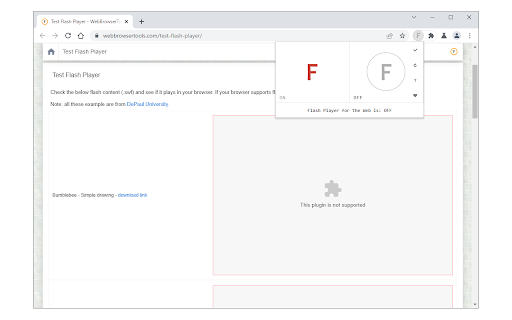

Easily play flash content across the web! Flash Player for the Web is an extension that lets you play flash content across the web via a JavaScript flash emulator. Toolbar popup has an ON|OFF switch to enable or disable the addon. This extension uses the Ruffle emulator (https://github.com/ruffle-rs/ruffle) to compile and play flash. Toolbar popup has an ON|OFF switch to quickly enable or disable the addon. By default, the addon is disabled. Please navigate to a webpage with flash content, then, open the toolbar popup and press on the - ON - button (with red F symbol). All the flash content should start to play. Please note that there might be some bugs in playing flash as this addon is still a work in progress. To turn off the addon, please press the - OFF - button via the toolbar popup. To report bugs, please open the addon's homepage and fill out the bug report form: https://mybrowseraddon.com/flash-player-for-the-web.html

Flash Player Extension For Web
Any flash content for web can be run using a Flash Player. E.g. flash games. Original flash player is nowadays disabled in the browser. Don't worry, just install this simple flash player. The flash player automatically recognises any flash content on a webpage and replaces it with "play" button. In a word, you can install this extension to unlock old flash games or other flash content. Automatically detects the flash content of a website and generates a "play" button. Play flash games, watch flash videos and more. Easy to use, one click to play flash content.

HTML5 Video Keyboard Shortcuts
This extension adds an extensive list of keyboard controls to improve your viewing experience. The shortcuts are only active on videos with the default controls enabled, so don't worry about them messing up YouTube or other custom video players. To enable controls (and keyboard shortcuts) on videos that don't have them, just right-click the video in question and select "Show controls". Note that this extension is only meant to affect Chrome's native HTML5 video player! -Click: Select video, Play/Pause selected video -Double-Click / F: Toggle fullscreen -Space / K: Play/Pause -Left Arrow / J: Skip back 5 seconds -with Shift: 10 seconds -with Control: 1 second -Right Arrow / L: Skip forward 5 seconds -with Shift: 10 seconds -with Control: 1 second -Comma (,): Skip back 1/60th of a second -Period (.): Skip forward 1/60th of a second -Home / 0: Skip to beginning -End: Skip to end -Numbers 1 - 9: Skip to X% (10%, 20%, 30%, ... 90%) -Up Arrow: Increase volume -Down Arrow: Decrease volume -M: Toggle mute -C: Toggle captions -R: Reload video file -Less Than (): Speed up video playback -Question Mark (?): Return to default playback speed This extension is open source! https://github.com/AjaxGb/Better-Chrome-Native-Video Changelog: -v4.1.5 - Fix native controls stealing keyboard events -v4.1.4 -Fix numpad numbers not working (thanks sauravc) -Update extension to Manifest V3 -v4.1.3 - Fix options page not working with HTML5.1 -v4.1.2 - Improve direct videos' compatibility with other extensions -v4.1.1 - Fixed unwanted wrapping on options page -v4.1 -Default values for options displayed in hover text -Added arrow key skip amounts to options -Added ability to enable shortcuts on videos that do not use the default controls -Disabled by default; see options page -v4.0.4 - Fixed clicks not working on standalone videos -v4.0.3 - Fixed multiline options being squashed -v4.0.2 - Improved visibility of disabled options -v4.0.1 - Fixed delay not working on standalone videos -v4.0 -Added an options menu! -Added a slight (optional) delay to clicks -Prevents double-click briefly play/pausing the video -v3.4 - Added Double-Click to toggle fullscreen -v3.3.1 - Made performance improvements more stable -v3.3 -Added "C" to toggle captions -Major performance improvements -v3.2 -Fixed error when disabling shortcuts on a video -Added auto-focus when shortcuts are re-enabled -v3.1 -Fixed keyboard shortcuts activating unintentionally -For example, Ctrl-F used to fullscreen the active video -Holding Ctrl while skipping left/right changes skip length to 1 second -v3.0 - Added right-click option to disable shortcuts on individual videos -v2.0 -Major behind-the-scenes refactoring -Better prevention of default key events -v1.5 - Fixed some dynamically added videos being ignored -v1.4 - Added "R" to reload video -v1.3 -Bug report "Works as Intended", v1.2 reverted -Videos get focus when fullscreened -Minor bugfixes -v1.2 -Added forward compatibility for when this bug is fixed: https://bugs.chromium.org/p/chromium/issues/detail?id=592245 -v1.1 - Moved to GitHub -v1.0 - Initial release

Disable Autoplay for YouTube™
Disable Autoplay for YouTube™ is a lite extension that lets you easily stop/pause YouTube videos from auto-playing. The toolbar button serves as an ON|OFF switch for this addon (the icon will change color accordingly). The red color shows an active state and the dark grey color shows a disabled state. To work with this addon, please add this addon to your browser and then start browsing YouTube. When the addon is active, videos are stopped automatically from playing when you open one. When videos are stopped, the buffering does not continue. You can change this behavior from the options page and let the videos "pause" instead of "stop". This way, the buffering continues but the video won't play. There is another option on the settings page to play or pause videos when a tab is focused or hidden (unfocused). These two options are not active by default. This addon works for all YouTube videos whether they are embedded or not. However, you can disable this feature from the settings page. Note 1: when you switch to the miniplayer, the video stops again. So if you want to use the youtube miniplayer feature, please turn off this addon. Note 2: by default, this addon does not work for youtube shorts and the small video player on the channel page. To enable this feature, please mark option #3 on the settings page. To report bugs, please fill out the bug report form on the addon's homepage (https://mybrowseraddon.com/disable-autoplay.html).

Flash Player Enable - flash emulator swf
Revive web Flash content and play online games seamlessly with a built-in Flash Player emulator. Swf player, flash games player. Experience the nostalgia and accessibility of Flash content once again with our "Flash ReNew" Chrome extension! Seamless Flash ReEnable: Enjoy your favorite Flash-based games, animations, and interactive content on websites that no longer support Flash. Easy Installation: Install our user-friendly extension with just a few clicks, and you're ready to relive the Flash era. Automatic Flash Detection: Our smart technology detects Flash content and instantly reactivates it, ensuring a smooth browsing experience. Security: Rest easy knowing our extension is designed with your online safety in mind. It activates Flash content without compromising your browsing security. Frequent Updates: We stay ahead of the curve by continuously updating our extension to adapt to changing web standards, providing a reliable Flash reenabling solution. Revive the magic of Flash with "Flash ReNew. Bring back your favorite Flash-based content effortlessly and relish the web as it used to be. Get started today!
