
olljocejdgeipcaompahmnfebhkfmnma
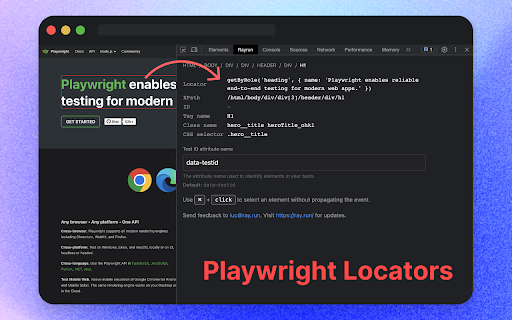

GUI for generating CSS selectors compatible with Playwright, Puppeteer, Cypress, and Selenium for web testing and scraping. This tool lets you select web elements effortlessly, no matter how nested or complex, and swiftly generate accurate CSS, xpath and Playwright locators. Rayrun produced selectors work with popular testing tools such as Puppeteer, Playwright, Cypress, and Selenium. Rayrun enhances your web development and testing workflow, making the tasks of testing, debugging, and web scraping more efficient and less tedious.

CSS Selector Capture Pro
Generate a copiable CSS Selector with a mouseover without Devtool Clean, simple and intuitive to use, accompanied with these exclusive features. ✓ Copiable and tweak-able Selector ready to use in CSS/JavaScript ✓ Highlights of elements which match the Selector ✓ Total matches based on the Selector within Viewport context ✓ The choice of Concise or Verbose selector ✓ Minimal interference with the page * Short version: - Enable the App, Use "CTRL" Key to lock/unlock the selector highlight in position and click the Copy button to copy the selector. - If needed, click on the selector path to tweak the selector before copying. - Use "ESC" key to exit the App * Beware the extension does not support the following contexts: - shadow DOM (suggestion: use chrome devtool since you will be traversing down the shadow root anyway) - iframe (suggestion: to open the iframe URL in new tab and use the extension) ≡ Where would this extension be useful * The extension would typically suit the use of Front End Development, End to End testing such as Selenium as well as Data Scraping where visually identifying a target, matches and getting the CSS selector are needed. * If you do find this extension useful, please support it by simply giving it a good review and that will help others find it. * The extension does NOT collect any data or send data to third party. * 2.4.0 (2024.06.06) - Optimization for highlights, scroll and resize * 2.3.0 (2021.07.15) - Optimization for concise selector * 2.2.0 (2019.03.23) - Added a User Guide Link in Extension Icon Popup * 2.1.0 (2019.03.21) - Added a shortcut hotkey (CTRL) for locking toggle of the overlays * 2.0.0 (2019.02.25) - Optimization for concise selector (i.e. shorter) - Adjustment of selector background opacity when trigger button for Settings Dialog is on top and user hovers it * 1.0.3 (2018.10.15) - Optimization for selector retrieval

Playwright Locator Assistant
Instantly generate and verify the best Playwright locators for any element on the page. Playwright Locator Assistant helps QA engineers and developers generate, verify, and manage Playwright locators directly from the browser — no DevTools diving, no manual selector writing. ───────────────────────────────────────── GENERATE THE BEST LOCATOR INSTANTLY ───────────────────────────────────────── Click any element on the page to capture it, or use the keyboard shortcut (Alt+Shift+L on Windows/Linux, ⌘+Shift+L on Mac) to lock in the element under your cursor without clicking — keeping dropdowns, menus, and hover states open. The extension automatically picks the most robust Playwright strategy available, in priority order: • getByTestId — data-testid, data-cy, data-qa, data-test, data-automation-id, data-test-id • getByRole with accessible name — buttons, links, headings, inputs, and more • getByLabel — for form controls associated with a • getByPlaceholder, getByAltText, getByTitle • Native dropdowns — generates a ready-to-use selectOption() call • Table cells — row-anchored via .filter({ hasText }) so locators survive row reordering • Chained ancestor locators — when no global unique match exists • CSS selector fallback — with a clear warning to add a test ID ───────────────────────────────────────── SKIPS DYNAMIC VALUES AUTOMATICALLY ───────────────────────────────────────── Exchange rates, prices, dates, times, and counters are detected at capture time and excluded from the locator. Your tests stay green across data refreshes. ───────────────────────────────────────── UNIQUENESS BADGE ───────────────────────────────────────── Every captured locator is checked against the current page instantly: ✓ 1 — unique match, safe to use ⚠ 3 — not unique, consider a more specific locator ✗ 0 — no match found (page state may have changed) ───────────────────────────────────────── ALTERNATIVE STRATEGIES ───────────────────────────────────────── Expand the "Alternatives" panel below any captured locator to see up to 5 other valid strategies for the same element — each with its own Copy button. ───────────────────────────────────────── VARIABLES FOR PARAMETERISED TESTS ───────────────────────────────────────── One click on the { } button converts table cell values, row identifiers, and select options into named variables (rowText, cellValue, optionText in JS; row_text, cell_value, option_text in Python) — ready to paste into a parametrised test function. ───────────────────────────────────────── VERIFY ANY LOCATOR ───────────────────────────────────────── Paste any locator into the Verify section and the extension highlights all matching elements on the page with a red outline. Supports: • Playwright syntax: getByRole, getByLabel, getByText, getByPlaceholder, getByAltText, getByTitle, getByTestId, locator() • Chained locators: page.getByRole("nav").getByRole("link", { name: "Home" }) • XPath: //div[@id="main"] or xpath=... • Playwright shorthands: text=Submit, css=.my-class • Plain CSS selectors • Python snake_case: get_by_role, get_by_label, select_option, etc. ───────────────────────────────────────── LOCATOR HISTORY ───────────────────────────────────────── The last 8 captured locators are saved and shown in the popup. Each entry has its own Copy button, so you can build out a full test scenario without losing earlier work. ───────────────────────────────────────── PYTEST & JAVASCRIPT SUPPORT ───────────────────────────────────────── Toggle between Pytest (Python) and JavaScript at any time. Every locator — including options, chaining, and exact flags — is formatted correctly for your chosen framework. ───────────────────────────────────────── BUILT-IN WARNINGS ───────────────────────────────────────── Elements inside an or Shadow DOM are flagged inline so you know exactly what extra step is needed (frameLocator() or a pierce: selector) before the locator will work in your test. ───────────────────────────────────────── HOW TO USE ───────────────────────────────────────── 1. Open the extension popup on any page. 2. Click "Pick Element" and click any element on the page, OR hover over an element and press Alt+Shift+L (⌘+Shift+L on Mac) to capture it instantly. 3. The locator appears in an overlay on the page and in the popup. Copy it directly. 4. To verify a locator, paste it into the "Verify Selector" box and click "Check Selector". 5. Recent locators are saved in section 3 of the popup for quick access. For native dropdowns: Click the dropdown to open it, press Escape to close it (without selecting), then press the shortcut. The locator is generated from the currently selected value — replace it with your desired option in the test.

CSS Selector Helper
Dev Tools sidebar that aids finding unique CSS selectors for Selenium WebDriver tests. CSS Selector Helper makes finding the right CSS selector on a web page much quicker and easier than digging through the HTML. Unlike other tools meant to help you locate CSS selectors, this extension allows you to choose the selectors manually, so that they can match up better with the structure of the page as it was designed.

Playwright Chrome Recorder
Playwright extension for DevTools that allows you to export tests directly from the Recorder panel. Records a user session and generates Playwright code for automation and testing purposes. Playwright Recorder Playwright Recorder is a developer tool that records user interaction within a web application and generates Playwright scripts to allow the developer to replicate that particular session. This will speed up your development cycle by facilitating the creation of unit and integration tests. Getting Started Click 'Add to Chrome'. That's it! Once you see our icon at the upper-right of your browser window, you are ready to start generating Playwright scripts. Features This extension will allow you to: * Record clicks, typing, submits, and navigation in the browser. * See the scripts render live as they are generated. * Delete accidental actions. * Reorder actions as necessary. * Pause and resume recording within a single session. * Record navigation within a domain. * Copy the generated code to your clipboard. Usage * Open the extension and click 'Start Recording' to begin recording actions. * Click links, submit forms, etc. * Check your saved actions by opening the popup at any time. * Click 'Stop Recording' to stop recording. From there, you will have the option to resume recording, reset, or copy your generated code to your clipboard. * You can also use keyboard shortcuts: On Macs: - ctrl + R to start and stop recording - ctrl + G to reset On PCs and Linux: - alt + R to start and stop recording - alt + G to reset
