
olfkbekaejmpdecdidepmhgjgcgnimad

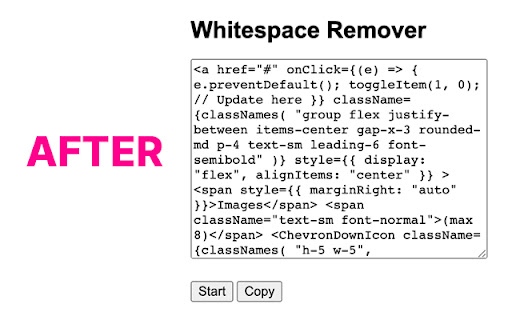
Utilize this tool to remove whitespaces and new lines to allow you to enter more text into your ChatGPT prompts. Utilize this tool to remove whitespaces and new lines to allow you to enter more text into your ChatGPT prompts.

Text Line Break Remover
Remove unwanted line breaks from your text while preserving paragraphs. Perfect for copying text from PDFs or formatted documents.

Text Tools
- Uppercase - converts all characters to upper case - Title Case - capitalizes every first character of word - Lowercase - converts all characters to lower case - Count characters - counts all characters in text - Count words - counts words in text - Count lines - counts new lines in text - Rotate 13 - Moves each character with 13 positions forward in the ASCII table - Sort lines alpha (case insensitive) - Sorts text lines alphabetically ignoring character case - Sort lines alpha - Sorts text lines alphabetically - Word frequency - How many times each word is used - Character frequency - How many times each character is used - Column from table - Allows you to get text column from HTML table. Copy and paste the table content in the text field and type the column number you want to extract then press Start - Trim lines start - Removes whitespace from beginning of lines - Trim lines end - Removes whitespace from end of lines - Trim lines - Removes whitespace from beginning and end of lines - Replace text with new line - Replaces string with new line - Replace text - Replaces one string with another - Format JSON - Pretty format JSON string - URLEncode - Encode string as URL safe string - URLDecode - Decode URL safe string as regular string - base64encode - Encode text as base64 - base64decode - Decode base64 sting - Add line numbers - Add line number before every line of text - Split text - Splits text by separator - Reverse text - Reverses text - Generate numbers - Generates numbers withing the provided range - Unix to date - Converts UNIX timestamp to Datetime string - Identify Hash - Try to identify hash string - Prefix/Suffix lines - Adds prefix and/or suffix to each line of the text - Format Numbers - Format numbers according to the current browser locale - Underscore - adds underscore to the text - Strikeout - strikes out the text - Shuffle - Shuffle the lines of the text - Remove duplicate lines - Removes duplicate lines from the text - Expand placeholders template 1.0.27 - Added function to format US phone numbers 1.0.26 - Added function to strip non-alphanumeric characters 1.0.25 - Migrated to manifest v3 1.0.24 - Removed automatic clipboard support 1.0.23 - Removed GoogleAnalytics 1.0.22 - Added slugify function 1.0.21 - Added Indent lines with spaces; Result is auto-selected after the operation 1.0.20 - Added replace regexp; Added expand template 1.0.19 - Added Remove empty lines 1.0.18 - Removed dependency on jQuery; 1.0.17 - Added trim lines start and end as separate commands to trim white-space from the beginning or the end of each line 1.0.16 - Added Remove duplicate lines 1.0.15 - Added case insensitive line sort 1.0.13 - Added shuffle function 1.0.12 - Added underscore and strikeout functions 1.0.11 - Save/Restore last used tool; 1.0.10 - Added auto number formatting; 1.0.9 - Added prefix/suffix to each line function; 1.0.8 - Fixed replace; Added replace with new line; 1.0.7 - Strip (most of) punctuation from word frequency; 1.0.6 - Frequency lists are now sorted 1.0.5 - Added Title Case convert. Your text is populated from the clipboard; 1.0.4 - Added Unix timestamp to date converter; 1.0.3 - Cleaner icon. Removed links from descriptions; 1.0.2 - Small interface improvements; 1.0.1 - Working Trim lines;

Copy Text with No Breaks, Spaces or Tabs
Removes trailing whitespace (line breaks, spaces and tabs) from copied text. Do you get frustrated when you copy text and get extra breaks, spaces or tabs at the end? This simple Chrome extension automatically cleans up your copied text by removing all trailing whitespace - no more annoying spaces, line breaks, or tabs cluttering the end of your clipboard content. Perfect for developers, writers, and anyone who frequently copies text from websites, documentation, or code snippets. The extension works silently in the background on all websites, instantly cleaning your copied text without any additional steps or clicks required. 👉 Automatically removes trailing spaces, tabs, and line breaks from copied text 👉 Works on all websites 👉 No configuration needed - just install and forget 👉 Lightweight and fast 👉 Preserves formatting within the text, only cleans the end 👉 Privacy-focused - no data collection or external connections How it works: Simply copy text as you normally would. If there's trailing whitespace, the extension automatically removes it before placing the clean text on your clipboard. If there's no trailing whitespace, your text passes through unchanged. Say goodbye to manually trimming copied text and hello to clean, professional clipboard content every time!

Faster OCR
Faster OCR improves your workflow by extracting text from images and PDFs that may contain images, all while ensuring that your data stays secure and is never exposed online. Features: • ⚡ Performance: quickly converts images to text without delays(file not sent to internet). • 🎯 Precision: delivers highly accurate results. • 🔒 Offline Functionality: operates entirely offline, ensuring your data stays private. • 🌍 Multilingual: handles multiple languages. • 🔄 Text Rotation Detection: captures and processes rotated text. • 🔨 Detection Scale: adjust scale to impact the detection accuracy. You can edit the processed content directly in the editor. • 📝 Copy Options: use the [RAW] icon to copy the plain text or [DOC] for editors like MS Word. • ⏳ Processing Speed: depends on your system resources and file size. • Paste files from your clipboard for processing: Ctrl/Cmd + V Also, it can be used with True Paper plugin to increase detection accuracy.
