
olfheempbpikpcdpkedempbbfkencacf
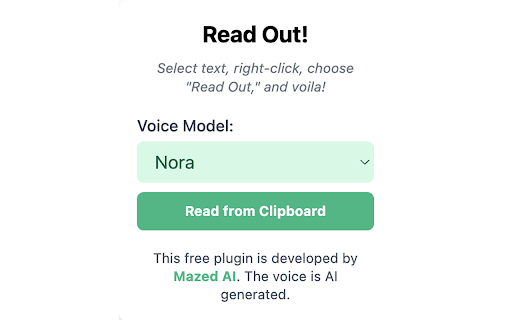
Read Out converts text you select or copy to speech. Read Out is a free browser extension that provides multilingual, AI-powered text-to-speech (TTS) functionality. To use it, simply select the text you want to hear, right-click, and choose "Read Out." The extension will then convert the text into natural, human-like speech. Additionally, you can play any copied text out loud on any webpage using the extension's popup, which is accessible from the icon pinned to your browser's navigation bar. Read Out offers six distinct voice models and adjustable AI voice quality, all at no cost. While the extension is compatible with the vast majority of websites, please be aware that some content restrictions may prevent its functions on certain pages.

Clearly Reader - Your AI Reading Assistant
A browser extension with reader mode for optimal experience. Features copy, translate, speech, and PDF and Markdown export. Clearly Reader - Redefine Your Web Reading Experience 【Key Features】 ✦ One-Click Reader Mode (Shortcut: Alt/Option + R) ✦ AI Article Assistant: Summarize/Translate/Chat With Article ✦ TTS: Read any article text to speech ✦ Cross-Device Sync & Cloud Storage ✦ Export Article to PDF, Word, and Markdown, etc. ✦ Add Article to: Pocket/Craft/Raindrop/Instapaper/Obsidian etc. 1️⃣ Ultimate Reading Experience • Remove ads, popups and distractions intelligently • Support dark mode & custom themes • Adjustable font, line height & page width • System fonts & custom CSS support • Unique book layout mode

Read It To Me
Read It To Me: read aloud any text. The TTS reader converts text to speech. Read It To Me is your ultimate text reader. Introducing the Read it to me app, your ultimate tool for converting text to speech effortlessly. Whether you're reading articles, documents, or any web content, Read it to me text reader helps you. With features like read alouds, this extension is perfect for anyone who prefers auditory input. Key Features of Read it to me: 🚀 Instantly read text out loud 🚀 High-quality voices 🚀 Customizable reading speed 🚀 Pause and resume functionality Using the Read it to me text reader, you can convert text into spoken words instantly. This text to voice app integrates with your browser, allowing you to have web content read aloud to you. Whether you need to read pdf aloud, this text to speech extension works for you. 🟢 With Read It To Me, you can read text aloud from multiple sources. 🟢 You can use the text to speech Google Docs feature for your documents. 🟢 It integrates with Google Play Books for listening to your favorite books. 🟢 This read aloud extension will read your Kindle content to you. 🟢 For pdf files, it provides pdf audio support and can read pdf aloud. 🟢 It supports Epub files, requiring an extension from epubread.com. Read it to me is designed to provide a seamless read aloud experience. With online tts reader functionality, you can enjoy free text to voice services that make reading accessible. The Read it to me feature ensures easy browser integration with a user-friendly interface. How Read it to me works: 🔺 Install the Read It To Me TTS reader from the Chrome Web Store. 🔺 Customize settings for a personalized experience. 🔺 Listen as the TTS reader reads aloud to you. Read it to me supports Google text to speech, ensuring accurate and natural readings. Its interface makes it easy to customize your listening experience. This ttsreader tool is perfect for users looking for a reliable text to speech extension. Additional Benefits: 1️⃣ Versatile capabilities 2️⃣ High-quality voices 3️⃣ Integration with popular platforms The Read It To Me tts reader offers text to speech services. This read aloud extension integrates with various platforms and provides text to audio free of charge. As a versatile tool, it easily adjusts to various content types. With text to speech Google Docs feature, this extension is valuable for personal and office use. ✔️ Experience clear, natural speech with advanced TTS technology. ✔️ Streamline your workflow with a tool that adapts to your reading habits. ✔️ Optimized for ease of use and reliable performance. ✔️ Flexible for both casual and professional reading needs. By using the Read it to me extension, you can access read aloud features in text to speech Google Docs. It also allows you to enjoy content on Google Play Books or Amazon Kindle, making reading more enjoyable. ☀️ Have any selected content spoken out instantly. ☀️ This tool reads content clearly and naturally for document review. ☀️ Designed to read for you while multitasking. ☀️ For those needing to read pdf out loud, it integrates with pdf files. This text to speech extension is perfect for those who need text read out loud pdf reader. For better comprehension, the tool allows you to adjust reading speed to suit your preferences. Read it to me settings: Adjust reading speed Choose from multiple voices Personalize voice pitch Customize display settings Enable/disable pause and resume feature Try Read it to me tts reader today. Enjoy having text read aloud to you. Make the most of your time with this powerful text reader.

Text Reader: Free Selected Text Reader
Read selected text out loud with one click. No login. No data collection. No ads. Just free, built-in text-to-speech (TTS). Highlight any text on a webpage, click the extension, and it speaks. Full page Reading. Speed, pitch and volume change option.

Zingy Reader
Zingy Reader uses the power of OCR (optical character recognition) to extract English text from images. The selected text may be read out loud and translated. While the extension is designed for Zingy Learning (www.zingylearning.com) content, it will also work for many other sites. Please view the instructional videos: www.zingylearning.com/zingyextension.html • The text select tool of this extension will only work when a single browser window is open. Please make sure not to open multiple windows. • If you would like additional languages added to the translation feature, please leave a comment in the review section.
