
olejekejjhgimnlliplaiodgmbpcflhi


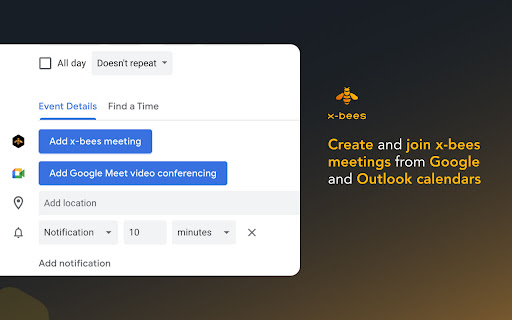

Streamline communication within your company, boost sales & win more customers – “bee” efficient with x-bees! x-bees is an advanced, easy-to-use sales communications platform designed to accelerate your B2B pipeline by giving you the tools you need to nurture leads and win their business. Use the x-bees Chrome extension as a shortcut to: • Quickly initiate calls and start x-bees conversations from a web page; • Create and join x-bees meetings directly from Google and Microsoft 365/Outlook calendars; • Easily find an open x-bees tab by clicking on the extension icon on Chrome toolbar. Note that you need to have an account on a Wildix PBX and have access to x-bees platform to use the extension. Here’s just a short list of what you can do with x-bees on desktop and mobile: • Chat or conduct voice and video calls with your teams, prospects and customers • Set up meetings through Google and Microsoft 365 calendars • Automatically log calls and meetings to Salesforce, HubSpot and other CRMs • Let your customers easily contact and schedule meetings with agents • Get insight into your sales team’s performance with live views and advanced analytics tools Get the x-bees extension for Chrome and experience a professional business communication platform built to boost your sales and performance!

bexio Time Tracking Templates
This extension allows saving and loading of form data within the bexio time tracking page. This extension improves handling of time tracking in bexio. How? It enables the user to save the form data as templates. The templates are placed as buttons directly on the time tracking page. So with one click the form will fill out all the values you saved earlier. Sidebar These templates are also available in the panel within the browsers sidebar. In the sidebar panel you can manage the templates (edit/delete) as well as reach out to further features: ManicTime (https://www.manictime.com) You can also import entries from ManicTime and use features like, Time, Date, Billable, Notes etc. to directly apply Time entries, including selecting a template for all the other values. Data is yours only All the data is saved in your browsers storage, they are not accessible from outside nor are they sent outside of your browser. FULL FEATURE OVERVIEW & FEATURE REQUESTS & ISSUE REPORT: https://github.com/SoulcodeAgency/bexio-chrome-extension CHANGELOG: https://github.com/SoulcodeAgency/bexio-chrome-extension/blob/main/CHANGELOG.md

NBI ATS
NBI ATS is a Chrome extension that connects your browser to your own OpenCATS / CATS applicant tracking system. It helps recruiting teams review resume and profile pages more efficiently by checking whether the current page already exists in CATS, showing a shortcut to the matched candidate when available, and allowing the user to manually import selected visible profile content into CATS. Check profile and resume page URLs against the user's configured CATS system. Find visible email addresses and profile links on compatible pages and show a shortcut when they match an existing CATS candidate. Show a CATS candidate shortcut when a visible profile link in search results matches an existing CATS candidate. Let the user manually select visible resume/profile sections before importing. Read a compatible profile Contact info dialog only after the user manually opens the visible dialog. Send selected preview content only to the CATS import endpoint configured by the user. NBI ATS does not provide a separate cloud service. It does not sell user data, does not use profile or resume content for advertising, and does not send resume/profile content to developer-operated servers. Data is sent only to the CATS server configured by the user, or remains local in the browser. Your remote CATS / ATS website must use a secure HTTPS connection. HTTP is supported only for local or loopback development environments such as localhost, 127.0.0.1, or ::1. Before you use it, your OpenCATS / CATS installation must include the required matching and import patches. For OpenCATS 0.9.4, see:

Wildix Collaboration
This extension provides quick access to Wildix Collaboration to Wildix PBX users. Important: you must be a user of Wildix PBX to use this extension! Wildix Collaboration is a web-based tool that enables simple, instant and secure communication between users.

FLOZABLE Tab Monitor
Boost focus with timers, block distractions, get study tips, and stay updated with group alerts using FLOZABLE. Supercharge your focus and productivity with the FLOZABLE Study Focus Chrome Extension. Seamlessly integrated with your browser, this extension is your go-to tool for cultivating efficient study habits and making the most out of your online learning experience. Time Management Mastery: Effortlessly track your study time with our intuitive timer. Set focused intervals, challenge yourself, and stay on top of your study goals. Distraction-Free Browsing: Activate the distraction-free mode to limit access to non-educational websites during your study sessions. Say goodbye to procrastination and hello to enhanced concentration. Personalized Study Plans: Receive AI-generated study suggestions based on your learning habits and preferences. Tailored recommendations to keep your study sessions engaging and effective. Group Study Alerts: Stay connected with study groups seamlessly. Receive instant notifications for group study invitations, challenges, and achievements directly through the Chrome Extension. Progress at a Glance: Get a quick overview of your study progress with a personalized dashboard. See your daily, weekly, and monthly study trends, empowering you to stay motivated and accountable.
