
jdemfbjhbcbhgpklhefanhhijiipioho


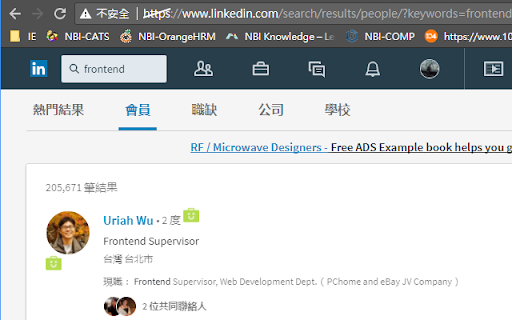
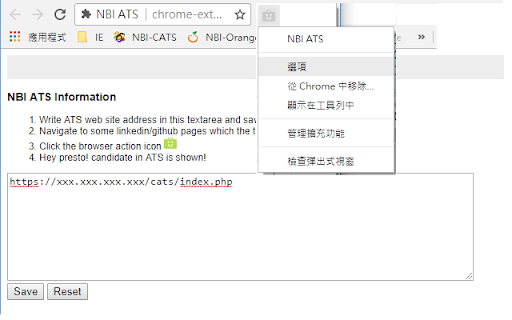
NBI ATS is a Chrome extension that connects your browser to your own OpenCATS / CATS applicant tracking system. It helps recruiting teams review resume and profile pages more efficiently by checking whether the current page already exists in CATS, showing a shortcut to the matched candidate when available, and allowing the user to manually import selected visible profile content into CATS. Check profile and resume page URLs against the user's configured CATS system. Find visible email addresses and profile links on compatible pages and show a shortcut when they match an existing CATS candidate. Show a CATS candidate shortcut when a visible profile link in search results matches an existing CATS candidate. Let the user manually select visible resume/profile sections before importing. Read a compatible profile Contact info dialog only after the user manually opens the visible dialog. Send selected preview content only to the CATS import endpoint configured by the user. NBI ATS does not provide a separate cloud service. It does not sell user data, does not use profile or resume content for advertising, and does not send resume/profile content to developer-operated servers. Data is sent only to the CATS server configured by the user, or remains local in the browser. Your remote CATS / ATS website must use a secure HTTPS connection. HTTP is supported only for local or loopback development environments such as localhost, 127.0.0.1, or ::1. Before you use it, your OpenCATS / CATS installation must include the required matching and import patches. For OpenCATS 0.9.4, see:

BBR Helper
This provides some advanced stats (game score, simple player rating and game box plus-minus) on multiple pages for NBA, WNBA, G-League, international leagues and college basketball. Including: - average stats by season on the player page - average stats by playoff series on the player page - average stats by player on the team_season page - average stats by player on the team_player page - average stats by player on the season_player page - single game/half/quarter stats by player on the game_boxscore page - single game and average stats on the gamelog and split pages - top 5 and top 20 average stats players on the season page - top 20 average stats players on the team_season page - top 20 average stats seasons rankings on the player page - top 50 career stats rankings on the player page - multiple stats rankings on the leader page - player awards column on team season page gBPM = (-0.55 * fga + 1.04 * fg3 + 1.39 * fg - 0.25 * fta + 0.79 *ft + 0.17 * orb + 0.27 * drb + 0.24 * (trb - orb - drb) + 1.34 * stl + 0.43 * ast + 0.64 * blk - 0.34 * pf - 0.95 * tov) / g """ , where orb is treated as 0.3 * trb and drb is treated as 0.7 * trb approximately when stats are not complete in early years.

Tanuki Utilities
Provide useful utilities for GitLab users. * Change the GitLab favicon to a project icon; you can easily distinguish many GitLab tabs. * Move "Copy reference" button on top bar; the button is always shown for your easy access. This extension tries to change favicons in the **all** sites by default. You can specify which GitLab site (e.g. gitlab.com or your self-hosted site) you would like to change favicons. #### Change the GitLab favicon to a project icon

ARGOS DOM
Xpath extraction extension for ARGOS STU (HTML Action) This extension works in conjunction with the HTML Action operation in ARGOS STU (the automation scenario development software of the ARGOS Low-code platform). It visualizes and facilitates acquisition of Xpath and other various browser related information for development of ARGOS Automation Scenarios.

TestFiltering+
TestFiltering+ automatically monitors your internet connection to ensure your filter is correctly blocking illegal/harmful content We work with specific partners to host test URL's on various lists and have test pages hosted where they will be blocked. This service was setup in response to the introduction of statutory guidance for schools in the UK about appropriate levels of filtering and monitoring of school internet connections. The UK Safer Internet Centre first published its filtering and monitoring definitions in 2016 to help both schools and providers understand what should be considered as ‘appropriate’.
