
okemdgokgchnocohlbdojahaebmekjel

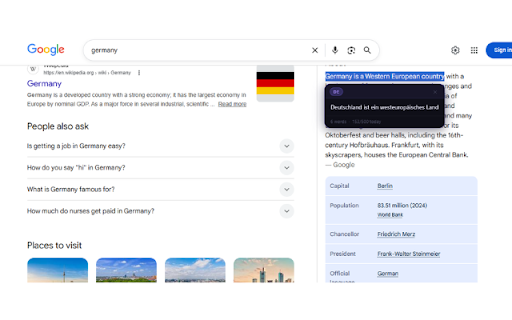


LinguaSnap is a powerful AI powered Chrome extension that instantly translates any text on any webpage into Sinhala and 25 other languages with just a single click. No copy-pasting, no switching tabs, just select and translate. Introduction Kindly provide a text selection from the page, and I will proceed to translate it into Sinhala. Instant translation — select any text on any webpage and get the translation instantly AI-powered — uses advanced translation engine for accurate results Sinhala dictionary — built-in offline Sinhala dictionary for faster single-word lookups Auto language detection — automatically detects the source language 25 languages — translate between any of the 25 supported languages Daily usage tracker — 500 words free per day with a clear usage indicator Beautiful UI — clean dark popup with language search and usage bar Lightweight — minimal impact on browser performance Perfect For Students reading English articles and research papers Professionals working with multilingual documents Travelers browsing foreign language websites Language learners practicing new languages Anyone who wants to break language barriers while browsing Privacy First LinguaSnap does not collect, store, or sell your personal data. Translation requests are sent directly to the translation API and never stored. LinguaSnap – ක්ෂණික භාෂා පරිවර්තකය | භාෂා 25 | AI බලයෙන් LinguaSnap යනු ඕනෑම වෙබ් පිටුවක ඇති ඕනෑම පාඨයක් සිංහලට සහ වෙනත් භාෂා 25 කට ක්ෂණිකව පරිවර්තනය කරන AI බලගැන්වූ Chrome extension එකකි. LinguaSnap සමඟ ඔබට හැකිය සිංහල පරිවර්තකය, Sinhala translator extension, ඉංග්රීසි සිංහල පරිවර්තනය, English to Sinhala, Chrome extension සිංහල, වෙබ් පරිවර්තකය, LinguaSnap, AI translator Sinhala, සිංහල Chrome extension, භාෂා පරිවර්තනය, instant translator Sri Lanka

autoTranslate - Translate web & PDF, Dictionary
🌐 AutoTranslate - Instant Translation for Web & PDF Translate full webpages, PDFs, and even your own writing into 248+ languages — automatically, instantly, and without intrusive permissions. Highlight and replace text, save phrases, listen with TTS, and learn with built-in dictionaries. 🚀 Key Highlights => 🌟 Why Choose AutoTranslate? ✪ No signup or permission required ✪ Don't ask permission: "Read and change all your data on all websites" ✪ Automatic translate full webpages when foreign language detect. ✪ Domain-wise auto translate. ✪ Translate while read and write . ✪ Translate and learn words in 248+ languages. ✪ Reverse translation ✪ Translate and replace text while writing in input field area ✪ Provides word meanings, pronunciation, synonyms, hypernyms, hyponyms, and more ✪ Persistent text highlighter with translated text in tooltip. ✪ Replace selected source text with translated text in tooltip ✪ Translate youtube subtitle ✪ Translate selected text in PDF file ✪ Unlimited number of whole PDF file translate ✪ Saved & history phrases ✪ View date-wise & domain-wise saved phrases in phrasebook ✪ Lightweight 35KB ✪ No tracking & no Ads. ✪ Dark mode ⌨ Keyboard shortcut: Press "Alt+P" to open extension's popup window Press "Alt+T" to open extension's popup card on any webpages Go to "chrome://extensions/shortcuts" to modify keyboard shortcuts Ctrl+Shift +Z ⇒ undo highlight Ctrl+Shift +Y ⇒ redo highlight Ctrl+ Shift + H ⇒ remove highlight Shift + Space ⇒ extend selection (At least one highlighted text exist on current page) 1. Go to extension options page to enable "Automatic translate full webpages". 2. Open extension's popup window and check the checkbox "auto translate this domain". 3. Right click on extension's icon and then click on "Translate this page" 🔐 Don't ask permission: "Read and change all your data on all websites" Due to privacy concern, autoTranslate don't ask this permission. So that autoTranslate and translation button on text selected disabled by default. 🔮 Translate while read and write Translate while reading You won’t have to skip emails, articles, or websites anymore. You can view the content you’re browsing in Chrome in your chosen language, in its original context. Translated text is editable. Edit translated text and click on swap language icon to reverse translation. You can highlight text. When you re-visit this webpage, you will see highlighted text with translated text in tooltip. You can replace source text with translated text. When you hover over replaced text, source text will show in tooltip. Translate your writing Whether you’re writing a social media post, chat message, or email, you can translate your own words immediately after you type them. This means you no longer have to copy, paste, retype, or leave Chrome to communicate in another language. Click on replace icon in translation popup to replace source text with translated text. ✅ Text-to-Speech autoTranslate reads and reproduces words, phrases and entire texts using quality human text-to-speech (TTS) translation. It shows transcription and transliteration, also knows how to reproduce words or texts with the correct accent and with correct stress. Learn the correct pronunciation words right away, without postponing it for later! ✅ Dictionary When you select one word, autoTranslate show meaning, pronunciation, synonyms, hypernyms, hyponyms,definition in these categories: Noun,verbmadjective 🖍 Highlight & replace text autoTranslate allow to highlight & replace selected text. When you hover over highlighted text, translated text will show in tooltip. When you hover over replaced text, source text will show in tooltip. 📒 Saved & history phrases All translation history is stored in your browser's local storage. Saved or history phrases never touch our cloud server. Export your saved phrases in HTML format. ⇒ **No invasive permissions** - doesn't request "read all data" access ⇒ **Zero tracking** - your translations stay on your device ⇒ **Ad-free experience** - focus on translation without distractions ⇒ **Dark mode support** - easy on your eyes ⇒ **Lightweight design** - minimal impact on browser performance 💡 Perfect For ⇒ **Students** learning foreign languages ⇒ **Professionals** working with international clients ⇒ **Travelers** browsing foreign websites ⇒ **Researchers** reading academic papers in other languages ⇒ **Anyone** who encounters multilingual content online Supports 248+ languages with Google Translate integration, including: ⇒ Major world languages (English, Spanish, French, German, Chinese, Japanese, etc.) ⇒ Regional dialects and variants ⇒ Less common languages for comprehensive coverage Start breaking language barriers today - install AutoTranslate and make the web truly multilingual!

Lingvanex - Online Text and Voice Translator
Lingvanex online text and voice translator provides instant translations into the language of your choice. Over 108 languages. Lingvanex Translator helps you easily understand words, phrases, on any language! Just highlight a word or phrase, click on Translate icon next to it to translate it to your language. The extension reads words and whole phrases using human-quality text-to-speech. Listen to pronunciation and discover real-life examples of usage. AI-based machine translation will give you a fast and accurate translation on more than 108 languages almost instantly. Word meaning, pronunciation, synonyms, hypernyms, hyponyms and more. Find common expressions and see examples depending on the context. Lingvanex Translator teaches you how to pronounce correctly. It shows phonetic transcription, transliteration and can speak out words and texts with the correct accents. Select an area on any webpage, Lingvanex Translator will recognize text and automatically translate it to your language. ► FULL-PAGE TRANSLATION With only one account, you can get access to your saved words and the translation history in all Lingvanex apps across platforms. Available in 30+ more languages user interface. You can select your language in the settings. You can familiarize yourself with the list of supported languages by following this link https://lingvanex.com/language-features/ . The extension also includes a "More Apps" banner and other promotional banners that allow users to explore additional apps and products developed by us.

Transync - Instant Translation & Dictionary
Fast translation across 160+ languages with optional on-device AI for private local translation, dictionary, and TTS. Unlock the world of languages effortlessly with Transync - the ultimate browser extension designed to bring instant translation, smart definitions, and advanced language learning directly to your fingertips. Whether you are navigating international news, studying a foreign language, or working in a global environment, Transync seamlessly breaks down language barriers while keeping you in your flow. ➤ Next-Gen Side-by-Side Translation Layout Experience a beautifully redesigned interface. Transync presents the original text on the left and the translated version on the right, allowing for a seamless, perfectly balanced comparison that enhances your reading flow. ➤ Smart Hybrid AI Translation Enhance your privacy with optional local processing. Transync supports Chrome’s built-in AI to translate text directly on your device. To ensure a seamless experience, our smart engine instantly balances the workload - automatically switching between local AI and our web services to guarantee uninterrupted translation, even if your browser is running low on memory. ➤ Smart Dictionary & Phonetic Guides Whenever a single word is detected, comprehensive definitions appear right below the translation view. Complete with accurate phonetic transcriptions (IPA), it is the perfect companion for language learners and curious minds. ➤ Accurate Pronunciation Support Master any language like a native speaker. With powerful Text-to-Speech support, you can listen to and practice perfect pronunciation using a variety of high-quality, natural voices tailored to your preferences. ➤ Seamless On-Demand Translation Translate selected text or sentences with a single click or customizable hotkeys. Get instant context without ever leaving your active tab. ➤ Full-Page Immersive Translation Transform entire web pages into your preferred language instantly. Enjoy a smooth, natural reading experience across the global web with extensive support for over 160 languages. ➤ Personalized Vocabulary & Study Aid Turn your daily browsing into a learning journey. Save important translations, bookmark new words, and organize your personalized notes for future reference. ➤ Advanced Customization Tailor Transync to perfectly match your workflow. Customize widget positioning, hotkey setups, user interface preferences, and audio playback speeds with ease. Experience a cleaner, faster, and more intuitive way to connect globally. Install Transync today and change the way you read the world! 📧 Contact & Support: For inquiries, feedback, or support, please reach out to us at extension@transync.io.

ReadText (Text to Speech Reader)
Single-click text-to-speech magic directly in your browser. Multi-task and customize in 30+ languages, effortlessly and for free. Ever feel like there's just too much to read and not enough time? I get it. That's why I created ReadText during my weekends – to help folks like us who love to learn, want to get work done faster, and hate the eyestrain. == Here's what ReadText can do for you == ➤ Turn any webpage into your personal audiobook Just click the ReadText icon, and boom – your browser starts reading to you. It's like magic, but without the pointy hat. ➤ Jump around the text like a pro See an interesting bit? Hover, click, and ReadText starts right there. No more losing your place or scrolling endlessly. ➤ Make it sound just right Speed it up when you're in a hurry, slow it down when you need it to. Change voices when you get bored. It's all right there in the reading bar. ➤ Your browser just learned new languages With over 30 languages and 100 accents, ReadText is ready for your next international adventure. (Also, there is way to add new languages seamlessly by you) ➤ All the good stuff, none of the bad Everything's free. No ads, no sneaky upgrades, no "premium" features. Just straightforward, helpful tech. ➤ Your secrets are safe with You! We don't know what you're reading, and we don't want to. Your data stays on your computer where it belongs. Also!, I'm just one person working on this in my spare time because I believe reading should be easier for everyone. If you run into any problems or have ideas to make ReadText even better for you and your friends, let me know! I'll do my best to fix issues and add cool new stuff as quickly as I can.
