
okabejbfommkkfnonpdcnicepcindnba


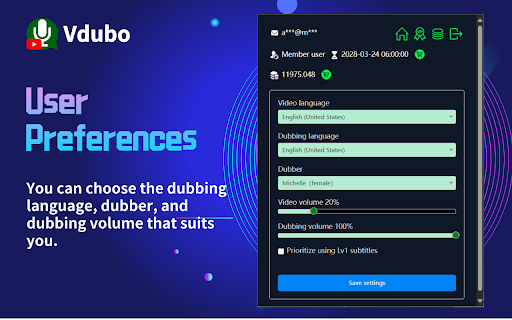

Play dubbing when watching YouTube video. Further optimize translation, subtitles, and dubbing for members. Vdubo provides online AI dubbing for video websites, based on the user-specified language. Currently, YouTube is supported. The Vdubo control icon is located at the bottom of the YouTube video being watched. Users can click the control icon at any time to start voice-over. For videos without subtitles or with unsatisfactory subtitles, members can use the speech transcription function to generate subtitles. Vdubo supports multiple languages for voice-over and can synchronize the volume and speed of the voice-over, allowing you to focus on the foreign language video without constantly looking at the subtitles, thus improving the video viewing experience.

YouTube Subtitle Reader (AI)
Dub YouTube videos with real-time translation and natural voices. Experience any content in your native language easily Convert YouTube subtitles into natural-sounding speech with cutting-edge Google & Microsoft AI Text-to-Speech technology! ℹ️ Note: This extension may conflict with other YouTube extensions. If you experience issues, try disabling other extensions. Try it now and enhance your YouTube experience with lifelike AI-generated voiceovers!

Dubsy
Instantly dub YouTube videos in any language and share them with the world! Introducing Dubsy, your one-click solution to translating and dubbing videos into any language, on the fly! Dubsy seamlessly integrates camb.ai’s cutting-edge AI technology (MARS and BOLI) to translate and dub any YouTube video into your chosen language in 4 clicks. How to use: > Step 1: Sign in / Sign up using your camb.ai account (https://studio.camb.ai) > Step 2: Open YouTube and find the Dubsy menu under the progress bar on the left side. > Step 3: Click on “Dub For Another Language” button. > Step 4: Select the original and your preferred language, click submit and wait for it to process. And Ta da! Your video is now successfully dubbed in your selected language! With Dubsy, you can now enjoy YouTube videos in any language of your choice. Whether you're learning a new language, exploring global content, or simply seeking clarity in your native tongue, Dubsy has you covered. Features Overview: ---> Wide Language Selection: Choose from 100+ languages with voice preservation. ---> Language Switching: Switch between your translated languages and original language with just a click. ---> Easy to use: Dubsy transforms spoken audio into your preferred language with just a click of a button, without you needing to do anything. ---> Shareable: You can share your dubs with friends and vice-versa. Invite them on to unlock many more videos to watch! ---> Accurate Performance transfer: Create a near-perfect replica of the performance in the target languages (with voice preservation, style cloning etc) ---> CAMB.AI's Powerful and Evolving AI: Dubsy utilizes Camb AI's advanced AI technology, known for its accuracy and continuous improvement. This ensures you get the best possible dubbing experience, always getting better. Dive deeper into camb.ai’s translating and dubbing technology: https://www.camb.ai

OneDub - Movie and Youtube dubbing
Movie and Youtube dubbing Watch YouTube videos and movies in your preferred language with our Onedub extension! Instantly dub videos using high-quality, AI-generated audio tracks tailored to your chosen language and voice. Simply select a video, pick your language, and start enjoying seamless dubbing. Free users get 4 unique videos daily with basic voices, while premium users unlock unlimited videos and premium voice options. Sign in easily, search for movies, or upload subtitles to dub your favorite content effortlessly. Onedub extension features: - Youtube dubbing. - Movie dubbing on websites like Neftflix etc. - Watch Coursera courses with dubbing by downloading and drag & dropping downloaded subtitles to Onedub. - OneDub extension is available for Microsoft Edge. While OneDub for the Chrome browser supports only a small set of free voices (27) for the most popular languages, Microsoft Edge users can access more than 320 free, high-quality voices for over 40 languages.

YouTube Dubbing – Translate & Dub
YouTube Dubbing is a browser extension that translates and dubs online videos in real time. No need to read subtitles—just listen in your native language and understand foreign videos instantly, as naturally as watching local content. Open any video on YouTube, Bilibili, Udemy, or Coursera—YouTube Dubbing automatically translates the subtitles and plays AI dubbing with no extra steps. Just hit play to start. ★ Free — Dub up to 5 videos per day for free, perfect for everyday watching and language learners. ★ Premium — Unlimited videos, AI subtitle enhancement (GPT / Claude), preserve background audio, smart multi-speaker detection, and priority customer support. Core features: - One-click translation & dubbing — Press play to automatically translate subtitles and start dubbing, saving time and effort. - AI subtitle enhancement (Premium) — Even if a video has no subtitles (YouTube & Bilibili), AI can generate subtitles automatically and then translate and dub them. - Multi-model translation (Premium) — Supports leading LLMs like GPT and Claude for more natural and accurate translations. - Rich voice library — Male and female voices, multiple regional accents, automatically matched to the best voice for the target language. - Adaptive playback speed — Dubbing stays in sync at 0.5× to 2× speed. - Preserve background audio (Premium) — Keep original music and sound effects for a more immersive experience. - Smart multi-speaker detection (Premium) — Distinguish different speakers and assign different voices for richer, more natural dialogue. - Cross-platform support — Available on Chrome, Firefox, and Android. - Multi-site support — Works with major platforms like YouTube, Bilibili, Udemy, Coursera, and more. - Universal video dubbing — Even when a video is not covered by the extension’s built-in one-click support, YouTube Dubbing can intelligently detect the media source and guide you to download the video and upload it to our server for subtitle recognition. You will receive an email when processing is complete, then come back and watch. - Subtitle Summary — Subtitle Summary is not limited to YouTube; any website supported by the extension can summarize subtitle content. - Subtitle Editor — If the translation or dubbing still is not satisfactory, copy subtitles from Subtitle Editor to your preferred AI model for translation, then paste them back and save. After manually enabling “skip translation for same-language subtitles,” the extension can dub with your custom subtitles.
