
gnkcmnoobhckipojdkemkelghfjcpmdc
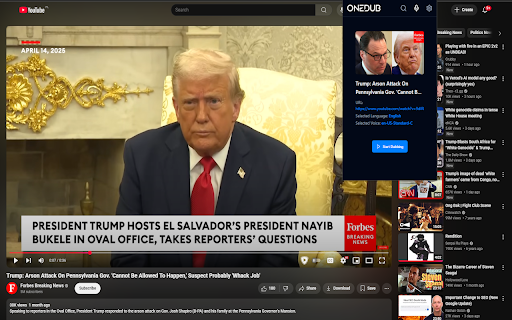


Movie and Youtube dubbing Watch YouTube videos and movies in your preferred language with our Onedub extension! Instantly dub videos using high-quality, AI-generated audio tracks tailored to your chosen language and voice. Simply select a video, pick your language, and start enjoying seamless dubbing. Free users get 4 unique videos daily with basic voices, while premium users unlock unlimited videos and premium voice options. Sign in easily, search for movies, or upload subtitles to dub your favorite content effortlessly. Onedub extension features: - Youtube dubbing. - Movie dubbing on websites like Neftflix etc. - Watch Coursera courses with dubbing by downloading and drag & dropping downloaded subtitles to Onedub. - OneDub extension is available for Microsoft Edge. While OneDub for the Chrome browser supports only a small set of free voices (27) for the most popular languages, Microsoft Edge users can access more than 320 free, high-quality voices for over 40 languages.

YouTube Dubbing – Translate & Dub
YouTube Dubbing is a browser extension that translates and dubs online videos in real time. No need to read subtitles—just listen in your native language and understand foreign videos instantly, as naturally as watching local content. Open any video on YouTube, Bilibili, Udemy, or Coursera—YouTube Dubbing automatically translates the subtitles and plays AI dubbing with no extra steps. Just hit play to start. ★ Free — Dub up to 5 videos per day for free, perfect for everyday watching and language learners. ★ Premium — Unlimited videos, AI subtitle enhancement (GPT / Claude), preserve background audio, smart multi-speaker detection, and priority customer support. Core features: - One-click translation & dubbing — Press play to automatically translate subtitles and start dubbing, saving time and effort. - AI subtitle enhancement (Premium) — Even if a video has no subtitles (YouTube & Bilibili), AI can generate subtitles automatically and then translate and dub them. - Multi-model translation (Premium) — Supports leading LLMs like GPT and Claude for more natural and accurate translations. - Rich voice library — Male and female voices, multiple regional accents, automatically matched to the best voice for the target language. - Adaptive playback speed — Dubbing stays in sync at 0.5× to 2× speed. - Preserve background audio (Premium) — Keep original music and sound effects for a more immersive experience. - Smart multi-speaker detection (Premium) — Distinguish different speakers and assign different voices for richer, more natural dialogue. - Cross-platform support — Available on Chrome, Firefox, and Android. - Multi-site support — Works with major platforms like YouTube, Bilibili, Udemy, Coursera, and more. - Universal video dubbing — Even when a video is not covered by the extension’s built-in one-click support, YouTube Dubbing can intelligently detect the media source and guide you to download the video and upload it to our server for subtitle recognition. You will receive an email when processing is complete, then come back and watch. - Subtitle Summary — Subtitle Summary is not limited to YouTube; any website supported by the extension can summarize subtitle content. - Subtitle Editor — If the translation or dubbing still is not satisfactory, copy subtitles from Subtitle Editor to your preferred AI model for translation, then paste them back and save. After manually enabling “skip translation for same-language subtitles,” the extension can dub with your custom subtitles.

LingTube - YouTube Subtitle Translator & Voice
Translate YouTube videos, speech and subtitles: bilingual captions, video transcription, AI dubbing and voice read-aloud. LingTube is a YouTube video speech translation, subtitle translation, and AI dubbing extension. Open a video and start it with one click: LingTube translates foreign-language captions or recognizes speech in videos without captions, then reads/dubs the translation in a natural voice, so you can quickly understand foreign-language YouTube videos without constantly watching subtitles. Ideal for language learning, courses, technical tutorials, news, podcasts, anime, movie clips, and watching during a commute. Key features - YouTube video translation: translate subtitles, speech, and no-caption video content - Bilingual subtitles: translation + original on screen, or translation-only/original-only - AI dubbing / subtitle read-aloud: read translations with Edge TTS or browser voices - No-caption handling: when a video has no captions, automatically convert speech to text, then translate and read it aloud - Context-aware translation: supports Google Translate and OpenAI-compatible APIs to improve understanding of long sentences and specialized content - AI learning: generate vocabulary, grammar, exercises, scoring, and review content - Audio mixing: original video audio and translated voice can play together with separate volume controls - One-click start/stop, with Alt+Shift+V hotkey support - AI video summary / summarizer: after AI is ready, it can use the full translated subtitles and video dialogue to quickly summarize YouTube videos, extract key points, explain technical terms, and find relevant timestamps. Ideal for quickly understanding long videos, course videos, technical tutorials, news, and podcasts. Privacy - Runs only on YouTube pages - Settings are saved in the local browser - Subtitle, translation, and voice requests are sent only to the services you enable extension, plugin

CCDub - YouTube Subtitle Translation and English Dubbing
Can't understand foreign videos? CCDub makes stars speak English instantly — pick your favorite voice too! When watching foreign language videos, inaccurate translations and choppy subtitles often make you miss out on exciting content? CCDub helps you say goodbye to these troubles by providing precise and natural subtitle translations, along with comfortable voiceovers, allowing you to enjoy a smoother viewing experience. Accurate translations, more relevant content CCDub utilizes advanced ChatGPT large models to generate subtitles word by word, ensuring accurate translations without context mismatches or ambiguities. Whether it's movies, TV shows, or documentaries, we provide precise subtitle translations that allow you to fully immerse yourself in the content without being distracted by translation issues. Comfortable voiceovers, no fatigue during long viewing Not just subtitles, CCDub also offers fitting voiceovers for the translated content. Our voiceover speed is moderate and the tone is natural, so even during long viewing sessions, you won't feel tired or uncomfortable, perfectly enhancing your viewing experience. Lightning-fast synchronization, say goodbye to subtitle delays Still troubled by translation delays? CCDub has optimized translation and voiceover speeds, ensuring precise translations are completed within 3 to 5 seconds and synchronized with voiceovers in real-time. Say goodbye to waiting and enjoy a completely synchronized and smooth viewing experience, never missing a single exciting moment. Visit https://dub.qhkly.com now to experience CCDub, allowing you to enjoy smoother and more natural subtitles and voiceovers anytime, anywhere. Version updates: 1.6.7 (2025-02-04) Optimized system performance and user experience by resolving key functional issues and improving stability. 1.6.6 (2024-11-22) Subtitle font and color selection. 1.6.5 (2024-10-24) Support for voiceover character selection. 1.6.3 (2024-09-04) Support for ChatGPT translation. 1.4.9 (2024-04-08) Support for 46 languages.

DupDub: YouTube Video Transcript & Summary Tool
DupDub: Free YouTube Transcript, Translation, AI Summary, and Text to Speech Transform your YouTube experience with DupDub, a free Chrome extension that automatically converts YouTube audio to text, translates video subtitles into 40+ languages, and generates AI-powered video summaries. Enhance your content with text-to-speech (TTS) , all seamlessly integrated within YouTube. DupDub is the ultimate tool for content creators, educators, and global audiences. 🌟 Why Choose DupDub? - Free Real-Time YouTube Transcript: Automatically convert YouTube audio to text with high accuracy. Download transcriptions in TXT, SRT, or VTT formats. - Multi-Language Subtitle Translation: Translate YouTube subtitles to 40+ languages, making content accessible worldwide. - AI Video Summary: Instantly generate concise video summaries. Save time and improve comprehension. - Text-to-Speech (TTS) Voiceover: Create professional voiceovers from translated text. - User-Friendly and Free: Enjoy unlimited transcriptions and translations without any cost. 🚀 How to Use DupDub: 1. Install the Extension: Search "DupDub" at the Chrome Web Store. 2. Activate the Extension: Click the DupDub Extension while watching a YouTube video. 3. Select Your Language: Choose your preferred translation language from the dropdown menu. 4. Transcribe or Summarize: Click the button to transcribe audio or summarize the video. 5. Download and Use TTS: Save the output in TXT, SRT, or VTT format, or generate a voiceover with TTS. 💡 Perfect for: - YouTube Content Creators: Automatically generate transcripts and subtitles to improve accessibility. - Educators and Students: Save time by generating video summaries and converting lectures to text. - Global Viewers: Watch videos in your native language with real-time translation. - Social Media Managers: Repurpose video content with AI-generated transcripts. - Podcasters: Convert spoken content into written format for easy editing and publishing. 🔒 Privacy and Security: DupDub processes your data locally, ensuring privacy and security. No data is stored or shared externally.
