
ojmfdiemlppklemnhaejhpnlpbphkbbe

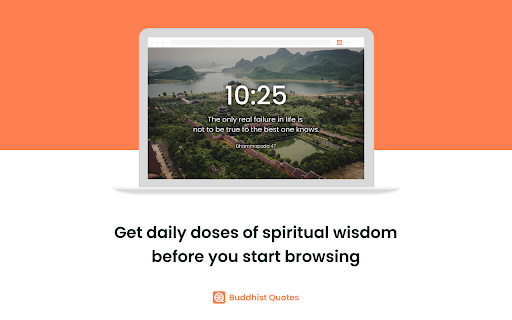
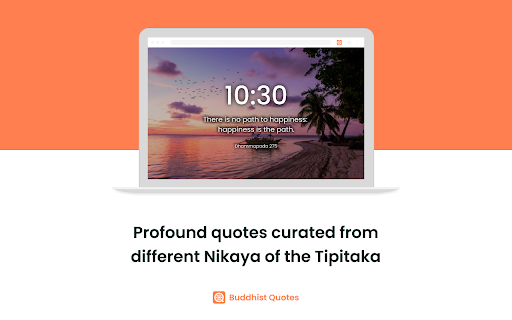
Start each new tab with inspiration and wisdom from the texts of the Tipitaka (Pali Canon). Elevate your browsing experience with Buddhist Quotes. Start each new tab with inspiration and wisdom from the texts of the Tipitaka. With this extension, every time you open a new tab, you'll be greeted by a thought-provoking quote from the Tipitaka, handpicked to uplift your day and provide spiritual nourishment. ☸ Inspiring Quotes: Experience a diverse collection of quotes sourced directly from the Tipitaka across the 5 Nikaya of the Sutta Pitaka: Digha Nikaya, Majjhima Nikaya, Samyutta Nikaya, Anguttara Nikaya, and the Khuddaka Nikaya. ☸ Daily Inspiration: Begin each browsing session with a fresh dose of wisdom and reflection, as the extension randomly selects a new quote for every new tab. ☸ Simple and Lightweight: The extension seamlessly integrates into your Chrome browser without any additional clutter or distractions, ensuring a smooth browsing experience. ☸ Offline Access: Access verses even when offline, ensuring uninterrupted contemplation and reflection. ☸ Completely Free: Enjoy the benefits of daily inspiration without any cost to you. There are no hidden fees or subscriptions, making it accessible to all users. ☸ More Quotes: Upgrading our collection from hundreds to thousands of carefully curated quotes from the entire Tipitaka.

EnkinGT Tracker
Track your productivity quickly and in real time with all the data stored in your EnkinGT account. Enjoy seamless time tracking with your browser! ※Need to create an EnkinGT environment in advance at the following site to use this extension. (You can create it for free) 1. Click "Add to Chrome". 2. Click the "Extensions" icon in the upper right corner of Chrome and pin the EnkinGT icon. 3. Click on the pinned EnkinGT icon and enter your EnkinGT URL and user information to log in to EnkinGT. 4. When you start time tracking in various EnkinGT features, the information will be added to the EnkinGT Chrome extension app as well. 5. Time tracking your tasks will immediately improve your productivity. If you have any problems or feedbacks regarding EnkinGT Tracker, write to us at support@enkinlab.com. EnkinGT is an online man-hour management tool that provides both task management and time tracking. You can track the time spent on various projects and tasks and analyze your productivity. EnkinGT can be used on the web, desktop, or mobile, and all data is synchronized in real time. Let's use EnkinGT to manage your projects and personal tasks more efficiently and increase your productivity!

Nardium - Google Docs Navigation
Explore and Navigate your Google Docs with Ease! 🔍 Introducing "Nardium", the game-changing Chrome extension that revolutionizes the way you interact with your Google Docs. Get ready for a whole new level of productivity and organization! 🚀 ⚡️ Seamless Navigation: Say goodbye to scrolling and endlessly searching your document. With Nardium, a simple and intuitive navigation window pops up on the left side of your Google Docs window, giving you instant access to all the different headings and hierarchies in your document. Navigate like a pro! ⚙️ Customize Your View: Tailor your document experience to suit your needs. Nardium empowers you to select which levels of headings are displayed, so you can focus on what matters most. Whether it's purely the highest level headings, right down to the tiniest detailed subheading, you can now easily navigate about. 🔍 Zoom In, Zoom Out: Nardium allows you to adjust the zoom level of the navigation panel so that you can set the font size just how you like it. No more straining your eyes or missing important sections. ⭐ Key Features: ⭐ ✅ Intuitive Navigation: Effortlessly visualise and navigate your document's headings. ✅ Google Docs Integration: Nardium seamlessly integrates into your Google Docs workflow for a smooth experience. ✅ Customizable Display: Filter and display specific heading levels to customise what you see in the navigation panel. ✅ Zoom Functionality: Zoom in and out to specify the size of the text shown in the navigation panel. ✅ Dark theme: Switch to an eye-friendly dark theme for a comfortable editing experience, especially during late-night sessions. Nardium allows you to seamlessly explore and navigate your document's hierarchy like never before. Add To Chrome now for a clear and streamlined editing experience. 💪💻

Random Buddhist Quotes New Tab
Displays a random Buddhist quote below the search box on a new tab. Transform your new tab page into a source of daily serenity and wisdom with our Random Buddhist Quotes New Tab extension. Each time you open a new tab, you’ll be greeted with a tranquil background and an inspiring Buddhist quote, perfectly positioned above a convenient Google search bar. Enhance your browsing experience with a touch of mindfulness and calm. Daily Inspiration: Access a vast collection of Buddhist quotes that offer timeless wisdom and encouragement. Tranquil Backgrounds: Enjoy a rotating selection of 10 serene backgrounds, including peaceful forests, calm lakes, serene mountains, and more. Seamless Search: Integrated Google search bar for quick and easy web searches. Donation Prompt: Every 20 new tabs, you’ll see a gentle prompt to donate and support the developers, with an easy link to contribute. Why Choose Our Extension? Mindfulness: Cultivate a mindful approach to daily life with quotes that encourage introspection and calm. Motivation: Find motivation and strength in the teachings of Buddhism, perfect for starting your day or finding a moment of peace during a busy schedule. Visual Appeal: Beautiful, high-quality background images that change with each new tab, providing a visually soothing experience. Free and Ad-Free: Completely free to use with no intrusive ads, ensuring a distraction-free browsing experience. How to Use: Install the Extension: Add it to your Chrome browser from the Chrome Web Store. Open a New Tab: Each new tab will display a random Buddhist quote and a serene background image. Read and Reflect: Take a moment to read and reflect on the quote above the search bar. Join Thousands of Users: Join our growing community of users who find daily solace and motivation in Buddhist wisdom. Embrace a more peaceful and enlightened state of mind with each new tab you open. Keywords: Buddhist quotes, daily inspiration, mindfulness, Buddhist teachings, Chrome extension, motivational quotes, spiritual quotes, inner peace, wisdom, meditation, philosophy, Buddhist philosophy, life quotes, positive thinking, mental health, self-improvement, serene backgrounds, tranquil images, new tab extension.

SimpleReads
An extension that takes note Say goodbye to scattered notes and endless distractions. SimpleReads transforms the way you read and take notes online — helping you stay focused, organized, and in control.Whether you're diving deep into research or casually browsing for ideas, our two signature tools — Blur + Zoom and Notepad — work together to create a seamless, distraction-free reading and note-taking experience. Explore websites with clarity, take notes without switching tabs, and save everything neatly into organized documents — all in one flow. ➤ Paragraph Mode (Blur + Zoom by Paragraphs) - Choose how many paragraphs you want to focus on at a time. - That set of paragraphs will stay clear and zoomed in, while everything else is blurred. - Press the ↓ down arrow to move to the next group of paragraphs. - Press Escape (Esc) to return to the normal view. - This is perfect for reading in small chunks with zero distractions. ➤ Full Page Mode (Blur + Zoom Entire Page) - The entire page is zoomed in for easier reading. - All images, ads, and extra content are blurred, so nothing distracts you. - This keeps the page stable — no moving content or shifting sections. ➤ Notepad Features - Take notes directly while reading any website. - Your notes are saved in the notepad. - Click any saved note to scroll back to where you wrote it on the website. ➤ Save Notes to a Document - When you’re done taking notes, press “I’m Done”. - You’ll then select a Simple Reads document to save the notes to. - Only documents created with Simple Reads can receive and organize notes. - Your notes and the website link are both saved to that document. - All documents created with SimpleReads are in your Google Drive in a folder called SimpleReads. ➤ Gather Notes from Multiple Sites - Go to multiple websites, take notes, and add them all to the same document. - This makes research and studying from different sources super easy and organized.
