
bmomoeeeljdicegfjigecnlmeifmhmam
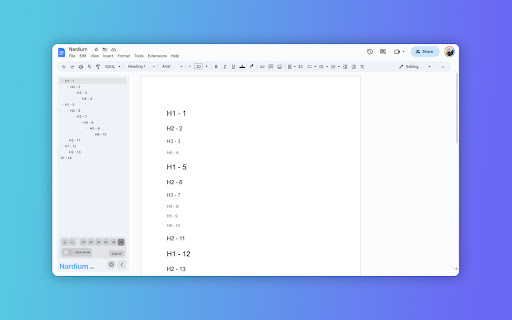
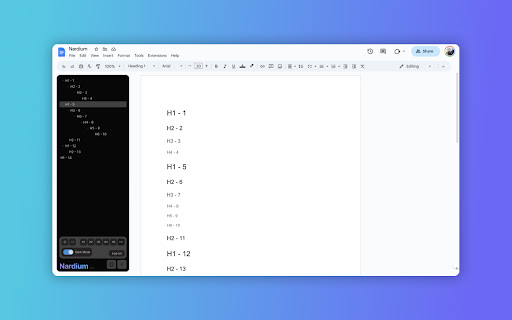
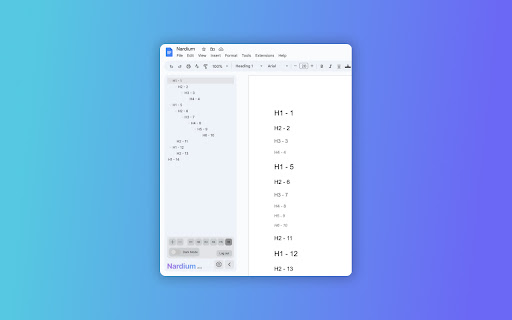
Explore and Navigate your Google Docs with Ease! 🔍 Introducing "Nardium", the game-changing Chrome extension that revolutionizes the way you interact with your Google Docs. Get ready for a whole new level of productivity and organization! 🚀 ⚡️ Seamless Navigation: Say goodbye to scrolling and endlessly searching your document. With Nardium, a simple and intuitive navigation window pops up on the left side of your Google Docs window, giving you instant access to all the different headings and hierarchies in your document. Navigate like a pro! ⚙️ Customize Your View: Tailor your document experience to suit your needs. Nardium empowers you to select which levels of headings are displayed, so you can focus on what matters most. Whether it's purely the highest level headings, right down to the tiniest detailed subheading, you can now easily navigate about. 🔍 Zoom In, Zoom Out: Nardium allows you to adjust the zoom level of the navigation panel so that you can set the font size just how you like it. No more straining your eyes or missing important sections. ⭐ Key Features: ⭐ ✅ Intuitive Navigation: Effortlessly visualise and navigate your document's headings. ✅ Google Docs Integration: Nardium seamlessly integrates into your Google Docs workflow for a smooth experience. ✅ Customizable Display: Filter and display specific heading levels to customise what you see in the navigation panel. ✅ Zoom Functionality: Zoom in and out to specify the size of the text shown in the navigation panel. ✅ Dark theme: Switch to an eye-friendly dark theme for a comfortable editing experience, especially during late-night sessions. Nardium allows you to seamlessly explore and navigate your document's hierarchy like never before. Add To Chrome now for a clear and streamlined editing experience. 💪💻

Open in GPT
Open selected text directly in ChatGPT with a customized prompt. This extension enables you to quickly open selected text in ChatGPT by right-clicking. Customize ChatGPT's behavior by setting a pre-filled prompt to provide contextual information. This ensures ChatGPT behaves like you want it to behave and enables you to make it solve repetitive tasks for you -- Automate the automation 🚀 • Answer questions in a specific manner (e.g. only ever answer with A, B, C, or D) • Give general context for tasks like summarizing a paragraph • Resolve code errors • Get language assistance • Translate text • Generate content in specific ways • Anything that you find yourself always copying into ChatGPT manually ... Click the extension icon to configure your custom prompt. Select text and right-click, then choose "Open selection in ChatGPT!" (Alternatively, press ALT + S). If you're working with other programs, use ALT + C to populate the prompt from your clipboard instead of selecting text. If there is a new version of ChatGPT and this plugin doesn't work with it please send me an email and I will also release an update :) Last Fix: 06.10.2024

Automod Fighter
This extension removes level 1 comments by the AutoModerator bot on reddit.

Uzera
Empower users with Uzera. Integrate tours and demos seamlessly. Design interactive tours, record engaging DemoX. Uzera: Elevate User Experience with Product Tours and DemoX 🚀 Welcome to Uzera, the ultimate Chrome extension designed to revolutionize user engagement on your website or application. With two powerful features – Product Tours 🎯 and DemoX 🎬 – Uzera empowers you to provide an immersive and user-friendly experience for your audience. 1. Product Tours 🌐: Easily create interactive product tours that guide users through the essential features of your website or application. The intuitive design interface allows you to define step-by-step instructions, ensuring users grasp the full potential of your product. 2. DemoX - Video Guides 📹: Take user guidance to the next level with DemoX. Record step-by-step actions within your website or application, transforming them into captivating video guides. Share these DemoX videos to enhance user understanding and streamline the onboarding process. - Product Tours: - Design Engaging Steps 🎨: Craft visually appealing and informative steps for your product tour. Customize each step to showcase specific features or actions. - Seamless Integration 🚀: Integrate product tours effortlessly into your website or application, enhancing user onboarding and feature discovery. - DemoX - Video Guides: - Effortless Recording 🎥: Capture user interactions and workflows within your website or application effortlessly. - Shareable Video Guides 🌐: Generate shareable DemoX videos to provide users with a dynamic visual guide for using your product. - Enhanced User Engagement 🤝: Keep users engaged and informed with interactive product tours and video guides that cater to different learning preferences. - Simplified Onboarding 🛤️: Streamline the onboarding process for new users by providing them with comprehensive product tours and step-by-step video guides. - Versatility 💼: Whether you're a developer, marketer, or product manager, Uzera Toolbox is a versatile tool that adapts to your needs, enhancing user engagement across the board. 1. Install the Uzera Chrome extension. 2. Access the intuitive design interface for Product Tours or start recording with DemoX. 3. Elevate your user engagement and provide an unparalleled experience for your audience. Transform user engagement today with Uzera – Your Gateway to Intuitive Product Tours and Dynamic DemoX Video Guides! 🚀

OpenText Core SCA Select Extension
Open Source Select will help developers find and use the right open source and reduce friction between organisations and developers Open Source Select helps you find and use policy compliant and great open-source for any development project. The OpenText Core SCA Select Extension is a free plugin created with developers in mind, enabling you to check the health metrics and license information of an open source project at a glance. If you need more granular data, the extension can lead you to Open Source Select for more detailed information. The three types of metrics you can examine are: Community - How healthy the community around a project is. Popularity - Is it used by many? Is the usage declining? Security - How well does the maintainers apply security best practices. The extension now supports Start Left Policies. This lets you immediately see if the open source you are browsing is compliant with your company’s open source policy, without the need to import and scan code with Software Composition Analysis tools and common source code repositories and package registries such as GitHub, pypi, npmjs, nuget and many others are supported.
