
ojlepencpbenklcahciikbenlfegodmd
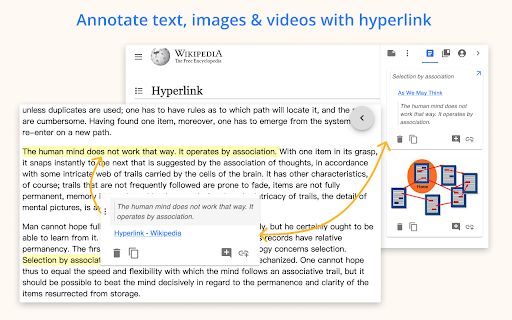
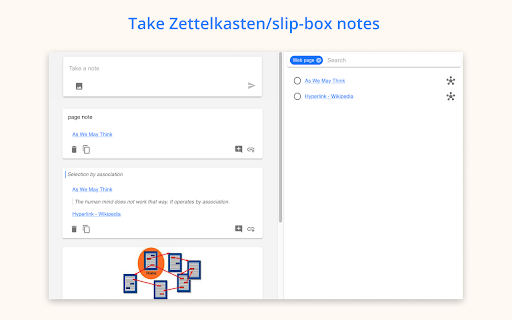
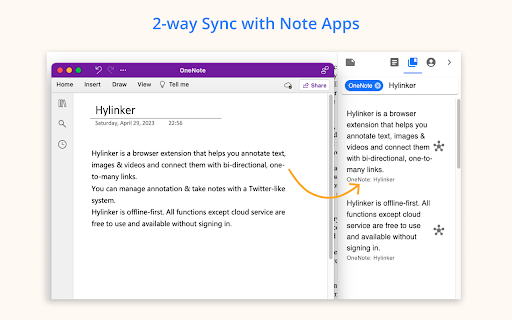
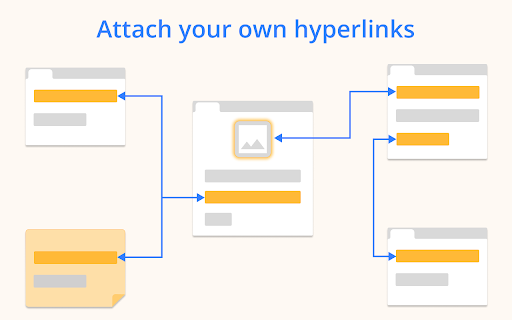
Annotate text, images and videos. Link them as you think. Integrate with Note Apps. What you can do with Hylinker: - Annotate, collect text and images from web pages. - Annotate PDFs and take screenshots. - Take timestamped notes and save screenshots while watching videos. - Take Zettelkasten/slip-box notes. To open this interface, click "Hylinker" in a new tab, or right-click "Hylinker" and select "Options". - Organize annotations and notes with hyperlinks. - Sync annotations to OneNote/Notion, linking the annotations and the notes in OneNote/Notion. Features: - Free to use, no ads. - No mandatory sign-in. All functions outside of cloud services do not require sign-in. - Archive webpages - Add tags to web pages. - Automatically load annotations. - Dark mode. - Export/Import data - More for you to discover… Cloud services (Pro): - Real-time syncing across devices. - Integrate with Note Apps (OneNote, Notion). In addition to syncing annotations to Note Apps, you can retrieve notes from Note Apps and connect to them. Don't worry, the data from Note Apps is only saved on your own device and will not pass through our server.

PAGENOTE
Highlight, annotate, and take notes on any HTML & PDF. Build your personal knowledge base.- free, easy to use, no sign-up required. Pagenote – Effortlessly Capture, Annotate, and Organize Web Content Pagenote is a sophisticated browser extension built to revolutionize how you collect, annotate, and manage information on the web. Designed as a versatile note-taking tool, it supports a broad spectrum of functionalities that include text highlighting, image capture, in-browser annotations, tagging, offline HTML saving, and full-page screenshots—all accessible through an intuitive, lightweight interface without requiring any sign-in. Whether you are a student, researcher, professional, or knowledge enthusiast, Pagenote offers an elegant workspace for transforming your browsing sessions into productive, organized, and easily retrievable knowledge bases. By integrating deeply with your browsing experience, Pagenote allows you to mark up any webpage with highlights, comments, and drawings. You can capture not only textual information but also screenshots and images with comprehensive annotation tools. Contextual tags and notes can be attached

Highlightion - Save Highlights to Notion
Highlight content on any web page and save to Notion databases. Highlightion is a tool that synchronizes your highlights on any web page with Notion databases. Notion is an all-in-one workspace that includes notes, tasks, wikis, and databases. If you haven't used Notion yet, you should start now. Notion databases are perfect for storing all your highlighted pieces. With Highlightion, every single highlight is stored as an item or page in a Notion database. ✅ Once you highlight something on a web page, you can send the highlight to a Notion database along with other properties such as page URL, tags, and notes. ✅ After that, you can view your saved highlights right inside your Notion database. ✅ You can also create different views of the Notion database to organize your highlights. ✅ Sharing the Notion database with others is also an option. We hope this synchronization tool helps you become more efficient and makes your life easier. 💌 If you have any questions or suggestions, please contact us at support@highlightion.com

myReach Web Clipper
Save the things that matter on the web in an interconnected network Introducing myReach: Unleash Your Productivity with AI-Powered Superpowers Discover the browser extension that revolutionizes how you save, organize, and access your digital knowledge. myReach is your second brain, seamlessly integrating with your browser to empower you with AI-driven intelligence and effortless retrieval of information. 📚 Save Anything, Find Everything: Capture websites, files, images, notes, and contacts effortlessly, and connect them to relevant tags. No more struggling to remember where you saved that important document or the name of a website – myReach lets you search based on your personal context, empowering you to find what you need quickly and effortlessly. 💡 AI-Assistant at Your Fingertips: Meet your smart AI-Assistant powered by myReach. Simply ask any question about your saved items, and it will instantly provide answers. Whether you need contract details, summarized articles, or reminders from your past conversations, it has the knowledge to assist you effortlessly. No more tedious searching or reading through endless pages – just ask and get instant answers. 🗂️ Organize Your Way: Say goodbye to traditional folders and embrace the freedom of myReach’s flexible workspaces. Create customized workspaces to separate business and personal matters, ensuring efficient organization and effortless collaboration for teams. With myReach, everyone can find the same document using their own context, eliminating the need for extensive training or navigating complex folder structures. 🔍 Intelligent Search, Even in Images: Extracted text from images and files makes every piece of content searchable, delivering unparalleled convenience and efficiency. Locate information buried within images effortlessly, saving you time and frustration. ⚡️ Enhance and Integrate: Customize your saved items with properties like rating, description, cost, and more, allowing for deeper organization and personalization. Seamlessly integrate myReach with your favorite tools, including Evernote, Zapier, Twitter, Google Maps, and more, expanding its capabilities and streamlining your workflow. Welcome to your personal knowledge hub, designed to boost productivity and streamline information retrieval. With myReach, your browser gains superpowers, empowering you to save, connect, and access your digital world effortlessly. Embrace the future of intelligent organization and download myReach today. Get myReach, and unlock a world of limitless knowledge at your fingertips

Hyperlink from selected text
Creates a hyperlink to the current page from the selected text in one click via the context (right click) menu Creates a hyperlink to the current page from the selected text in one click via the context (right click) menu. A new blank tab opens containing the hyperlink. From there you can easily drag it into email or Google Docs.
