
ojjgkgnnebfjcocfceidjnekcdamfjbf
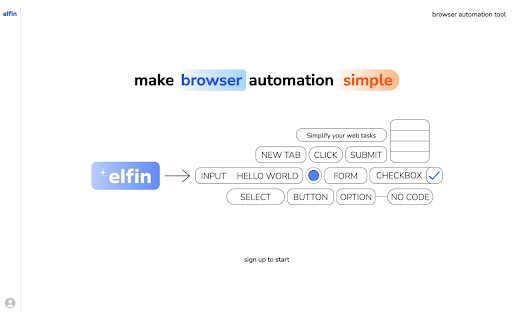


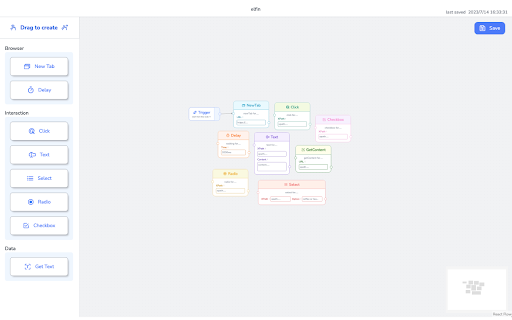
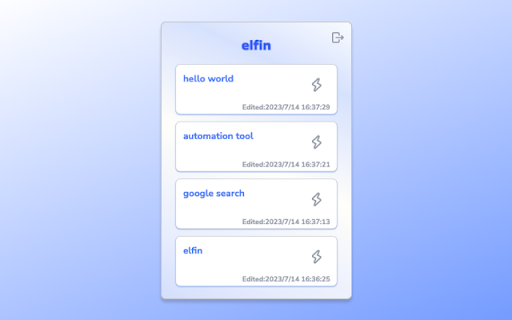
Elfin is a tool that makes browser automation simple. It allows you to easily customize your own browser scripts Elfin is a powerful browser automation tool that simplifies the process of automating your browser tasks. With its intuitive and user-friendly interface, Elfin allows you to easily create and customize your own browser scripts using a node-based system. Whether you're dealing with repetitive daily workflows or testing web applications, Elfin puts the power of browser automation in your hands. Intuitive Node-Based Design: Elfin's design is built around the concept of nodes that can be connected to create custom browser scripts. This intuitive approach makes it easy to visualize and construct complex automation sequences without any coding knowledge. Seamless Script Synchronization: Elfin seamlessly synchronizes your scripts across devices. Once you've created and arranged your scripts on the web app, they are automatically saved and synchronized to the extension. This ensures that your scripts are always accessible and up-to-date wherever you use Elfin. Effortless Script Triggering: With the Elfin extension, triggering your web scripts is a breeze. Simply activate the extension and watch as your pre-configured scripts come to life. This eliminates the need for manual execution and streamlines your browsing experience. Take control of your browser automation with Elfin and experience the power of simplified and efficient web scripting. Install Elfin today and unlock new possibilities for enhanced productivity and seamless browsing.

GoLess: Browser Automation and Web Scraping
GoLess no-code browser automation and Robotic Process Automation (RPA) tool GoLess tool allows you to quickly automate website actions and other tasks, eliminating the need for coding, APIs, or developers. Simply use clicking and typing on the user interface of websites and web apps to perform automation. GoLess enables you to: ◦ Easily scrape data from any website ◦ Easy data entry into web forms ◦ Integrate with Google Sheets for reading and writing data ◦ Collaborate and share your automations with other users Create automations: ◦ Data scraping and entry ◦ ETL processes (Extract, Transform and Load tasks) ◦ Building social media bots ◦ Transferring data between applications ◦ Automating workflows within web apps without the need for APIs Release 1.2.27 Fixes: - Fixed validation for masked string input - Removed "required parameters" for checkbox and googleDrive parameters Release 1.2.26 Features: - Notification if active-tab on the dashboard page (handleActiveTab error) - Validation for UiInput, validators - Validation error output Fixes: - OpenDashboard on background for executing workflow - Timeout for notify - Remove logic with window defocusing Release 1.2.25 Features: - Changed app sidebar - Added shortcut for /packages page Fixes: - /run route for Gologin automations - Fixed some errors Release 1.2.24 Features: - Added "Empty block" for all tables Fixes: - Removed hotkeys for "search" and "new workflow" - Adjusted padding for trigger modal, corrected ui-popover placement. - Ensured extension execution after updating route to /run. Release 1.2.23 Features: - Added "selector" type for parameters Fixes: - Authoma updates from version 1.28.6 to 1.28.10 - Fixes for dark theme - Fixes for search input field - Change of "Execute" button inside workflow Release 1.2.22 Fixes: - Sort 'Installed At' - Execution of the elementSelector - Workflow execution if dashboard is not running - Size when opening the dashboard window - Opening dashboard after install Release 1.2.21 Features: - Images open in a new window when clicked on for public workflows - Options in logs for the /logs route - Open workflow by clicking the icon in the workflow card on the start screen - Open a public workflow on the site by clicking on the workflow modal Fixes: - Display role when sharing workflow for editor (reviewer) - Hide debug button in workflow editor - Changed workflow getting route (/my-workflows) - Added access validation for workflows - Removed GoToWorkflow button - Layout fixes: fixed top panel and bottom panel with minicart when resizing in editor, fixed open flow icon change panel - Changed display when icon fails to load or link is incorrect Release 1.2.20 Features: - Modal window with info instead of editor for public workflows - Added buttons in googleDrive blocks Fixes: - Generation of exact path to open the editor of worklfow - Different dropdown due to different permissions of the workflow Release 1.2.19 Features: - Autocomplete fixed and enhanced Fixes: - Documentation links added for Storage/Logs/Packages/Schedule - Fixed buttons on the Storage page - Dark theme improvements - Fixed tab for EditGoogleSheetsDrive - Fixed logo in the sidebar Release 1.2.17 Fixes: - Creating Google Drive Sheets table in "Params" page - Authorization fixes - Adding "Share" in workflow editor Release 1.2.16 Fixes: - Design - Binding values for checkbox - Resetting values when changing parameter type - Removed default value for the googleDriveSheets type - Displaying errors in the Params modal. Displaying GDrive integration error if it's missing - Bug with canceling a running flow, cancels all instead of just one Release 1.2.15 - Loader for the workflow block when Enable/Disable/Uninstall - Changes to Google Drive Sheets: - Restored the ability to manually specify a spreadsheet in Google Drive Sheets - New parameter type and displaying it in the Params modal, using params variable in the Google Drive Sheets block - Validation for the block, displaying block errors - Ability to choose ChatGPT4 - Captcha block to solve webpage captchas Release 1.2.14 - Fixed problem with authorization, login and event from GoLess site - Display running workflows in popup - Added loader on Install/uninstall workflow, errors on fast switching Release 1.2.13 Features: - Google Drive Sheets API changed to GoLess backend API - Renaming by clicking on the workflow label - Displaying role in read-only mode in workflow Fixes: - Fixed extension authorization reset when closing the browser Release 1.2.11 Features: - Workflow sharing - Restored functionality of GDrive Sheets block - Added ability to create spreadsheets and sheets in GDrive Sheets block Fixes: - Fixes in the 'Parameters' modal, responsible for adding parameters in the trigger Release 1.2.10 Features: - Install/uninstall public workflows - Popup changes - Sentry - Output of shared workflows Fixes: - Removed logic for minimize dashboard window - Switch tabs between Marketplace/My Workflow Release 1.2.8 Fixes: - Fixed log message for GoLess API - Added "Duplicate" button on editor workflow - Refactoring Features: - Showing Notify component after finish workflow - Showing Loader component with blocks process - Loader and notification changes - Design changes (Package/Logs/Popup/Newpage pages) - Don't execute public workflows Release 1.2.7 Fixes: - "popup" is now set as the default option. - Removed the "/welcome" route. - "maximized" dashboard now opens from the popup, changed size. - Fixed the link string for the "Publish" workflow. - Refactoring, eslint changes. - Made changes to the popup: - Added separate state for the popup. - Workflow can now be accessed without details. - Implemented tabbed loading for workflows instead of loading all at once. - Made changes to the loader. Features: - Added a 'permissions:allow' message for the GoLess site. - Opening the "welcome" page of the GoLess site on extension startup. Release 1.2.6 Fixes: - Deleted unnecessary routes. - Changed tab names (title). - Made changes to "packages" page (locales, "empty" block). - Renamed "Input (JSON)" to "Textarea (string)". - Updated colors in blocks. - Removed Prettier, ESLint changes. - Adjusted the color of the 'empty' block for the dark theme. - Added one checking for handlerChatGpt. - Fixed elements removing (Loader, Notifier). Features: - Added output of workflow status (Private/Public/Published). - Implemented sending logs to the API. - Modified the 'welcome' page, which now shows up after installation. - Made changes to the Notifier. Release 1.2.5 - Ability to specify blocks that are undocumented - Corrected some documentation references - fixed modal Logs window to page - Stop operation for workflow in popup window - Changes with design, displaying information that there is no workflow - Fixed bug with trigger: null, also trigger is populated when created - Error handling in site messages, open:page event Release 1.2.4 - Added ability to launch with query parameters - Fixed popup notification that you have to login or register - Fixed locale i18n error in the popup - Fixed search in the popup - Added ability to add notifications to the page and a lowader for ChatGPT - Logs in the popup (last activity), pagination for flow Release 1.2.3 - Added template selection when creating a new workflow - Fixed bugs: - Error when executing the GoogleSheets block (block not executing, "response.json()" error) - Incorrect execution of Update/Append for the GoogleSheets block - Bug when running a public workflow with parameters. Parameters didn't have input fields. Version 1.2.0 - Engine update - Fixed documentation links - Localisation fixes - Auth bug fix when closing goless website window - Fixed workflow tab updates, faster loading without timeout like in Automate - "Testing mode" button for debugging is currently inactive - Added a route for automatic flow start on transition - Ability to open read-only and private flows - Google Sheets block added Release 1.1.3 - Added website authorization (login/logout/update) - Fixed a bug with launching flow in popup - UI/UX improvementsRemoved new flow creation button panel in the "Marketplace" tab - Fixed the display of the running flow icon next to "Logs" - Added display of running flows under the extension icon.

cmdOS Automation - AI Command Terminal for Browser Workflows
Think of cmdOS as your digital brain for managing daily browser workflows — all in one place. Browse 1.2x faster with cmdOS — a powerful command terminal for your browser workflows. You can create command shortcuts and keyboard hotkeys to access anything on the web and automate workflows — including AI agents, links, notes, automations, dashboards, and more. Everything becomes a command. No endless scrolling. No repetitive clicking. Just a fast, intelligent browser search interface built for pure speed and clarity. With cmdOS, you can: ◆ Search instantly across AI agents, bookmarks, apps, knowledge bases, documents, web tools, and more from one command interface ◆ Execute repetitive tasks in seconds with context-aware commands ◆ Organize workflows, data, and resources into collaborative project workspaces ◆ Connect your existing tools and workflows into one unified system ◆ Reduce context switching and stay focused on execution instead of navigation ⚡Instant Information Access Search across AI agents, links, notes, bookmarks, apps, documents, and knowledge bases from one command interface ⚡Automated Browser Workflows Build workflows to automate your browser actions using our no-code interface and turn repetitive browser actions into reusable commands ⚡Universal Search for Reduced Context Switching: Access all your workflows, tools, docs, notes using a universal command search interface, on any webpage, without switching tabs using the Alt+Q shortcut. ⚡Context-Aware Productivity cmdOS understands the user's intent and surfaces the right actions, tools, and information faster How our users work with cmdOS: - Jay A, a Software Dev, manages Jira tickets, product docs, analytics dashboards, and AI-assisted research in one place, reducing constant app switching and keeping product execution streamlined throughout the day. - Chandu N, a tech founder, uses cmdOS to pull together competitor research, internal documents, meeting notes, and ChatGPT outputs into one workflow so he can prepare for investor calls and strategy meetings without switching tabs or opening multiple apps. - Sarah L, a recruiter, automates candidate sourcing, profile reviews, and outreach workflows across LinkedIn, ATS platforms, and email tools, helping her move faster while managing hiring pipelines from one interface. - Kei W, Head of Growth at a startup, instantly generate account research, open CRM records, prepare outreach workflows, and access prospect insights from one command — making sales prep and follow-ups significantly faster. Just pure speed and clarity.

Hyland RPA Automation Extension
Allows Hyland RPA to access and automate the browser. The Hyland RPA Automation Extension is used to connect Hyland RPA’s Web Automation to your browser. Leverage the browser for attended and unattended automation. Using this extension, you can automate tasks with ease. This extension requires additional software to build the automation flow. Make sure that you have downloaded and installed the Hyland RPA Designer before using this plugin. The Hyland RPA Designer is a low code tool that will convert your actions into an automation flow.

PACA
Your all-in-one solution for automating web data extraction and workflow automation. Whether you're scraping job listings, social media posts, or competitor prices, our tool delivers accurate results in seconds.
