
ojjdkeojammiappbjokhemcnnbbllclm
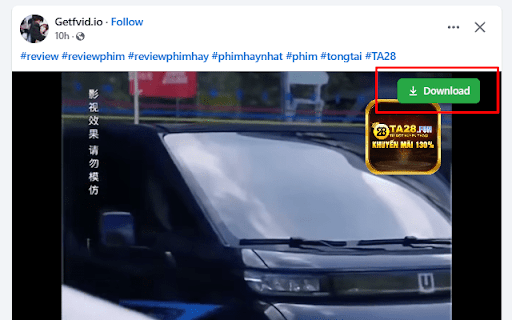

Adds a download button on Facebook videos that redirects users to GetFVid to save public videos for personal use. GetFVid Extension is a lightweight and easy-to-use Chrome extension that allows you to download publicly available videos from Facebook directly to your device. This tool is intended solely for personal use and supports only content that is publicly accessible and does not infringe on copyrights. With GetFVid, you can: Save public Facebook videos to your computer Use the tool seamlessly within your browser Enjoy a clean, secure, and ad-free experience ⚠️ Important Note: This extension does not support downloading private or copyrighted content. We respect the rights of content creators and encourage users to download videos only when permitted by the content owner.

Video Downloader for Chrome - M3U8 Video Downloader | 4saved
4saved Video downloader, download M3U8 videos, save video from social networks, easy video download for offline viewing 4saved Video Downloader is a powerful video downloader for Chrome that lets you download videos from websites, save M3U8 streams, and watch videos offline with fast and reliable performance. Install 4saved Video Downloader to download videos instantly, save streaming content, and build your personal video library with one click. 📥 Video Downloader for Chrome - Download videos from websites quickly and easily 🎞️ M3U8 Video Downloader - Download M3U8 playlists, streams, and video files ⚡ One-Click Download - Save videos instantly with a single click 🚀 Fast Video Download - High-speed video downloader with stable performance 🌐 Multi-Platform Support - Download videos from Facebook, Twitter, Instagram, TikTok, and more 🔒 Safe and Secure - Video downloader that protects your privacy 🪶 Lightweight Extension - Optimized for performance without slowing down Chrome 🌐 What You Can Do with Video Downloader 🔽 Download Videos from Websites - Save videos from social media and online platforms 🎥 Download M3U8 Streams - Capture streaming videos and playlists easily 📂 Watch Videos Offline - Access your saved videos anytime 📚 Build Your Video Library - Store and organize your favorite content ⚡ How to Use Video Downloader 1. Install the video downloader extension from the Chrome Web Store 2. Open a website or social media page with the video 3. Click the video downloader extension icon 4. Choose video format and preferred quality (including M3U8) 5. Download video and watch offline anytime Download videos in seconds with this fast and easy video downloader for Chrome. Download Facebook videos easily with this Facebook video downloader. Save videos, reels, and clips in high quality. This Chrome video downloader lets you download Facebook videos and watch them offline anytime. Download Instagram videos, reels, and stories with this Instagram video downloader. Save IG content quickly and keep your favorite videos forever for offline viewing. Download videos from Twitter with this fast Twitter video downloader. Save clips and GIFs directly to your device and watch them anytime offline. Download Twitch videos and live streams with this Twitch video downloader. Save gaming streams and broadcasts in high quality for offline viewing. 🚀 M3U8 and Streaming Support Download M3U8 playlists, encrypted streams, and live broadcasts ⚡ High-Speed Downloads Fast and stable video downloading from multiple websites 🔄 Regular Updates Updated to support new websites and video formats ⭐ Why Users Install 4saved Video Downloader • Download videos in one click • Save M3U8 streams and online videos • Watch videos offline anytime • Fast and reliable performance • Simple and easy to use 🔐 Privacy and Security 4saved Video Downloader does not collect or store personal data. Your activity remains private and secure. This video downloader extension is intended for personal use only. Users must respect website terms and content creators’ rights. This extension does not support downloading YouTube videos due to Chrome Web Store policies.

facebook video downloader - download video from facebook
Download videos and reels from Facebook easily. fast and lightweight Facebook video downloader tool for online video downloads. Facebook Video Downloader - Easily Download Facebook Videos and Reels Facebook Video Downloader is a convenient and lightweight Chrome extension that helps you save Facebook videos and Reels to your device with just one click. It’s designed to be simple, fast, and efficient, making offline viewing effortless. Hover over any Facebook video and a download button will appear automatically. Click once to start saving the video instantly. Choose from different available resolutions such as HD or SD, depending on your preference and storage needs. ⚡ Optimized for Facebook Reels Quickly download Facebook Reels with optimized detection and smooth performance. Track the download status with a clear progress indicator, so you always know what’s happening. Built to use minimal system resources, ensuring smooth browsing and stable performance without slowing down your browser. Install the extension from the Chrome Web Store. Open Facebook and navigate to any video or Reel. Hover your mouse over the video player. Click the download button that appears. Select your preferred video quality (if available). The video will be saved automatically to your default download folder. Videos in the Facebook news feed Videos on user profiles and pages Live stream recordings (after the live ends) All video processing is done locally on your device Your privacy is fully respected. Save your favorite Facebook videos, Reels, and memorable moments easily for offline viewing — anytime, anywhere.

Video Downloader for Facebook
Download Videos from Facebook Reels and Posts in a single click 💡 Features ✓ Download videos from Facebook Reels, Posts, and Watch pages ✓ One-click download — button appears directly on each video ✓ Automatically selects the highest available video quality ✓ Merges audio and video tracks for complete, sound-on playback ✓ Real-time download progress indicator on the button ⚙️ Get Started 1. Install the extension from the Chrome Web Store 2. Open any Facebook page with a video 🎬 3. Hover over the video — a download button will appear 4. Click it and the video saves to your device automatically 🎉 🔒 Data Privacy Your data privacy is our top priority. All processing happens locally in your browser — videos are downloaded directly from Facebook to your device. We never collect, transmit, or store your videos or personal data on our servers. 🛡️ ⚠️ Disclaimer FACEBOOK is a trademark of Meta Platforms, Inc. Video Downloader for FB is not affiliated with, endorsed, sponsored, or otherwise related to Meta Platforms, Inc., Facebook, or any of their affiliates or subsidiaries.

ESUIT | Bulk Videos Downloader for Facebook™
Bulk videos downloader for Facebook, supports reels and videos This extension allows you to bulk-download all videos/reels from Facebook. Works on: - Any User's reels/videos - Any Page's reels/videos With ❤️ from esuit.dev If you need to subscribe to our service, we will collect your email address to verify your subscription status. (We only collect this data from subscribers; if you do not subscribe, we will not collect any of your data.) This is our privacy policy. https://esuit.dev/privacy-policy Additional Features: In the Popup, we provide the following additional features: Function Description: A brief description accompanied by a video tutorial demonstrating how to use this extension. Login Button: Use when you need to subscribe to premium features or log in with an existing subscription. Relevant-Ext: We provide brief recommendations and introductions to relevant extensions in a small section. Encountering an issue? Report it to us 💪: If you encounter any issues, you can get in touch with us through this link, and we will assist you in fixing it. Warning Facebook™ is a trademark of Facebook Inc., registered in the U.S. and other countries. This is an independent project developed by ESUIT. and has no relationship to Facebook™ or Facebook Inc. this extension is not officially developed by Facebook™, The author is @William Chen Got feedback or experiencing any issues? Let us know on Facebook! Your input is important to us and we're here to help. https://www.facebook.com/esuitdev
