
hmeiacccncialhnailffohoaeebcjanp
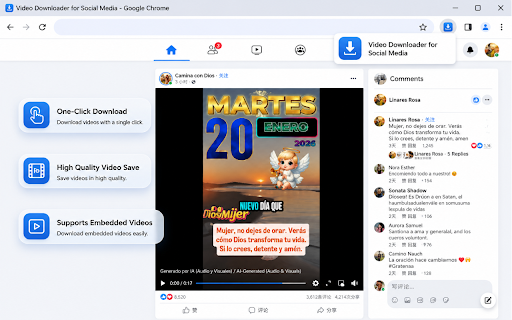


Download videos and reels from Facebook easily. fast and lightweight Facebook video downloader tool for online video downloads. Facebook Video Downloader - Easily Download Facebook Videos and Reels Facebook Video Downloader is a convenient and lightweight Chrome extension that helps you save Facebook videos and Reels to your device with just one click. It’s designed to be simple, fast, and efficient, making offline viewing effortless. Hover over any Facebook video and a download button will appear automatically. Click once to start saving the video instantly. Choose from different available resolutions such as HD or SD, depending on your preference and storage needs. ⚡ Optimized for Facebook Reels Quickly download Facebook Reels with optimized detection and smooth performance. Track the download status with a clear progress indicator, so you always know what’s happening. Built to use minimal system resources, ensuring smooth browsing and stable performance without slowing down your browser. Install the extension from the Chrome Web Store. Open Facebook and navigate to any video or Reel. Hover your mouse over the video player. Click the download button that appears. Select your preferred video quality (if available). The video will be saved automatically to your default download folder. Videos in the Facebook news feed Videos on user profiles and pages Live stream recordings (after the live ends) All video processing is done locally on your device Your privacy is fully respected. Save your favorite Facebook videos, Reels, and memorable moments easily for offline viewing — anytime, anywhere.

Facebook Videos Downloader - Save FB Videos
Easily download Facebook videos from profiles, groups, pages, feeds, and even embedded videos on any website in just one click. 💨 Fast, 🔒 private, and 🖱 super easy to use — no tech skills needed. Perfect for bulk downloads or saving just a few favorites. 💲 Pricing at a Glance (please read before installing) • 🆓 Free Plan: download up to 10 videos/images per day — great for casual use • � Pro Plan: unlock unlimited downloads, bulk saving, photo albums, and priority support starting at $9.9 This extension is free to try with a daily limit. A one-time or subscription upgrade is required to remove the 10 downloads/day cap. We want to be upfront about this so there are no surprises. Facebook is full of live streams, stories, and memorable videos — but saving them isn’t always easy. With Facebook Videos Downloader, you can grab high-quality FB videos directly from your browser in seconds. ✅ Download from Facebook or any site with embedded FB videos ✅ Works on profiles, pages, groups & search results ✅ No complicated setup — just install and download instantly 2️⃣ 🌐 Download Embedded Videos Not just Facebook.com — this extension also detects and saves Facebook videos embedded on any external website. 3️⃣ ⚡ Lightning-Fast Bulk Saving • 📥 Download all videos on a page in one click • 📌 Save entire video sections in seconds • 🧭 Works seamlessly while you browse 4️⃣ 🛠 Smart Download Controls • ⏸ Pause & resume anytime • 🛑 Stop ongoing downloads instantly • ✅ Auto-organizes videos into folders by page or profile 💡 Who Is This For? Perfect for: • 🎬 Video Collectors – Save your favorite clips before they’re gone • 🧑💼 Social Media Managers – Archive client videos with ease • 🗃 Content Creators – Gather inspiration from groups & pages • 👨👩👧 Families – Download and preserve video memories • 🎓 Students & Researchers – Capture study materials or references ✅ Benefits at a Glance • 🔄 Works with all sections of Facebook • 🌐 Supports embedded FB videos on any site • 📦 Auto-sorts into folders • 🎥 Saves high-resolution videos • 🚀 Reliable, lightweight & beginner-friendly 🧰 How It Works 📍 Refresh your Facebook page or open any site with an embedded FB video 📍 Click the Download button next to the video 📍 ⏬ Your video is instantly saved to your device 🔐 Privacy You Can Trust • ✅ No Facebook account data collected • ✅ No cloud sync or hosting • ✅ Everything runs fully inside your browser 💎 Free vs Pro – What You Get 🆓 Free Plan (no payment required) • ✅ Up to 10 video/image downloads per day • ✅ Access to all core download features • ✅ Works on Facebook and embedded FB videos 💎 Pro Plan – Unlock Unlimited Exports Upgrade to Pro starting at just $9.9 (Monthly, Annual, and Lifetime options available) and get: • 🔓 Unlimited video downloads • 🔓 Unlimited image downloads • 📦 Bulk video & image download • 🖼 Download full photo albums • 🛠️ Priority customer support 📣 Download Now & Keep Your Facebook Videos Forever No more searching or recording — with Facebook Videos Downloader, you can save any Facebook video (even embedded ones) quickly and securely. 🌟 Promoted chrome extensions Looking for more powerful tools to download and manage media across the web? Try these related extensions: ⚠ Legal Notice: This tool is independently developed and not affiliated with Meta Platforms, Inc. or Facebook. Please use responsibly and follow Facebook’s terms of service.

ESUIT | Photos Downloader for Facebook™
Before you delete all the photos from Facebook and lose them forever, downloading them first might be a great idea. That way, they will all be in the same folder. This extension allows you to bulk-download all photos from Albums or a single Facebook collection. Works on: - Any User's Album - Any Page's Album - Any Photo Collection - Any photo viewer With ❤️ from esuit.dev You know, it’s easy to save a single photo on Facebook. Just hover over the image, right-click or tap on the image and select “Save Image As…”, pretty simple, huh? What if you have a thousand pictures to download? I bet you don’t want to save them one by one. Imagine, with only a few clicks, you get a copy of all your favorite pictures. Even better, you’ll get the exact albums/photos you want without sacrificing image quality. You could then keep those digital memories in a safe place, or share them with family members offline. For those who want to close their Facebook account, you can do so without worrying about data loss. Or download all photos of your crush, everything done in a few clicks. Install this extension and make that works for you. Changelogs: In version 3.0.0, we completely rewrote the extension, and here are the modifications: - New feature: Resume downloading - now you can continue downloading from where you left off, instead of starting from the beginning every time the download is interrupted. - New feature: Individual image download - you can now conveniently download single images within the image viewer. - New feature: Account restriction prevention - added a timer algorithm that introduces delays between requests to avoid imposing limits on your account due to excessive requests (please note that this might significantly decrease the download progress, but you can disable this feature by enabling FullSpeed mode). - New feature: Compatibility mode - this mode disables animations in the extension to address performance issues for some users. - Optimization: Memory usage optimization - we have implemented new techniques to optimize memory usage, allowing for the downloading of images larger than 10k. - Optimization: Improved UI interaction - streamlined and expedited the download process for a more user-friendly experience. - Bug fix: Fixed the non-functioning "saveIndex" feature when "genFolder" is enabled. - Bug fix: Corrected the issue where the download feature was erroneously displayed in the video section. If you need to subscribe to our service, we will collect your email address to verify your subscription status. (We only collect this data from subscribers; if you do not subscribe, we will not collect any of your data.) This is our privacy policy. https://esuit.dev/privacy-policy Notice: this extension has In-App Purchases. This extension includes features that require payment to unlock unlimited usage. Please refer to our pricing page for more details. https://esuit.dev/pricing/download-albums-for-facebook Additional Features: In the Popup, we provide the following additional features: Function Description: A brief description accompanied by a video tutorial demonstrating how to use this extension. Login Button: Use when you need to subscribe to premium features or log in with an existing subscription. Relevant-Ext: We provide brief recommendations and introductions to relevant extensions in a small section. Encountering an issue? Report it to us 💪: If you encounter any issues, you can get in touch with us through this link, and we will assist you in fixing it. Warning Facebook™ is a trademark of Facebook Inc., registered in the U.S. and other countries. This is an independent project developed by ESUIT. and has no relationship to Facebook™ or Facebook Inc. this extension is not officially developed by Facebook™, The author is @William Chen Got feedback or experiencing any issues? Let us know on Facebook! Your input is important to us and we're here to help. https://www.facebook.com/esuitdev How to Download Facebook Photos in bulk? (2023) How to Save Pictures from Facebook? Before you delete all the photos from Facebook and lose them forever, downloading them first might be a great idea. That way, they will all be in the same folder.

Video Downloader for Facebook Plus
Adds a download button on Facebook videos that redirects users to GetFVid to save public videos for personal use. GetFVid Extension is a lightweight and easy-to-use Chrome extension that allows you to download publicly available videos from Facebook directly to your device. This tool is intended solely for personal use and supports only content that is publicly accessible and does not infringe on copyrights. With GetFVid, you can: Save public Facebook videos to your computer Use the tool seamlessly within your browser Enjoy a clean, secure, and ad-free experience ⚠️ Important Note: This extension does not support downloading private or copyrighted content. We respect the rights of content creators and encourage users to download videos only when permitted by the content owner.

Download Facebook videos
1️⃣ You need to log in to Facebook to download videos. 2️⃣ If you don't see the download button, reload the Facebook page you're viewing. 😎 HOW DOES THIS TOOL WORK? After you open this tool, a piece of code will be executed in the current tab. This code is responsible for analyzing the json code and finding the id of the video currently displayed on the screen. Videos that do not appear in the screen frame will be ignored. After finding the video id, the tool continued to send a request to Facebook to get the mp4 link. Then a download button will float above the video and inside the tool window. 🧐 HOW TO USE 1. Open the Facebook website. 2. Play a video on Facebook. 3. Open this extension. 4. Wait a few moments. 5. Click on the quality you want to download. 6. On the new tab, the file will automatically download and then save to your device. ☀ Download videos, audio, subtitles (closed caption), images (gif and thumbnail) from Facebook timeline, groups (include secret groups), profile, reel. ☀ Automatically download and save the file according to the title of the video and the selected quality. ☀ Multi language. ☀ Suggest queries. ☀ Generate random keywords.
