
ojiighldhdmahfdnhfdebnpmlbiemdfm

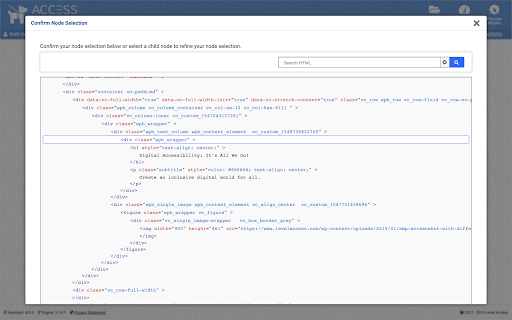

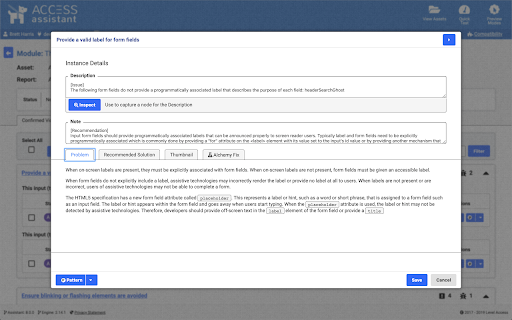

Test your web pages for accessibility with Access Assistant. With over 250 fully automated accessibility tests, and many more partially-automated and manual tests, you can identify the most common, highest risk accessibility violations on your website or application. View details for any accessibility violation, along with remediation guidance. Simply run a Quick Test on any web page to view details for all accessibility violations on the page, along with remediation guidance. Testing results can also be saved to Level Access' Accessibility Management Platform (AMP), where you can report on your site’s accessibility compliance over time. This extension accesses URLs for all open tabs to enable testing of pages on any open tab.

WCAG Color contrast checker
To check the color contrast between foreground and background of the texts It checks the color contrast between the foreground and background of the elements that are in the page according to the WCAG 2.2. It evaluates the contrast on all elements of the page considering their computed style for the color and background-color CSS properties. In case of these colors are defined with RGBA values, it also considers the opacity to deduce the real color that finally is show. It can simulate color blindness and evaluate the contrast for the simulations. By this way, developers can see how the pages look for colorblind users. The tool also includes two fields in which the colors can be introduced manually to be tested. It also allows to pick the color directly from the documents. Finally, it auto-refreshes when DOM of the page changes (addition or removing elements), but if the page has many changes, this behavior can be de-activated.

Accessibility View
Have you ever wanted to see a website's structure from the view of a screen reader but without actually having to start a screen reader? Accessible View converts an arbitrary website into its accessibility relevant form. Think of it like a representation from the view of a screen reader. That means that it reverts any frontend adjustments and only shows things like: • HTML5 structural elements like hav, header, main, footer, aside or articles • Forms and form inputs • Links • Lists • role attributes • Hides aria-hidden elements • Hides display: none elements WIP: • Show aria-labels • Hint on missing image alt attributes • Hint on title attributes since they are not well supported by screen readers

axe DevTools - Web Accessibility Testing
Accessibility Checker for Developers, Testers, and Designers in Chrome ★Digital accessibility testing right in your browser: The Axe DevTools Extension is an automated accessibility testing tool that helps you find and fix accessibility issues early in web development right in your Chrome browser. It helps ensure your team gets fast, accurate, actionable results so you can save time on costly reworks, and create digital experiences that are compliant and work for everyone. ★Leverage the global standard in automated web accessibility testing: The free version of the Axe DevTools Extension gives you the tools to conduct page-by-page, automated accessibility testing—all run on Axe-core, the global standard in automated web accessibility testing. With the free browser extension, teams get a useful introduction to accessibility and a quick, automated way to catch defects, all while benefiting from the same reliable and consistent results trusted by industry leaders around the world. ★Find and fix even more accessibility issues with AI and automated testing: Upgrade to the pro version of the Axe DevTools Extension to move faster, smarter, and further streamline workflows with AI-enhanced features, intelligent guided testing, component-level checks, the ability to test entire user flows, central administration, deduplicated results, Jira integration, and more. Dev teams can use this pro version of the browser extension to fix a majority of issues before production by combining traditional test automation with AI, reducing remediation costs and saving time. It’s great for teams who want to check specific pages, groups of pages, or workflows for accessibility issues. To learn more about the Axe DevTools Extension visit https://www.deque.com/axe/devtools/extension Use of this extension is governed by this license agreement https://www.deque.com/terms-of-use/axe-ext/ and the privacy policy linked under the developer information Data collection information can be found here: https://docs.deque.com/devtools-server/4.0.0/en/data-collection#axe-devtools-browser-extension-free Upgrading to the Axe DevTools Extension pro plan gives you more control over what data is collected.

Accessibility Insights for Web
Accessibility Insights for Web helps developers quickly find and fix accessibility issues. The default keyboard shortcut to launch Accessibility Insights for Web is [Ctrl+Shift+K]. If that doesn't work, follow these instructions: 1. Select Shift+Alt+T to move focus to the Chrome address bar 2. Select the Left arrow key to move focus to the Accessibility Insights for Web extension. 3. Select the Space key to open the extension.
