
ojcbifibdafhihfnmeefbidmiballgfb


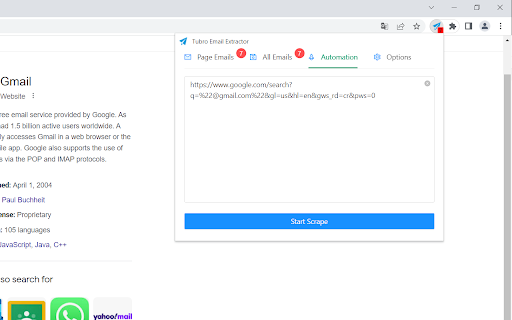
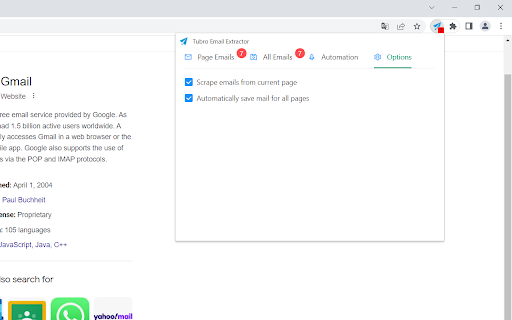
Extract emails from all web pages, export collected emails to CSV file and copy to clipboard Tubro Email Extractor is a powerful email extraction extension for Chrome. Tubro Email Extractor automatically searches valid emails from the web page, you can copy paste particular emails you need or export all of them to a CSV file. Tubro Email Extractor extension find email addresses on pages you visit. Auto mode automates search for emails on urls. Tubro Email Extractor easily extracts email addresses from pages as you visit them and auto saves them all. This chrome app finds email addresses scraping and searching source code and no matter what you see on the front. Features: * Extract emails from visited pages * Auto save all pages emails * Export collected emails to CSV file and copy to clipboard

Multiformat Email Extractor
Extract email addresses from PDF,CSV,Excel,DOC,TXT file and plain text with one click. 🙂How it works: 1. Choose or drag your file into the extension's drop zone. 2. The extension scans and extracts email addresses automatically. 3. You can easily save the extracted emails as CSV, Excel, or TXT. 📋Features: 1. Broad File Compatibility: Works effortlessly with PDF, CSV, Excel, DOC, TXT and plain text. 2. Instant Extraction: Quickly scans through your files to find and list all email addresses. For PDF, it also records the page number where each email is found. 3 .Export with Ease:You can directly export your collected emails into CSV, TXT, or Excel formats for easy access and analysis. 4. High Accuracy: Advanced parsing algorithms guarantee a high accuracy rate in email detection. 🔒Data Privacy: Your privacy is our priority. We adhere strictly to GDPR guidelines. All processing is performed locally on your device. No data or files are ever uploaded or stored on external servers. ✉️Contact us: We're always looking to improve Multiformat Email Extractor and we value your input. If you have any feature requests, feedback, or if you need support for additional file formats or export options, please don't hesitate to reach out.

Email Extractor - Pro Email Scraper from Carryfest
Extract emails from web pages, links, texts, social media, and wherever you want! Email Extractor - Pro Email Scraper from Carryfest is a powerful and user-friendly browser extension designed to simplify the process of extracting email addresses from web pages. Whether you're gathering contacts for your business, research, or networking, Oimi Email Extractor streamlines the task, saving you time and effort. Key Features That Set Email Extractor - Pro Email Scraper from Carryfest Apart: 1. Auto-Scan Web Pages: Auto-scan any web page for emails. 2. CSV Export: Export collected emails in CSV format. 3. TXT Export: Export collected emails in TXT format. 4. Save to Dashboard: Save emails to dashboard and filter from there. You can also export your emails from dashboard. 5. Duplicate Filter: Cleanup duplicates and export the unique ones only. How to Use: 1. Add to Chrome: Add this extension to your Chrome browser from the Chrome Web Store. 2. Visit a Web Page: Visit your desired web page and open the extension. 3. Choose Export Format: Export extracted emails as CSV or TXT files with just a click, adapting to your workflow. 4. Save to Dashboard: Keep your email collection organized and secure by saving directly within this extension. 5. Filter Duplicates: Let this extension optimize your list by effortlessly removing duplicate entries. Privacy: Rest easy knowing that Email Extractor - Pro Email Scraper from Carryfest operates locally on your device. Your data is processed with the utmost privacy and security, ensuring that your valuable information remains confidential. However, we do not store any emails collected by you. Upgrade your email discovery experience with Email Extractor - Pro Email Scraper from Carryfest, where efficiency meets simplicity, and your contact lists reach new heights! 2.2.1 - Updated the name 2.1.0 - Introduced subscription models - Introduced cloud email saving - Integrated with more tools of Oimi 2.0.0 - Added 'Auto-scan' functionality instead of manual page scanning - Added 'Extract from Links' and 'Extract from Text' options - Redesigned the whole product with new UI and theme - Integrated sign in and sign up options with Google or email and password 1.1.0 - Reduced header padding in the pop-up - Adjusted button sizes in the pop-up - Added hover effects to buttons in the pop-up - Added download indicators to "CSV" and "TXT" buttons in the pop-up - Included options for "Request New Features," "Provide Feedback," "Visit Developer," and "Rate in the Store" in the pop-up - Readjusted table width in the pop-up - Updated developer's website link

URL Opener and EMAIL Extractor
"URL Opener and EMAIL Extractor" can effectively improve the efficiency of searching for email, LinkedIn and other social media… "URL Opener and EMAIL Extractor" can effectively improve the efficiency of searching for email, LinkedIn and other social media information within web pages and can export the results as CSV files. Here's how to use it: 1 Click on the extension and enter the URLs. 2 Click "Confirm" to automatically open the specified URLs. 3 Press the Ctrl + Enter keyboard shortcut will automatically collect information such as Email, Social media links.(Use the slider to confirm if the page will automatically close after gathering information). 4 If there's no information you want to save in the opened page, press the ESC key to automatically close the current page. 5 Click “preview” to view the collected information. 6 Click "Download" to automatically download the saved information.

Email Extractor - One Click Lead
Effortlessly collect leads with our powerful extension that auto-extracts and saves email IDs from visited web pages. Extension for Automatic Email ID Extraction from Web Pages the Email Extractor Tool, a powerful Chrome extension designed to effortlessly retrieve valid email addresses from web pages. With this tool, you can conveniently copy email addresses or export the entire list to a text or CSV file. The Email Extractor is a valuable tool that helps sales and marketing teams, recruitment agencies, HR professionals, small business owners, researchers, and digital marketers. It makes it easy to quickly find and collect email addresses from different sources, automate the email search process, and create detailed email lists. This tool helps you reach your target audience more effectively, saving you time and effort. Features: AutoVisit: Automatically visit a list of queued URLs. Automatic Email Extraction: Extract email addresses from web pages seamlessly. Dashboard View: Access a comprehensive dashboard where you can see all extracted email addresses along with statistical data such as: -Total number of email addresses extracted. -Email addresses found in the last 24 hours. -Count of unique domains. Download Option: Download the stored email IDs. How to Use the Extension: - After installation, the extension will automatically extract emails from web pages you visit. - The number of emails collected on the current tab will be shown on the icon in the browser toolbar. - Click the "Dashboard" button to open a full-screen page where you can view a table of the collected emails. How It Works AutoSave: Automatically save all discovered email IDs as you browse. Automation: Queue up to 1,000 URLs for the tool to visit. A robot will then navigate these pages and extract all email addresses found. The plugin extracts email IDs directly from the source code, allowing it to uncover hidden email addresses that may not be visible on the front end. For instance, if a website displays three email addresses, the plugin might find more if there are hidden ones in the source code.
