
nledegbmhffdcenmgjlmljchkdofamho
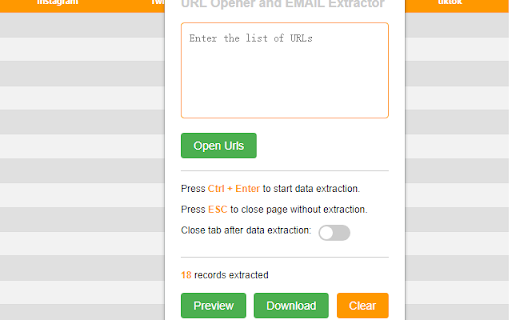

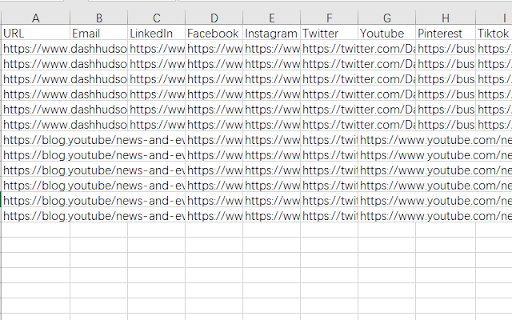
"URL Opener and EMAIL Extractor" can effectively improve the efficiency of searching for email, LinkedIn and other social media… "URL Opener and EMAIL Extractor" can effectively improve the efficiency of searching for email, LinkedIn and other social media information within web pages and can export the results as CSV files. Here's how to use it: 1 Click on the extension and enter the URLs. 2 Click "Confirm" to automatically open the specified URLs. 3 Press the Ctrl + Enter keyboard shortcut will automatically collect information such as Email, Social media links.(Use the slider to confirm if the page will automatically close after gathering information). 4 If there's no information you want to save in the opened page, press the ESC key to automatically close the current page. 5 Click “preview” to view the collected information. 6 Click "Download" to automatically download the saved information.

URLs Email Extractor PRO
Extract emails from URLs and Websites with advanced crawling capabilities Extract emails from hundreds of websites automatically with this powerful Chrome extension. Perfect for lead generation, market research, contact discovery, and business development. ### Multiple Input Methods 1. **Import from TXT**: Upload files with URL lists 2. **Add Manually**: Paste URLs directly (one per line) 3. **Extract from Website**: Auto-discover URLs from any webpage ### Smart URL Crawling - **Depth Control (0-3 levels)**: Choose how deep to crawl websites - Depth 0: Extract URLs from current page only - Depth 1: Current page + all direct links (recommended) - Depth 2-3: Deep crawling for comprehensive coverage - **Configurable URL Limit**: Set max URLs to find (up to 10,000) - **All Domains Included**: No restrictions - crawl across any domain - **Query Parameter Filtering**: Smart deduplication removes duplicate URLs - **Real-time Progress**: See exactly what's happening during crawling ### Intelligent Email Detection - **Ultra-Powerful Extraction**: Finds emails in both HTML and text content - **TreeWalker Technology**: Discovers hidden emails in dynamic content - **Smart Filtering**: Removes spam, noreply, and invalid addresses - **Multi-Source Search**: Scans 6+ different sources per page - **5-Second Page Load**: Ensures complete content rendering - **Works on Dynamic Sites**: Compatible with JavaScript-heavy websites ### Powerful Processing - **Bulk Email Scanning**: Process hundreds of URLs automatically - **1-Second Delay**: Prevents server overload between requests - **Stop/Resume Control**: Pause extraction or crawling anytime - **Auto-Save**: All data persists in browser storage - **Duplicate Removal**: Automatic URL and email deduplication ### Professional Interface - **Modern Dark Theme**: Easy on the eyes, professional appearance - **850px Width**: Perfect visibility for all content - **Scrollable Results**: Table with 400px max height - **Real-time Counter**: Live URL and email count updates - **Progress Display**: See current URL being processed - **Quick Actions**: Header buttons for instant access ### Export & Management - **CSV Export**: Download results in spreadsheet format - **Clear All**: Reset everything with one click - **Persistent Storage**: Data saved between sessions - **Copy Protection**: Professional data handling Upgrade to PRO for unlimited capabilities: 3. **Extract URLs** (optional): - Click "Extract from Website" - Wait for crawling to complete 4. **Scan for Emails**: - Click "Start Scan" - Watch real-time progress - Stop anytime if needed 5. **Export Results**: - Click "Export CSV" - Save to your computer ### Advanced Features: - Use Depth 0 for quick URL listing from single page - Use Depth 1 for comprehensive site scanning (recommended) - Use Depth 2-3 for deep website exploration - Stop button available for both crawling and extraction - Manual URL addition for quick additions **Market Research** Gather competitor contact information and analyze industry presence. **Recruitment** Find contact emails from career pages and professional networks. **Content Research** Discover authors and contributors across multiple websites. **Business Development** Create comprehensive contact databases for outreach campaigns. - **100% Local Processing**: All extraction happens in your browser - **No Data Collection**: We don't store or transmit your data - **No Server Communication**: Extension works entirely offline - **Secure Storage**: Data saved only in browser's local storage - **No Tracking**: Zero analytics or user tracking - **Copy Protection**: Professional data handling **Max Depth** Control crawling depth: - 0: Current page only (~1 second) - 1: Page + direct links (~30 seconds for 50 URLs) - 2: Two-level deep crawling (~5-10 minutes) - 3: Three-level deep crawling (extensive) - **Fast Processing**: ~1 URL per second for email extraction - **Efficient Crawling**: Smart depth control prevents over-crawling - **Memory Optimized**: Handles thousands of URLs smoothly - **Progress Tracking**: Real-time feedback on all operations - **Stop Control**: Interrupt any operation instantly

Email extractor
Auto extractor email addresses from anywhere on the web. Welcome to Email Extract, the Chrome extension that helps you effortlessly collect leads by extracting email addresses from visited web pages. With our extension, you can easily search for and extract email addresses on pages you visit, and even automate the search process for major search engines like Google and Bing. Our extension also bypasses obfuscation techniques, making it easier to find the email addresses you need. - Extract emails from visited pages - Bypass obfuscation techniques (some of them) - Auto Search for major search engine e.g. Google and Bing - Export to Excel in XLSX format with proper data types - Filters for Duplicate Email ID, so you get only Unique ones - Local Storage - Fast, Light ##AUTOMATION with AutoVisit and AutoSave. How it works? After installing the extension, it automatically enables "Email extraction" mode. The number of collected emails is displayed over the icon in your browser toolbar. To view the collected emails, simply press the "Collected emails" button, which takes you to a full-screen page with a table of collected emails. You can then export the data to Excel in XLSX format with proper data types by pressing the "Export" button. #IS IT FREE? It includes a FREE TRIAL for limited use and once you're sure you like it you can purchase PRO membership to use the full version. #Data privacy All the data is processed only on your local computer, it never passes through our web servers, no one knows what others export. ##Informal Disclaimer : This extension is not developed with an intention to spam people with your marketing mails, so use it for your personal stuff only. #SUPPORT We sincerely want to solve any problem you may have.Please feel free to contact us via emailextractor@email-extractor.cc.

Email Extractor Plus - Auto Save & Auto Tasks
Discover & extract emails from any webpage. Auto save emails as you browse. Automated tasks can extract emails from multiple pages. Discover and extract emails from any web page with ease using our powerful Email Extractor & Email Finder Chrome Extension. Designed for speed and accuracy, this extension simplifies the process of collecting emails, making it an essential tool for marketers, researchers, and anyone needing to gather email addresses from the web. Fast and Accurate Email Extraction: Quickly and precisely extract emails from any web page, ensuring you get the information you need without hassle. User-Friendly Interface: Our simple and intuitive design makes it easy for anyone to use, regardless of technical expertise. Automatic Email Saving: As you browse the web, collected emails are automatically saved for your convenience. Automated Tasks: Set up automatic tasks to visit dozens of websites (URLs provided by you) and let the extension run in the background, freeing you to focus on other tasks. Resumable Tasks: If the auto task tab is accidentally closed, the extension will resume from where it stopped, ensuring no interruption in your workflow. Unlock the full potential of your email collection process with our Email Extractor & Email Finder Chrome Extension. Download now and start extracting emails effortlessly! If you have any questions, feature requests, or bug reports, feel free to reach out to me at revpt0189@gmail.com.

Email Extractor By-SS
Unlock the power to effortlessly extract email addresses from any web page with the Email Extractor By-SS Chrome extension. Developed by Saurabh Srivastava, a technical talent sourcing professional, this tool is perfect for marketers, researchers, and anyone looking to streamline their contact gathering process. Designed with intuitive features, it enhances your productivity and simplifies the task of collecting valuable contact information. LinkedIn Integration: Specifically tailored to work with LinkedIn profiles, the extension intelligently retrieves email addresses from LinkedIn's profile. This ensures you capture all available contact details effortlessly. Seamless Email Extraction: Extract email addresses from the current web page with a single click. The extension scans the entire page content, identifying and compiling valid email addresses quickly and efficiently. Advanced Filtering and Deduplication: Automatically filters out duplicate email addresses and presents a clean, streamlined list for easy viewing and export. This feature saves time and ensures data accuracy. CSV Export Capability: Easily save extracted email addresses in CSV format directly from the extension interface. This allows for seamless integration into your CRM, email marketing tools, or contact management systems. User-Friendly Interface: Designed for ease of use, the extension's intuitive interface makes email extraction a straightforward process. Simply click to extract, view results instantly, and export with minimal effort. Privacy and Security: Operates securely within your browser, ensuring that your data and browsing activities remain private. No data is stored externally, offering peace of mind regarding data confidentiality. Simply install the Email Extractor By-SS extension from the Chrome Web Store, and it integrates seamlessly into your browser toolbar. Whenever you need to gather email addresses from a webpage, click on the extension icon and let it do the work. Exporting your findings to CSV is just as easy, making it an essential tool for anyone who needs to compile email lists efficiently. Ideal for: Digital Marketers: Quickly build targeted email lists for outreach campaigns. Recruiters: Gather contact details from candidate profiles and resumes effortlessly. Researchers: Collect contact information for academic or professional purposes with ease. Sales Professionals: Generate leads and enrich customer databases effortlessly. Enhance your productivity and streamline your email address extraction process today with the Email Extractor By-SS Chrome extension. Download now and experience the convenience of powerful email gathering tools right at your fingertips.
