
oijipkokfkhgojikimbbcafnbppebnhe
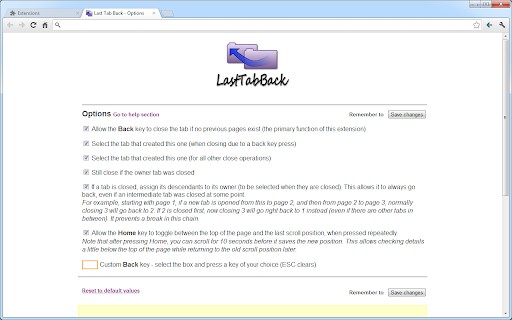
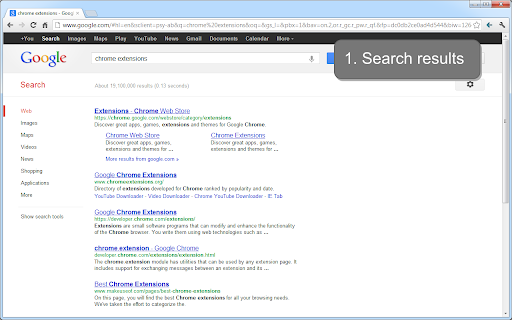
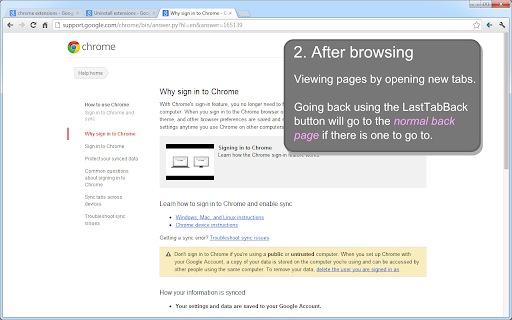
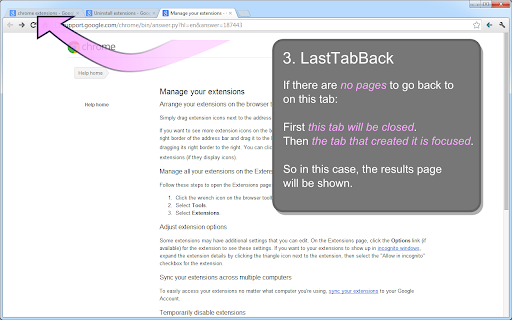
Use the back key to close the tab if there are no pages to go back to. When it closes, go to the tab that created it. This extension allows using the back key to go back to where you came from if it would normally have no pages to go back to. To try it, open a new tab from a link, and then press the backspace key (note: this will not work within the web store; and if a form field is selected you need to tab out of it. It also obviously cannot work when Adobe Flash (or another plugin) is focused, as this captures key presses). -- Tip: if you use a keyboard key or mouse button that does not appear to work in Last Tab Back, you can set up a custom key in the options page. Click on the box and try your key. If this still doesn't work, you might be able to set up a custom key in the keyboard or mouse software (possibly only for Chrome) and then try setting the custom key again in the options page. -- Pressing backspace / a custom key / clicking the LastTabBack button will go back as usual, until there are no such pages. Then it will close the tab and go back to the tab that opened this one. This allows you to open new tabs and then go back where you came from without having to remember whether it was a new tab or a normal click to navigate - pressing backspace will take you back to the results either way. You can also press Ctrl+Backspace to just go back to the tab that opened this one without closing the current tab, if you wish to leave this page to view later. The extension also modifies the usual tab behavior to go back to the tab that opened this one when you close a tab. Check out my other extension - search the web store for tabtiles. Release history: 0.8.0.3 - Manifest V3 updates and other bug fixes 0.7.3 - Changed the custom key system to allow shift key modifiers e.g. Shift + Chosen Key (for more flexibility with non-standard mouse button binding) 0.7.2 - Fixed a bug where clicking on a Google Search result was occasionally selecting the owner tab. 0.7.0 - Initial release

Backspace to go Back
Restores browser behavior of navigating to previous page when pressing the Backspace key. This extension requires permissions to inject a piece of code in all of the pages you visit. If that freaks you out, that's ok. Handing over those permissions freaks me out too. You can choose to install this extension from source (it's very short) to make sure it's not doing anything malicious. See: https://github.com/oslego/chrome-backspace-back#from-source

Close Tabs to the Left
Adds a button to close all tabs to the left of the current tab. Most browsers have the ability to right-click a tab and "Close tabs to the right", but not "Close tabs to the left"! This extension adds a button to the right of the address bar that all closes all tabs to the left of the current active tab. Unlike most other extensions, it doesn't closed tabs you've pinned!

Open a Closed Tabs
Reopen lost tabs instantly with Open a Closed Tab! Easily open recently closed pages with one click. Your Solution to Recovering Lost Tabs – Open a Closed Tab Extension Accidentally closed a page and need it back? This Chrome extension is here to save the day! Designed for seamless browsing, this lightweight tool helps you instantly open google chrome tabs that were closed by mistake. Whether you're researching, working, or shopping is essential for a smooth online experience. With just one click, this extension lets you open closed tabs on chrome, making it a must-have for every Chrome user. Why You Need Open a Closed Tab Losing a tab can disrupt your workflow, but this extension ensures you never lose track. Here’s why it stands out: Instant Recovery: Learn how to open recently closed sessions in seconds. User-Friendly: Simple interface to open a shuted page without hassle. Lightweight: No impact on browser speed when used this extension. This extension is perfect for anyone who wants to master how to restore a tab you just closed, especially during multitasking sessions. Effortless Tab Recovery with Chrome Lost your previous page in Chrome? Our extension is the seamless solution. Retrieve your most recent browsing session instantly with just one click. Eliminate the hassle of searching through your history for lost research or shopping sites. This tool guarantees your essential pages remain just a moment away, always accessible. The extension is packed with features to enhance your browsing: 📍 Quick Access: recivery recently shuted tab with one click. 📌 Easy selection: quickly open one, three or five last closed sessions. ➡️ Help: read how to restore shuted pages These features make it easy to find tabs and keep your workflow uninterrupted. How to Make Work More Comfortable Not sure how to open pages? Our extension is your answer. It adds a convenient button to your Chrome toolbar, allowing you to open window chrome instantly. It’s perfect for students, professionals, or anyone who needs to work comfortably at a computer. Perfect for Multitasking If you’re juggling multiple google open tabs, this extension is a game-changer. It helps you manage tabs opened during busy sessions, ensuring you can open chrome tabs without missing a beat. Here’s how it benefits multitaskers: 1️⃣ Fast Recovery: Quickly restored a closed one, three, five pages during hectic workflows. 2️⃣ No Lag: Lightweight design keeps chrome open closed tab functionality smooth. 3️⃣ Intuitive: Perfect for users learning how to load a recently closed session. Seamless Integration with Chrome This extension blends perfectly with Chrome’s ecosystem. It supports across all types of pages, from news articles to work documents. The extension’s intuitive design makes it easy without slowing down your browser. Why is our extension, and not an alternative one There are many similar tools, but none are as focused as open a closed pages. Here’s what sets it apart: 📍 Simplicity: No complex menus—just three buttons in the extension 📌 Speed: Instantly extension without delays. ➡️ Reliability: Consistently recovers chrome open tabs. This article details a Chrome extension designed for effortless retrieval of lost browser sessions. Its core benefits are: 1. Instant Access: Regain lost content in seconds with a single click, bypassing complex history menus. 2. Streamlined Workflow: Its simple, intuitive interface prevents disruption, maintaining your focus and productivity. 3. Lightweight Performance: The tool operates seamlessly without consuming excessive memory or slowing down browser speed. 4. Customizable Retrieval: Quickly open tabs: one, three, or five of your most recently lost pages to suit your immediate needs. 5. Seamless Integration: It blends perfectly into the Chrome environment for a native and hassle-free user experience. Ultimately, this extension is a essential productivity tool for anyone seeking a reliable and efficient method to recover their browsing activity. Open tabs in one click.

Recover Closed Tab
🚀 Recover closed tabs with one click! Works in incognito mode. Right-click icon or webpage to show history. Tired of accidentally closing important tabs and not being able to quickly retrieve them? Our extension allows you to reopen recently closed tabs with just one click! No need to memorize complicated shortcuts or click multiple times. Simply click the extension icon to easily get back what you need! In addition, you can customize the extension icon to make your browser reflect your personal style! Right-clicking also provides a history menu for quick access. 🎨 Version 3.63 (2026-01-21): Right-clicking anywhere on the webpage can now also display the history menu. Version 3.61 (2025-07-24): Added keyboard shortcut settings guide, supporting the configuration of multiple shortcuts for launching extensions. Version 3.6 (2024-11-30): Added a default-enabled option to conveniently use the extension in Incognito Mode. Version 3.5 (2024-11-20): Added right-click history menu and optimized the user experience. Version 3.0 (2024-10-27): Optimized details and added an option in settings to restore tabs using the Chrome API (restored tabs retain history, allowing forward and backward navigation). Version 2.1 (2024-10-19): Fixed some bugs. Now, closed tab records will be saved even after closing Chrome, up to 1000 entries. Feel free to make requests and provide feedback; we will continue to update! 🔄 Upgraded to Manifest V3 and fixed some issues. Experience a more convenient browsing experience and say goodbye to the frustration of lost tabs! Try it now! 🎉
