
oijfkgmlaaolhekgpnnkpioflmbpdodc

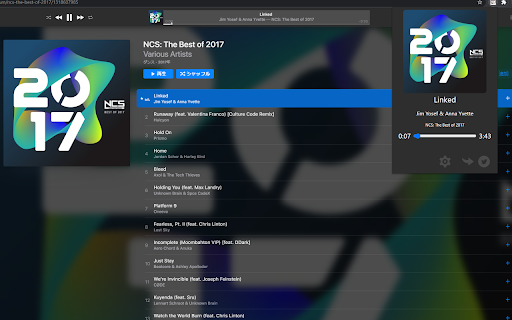
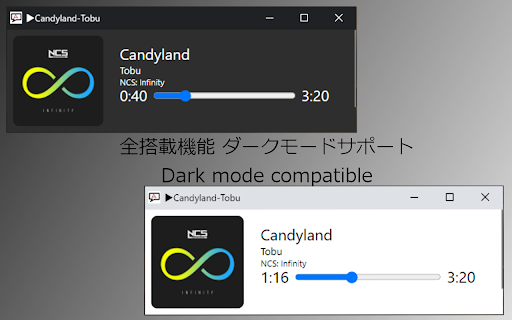

You can display and operate Apple Music music information during playback. In addition, the lyrics can be displayed . The music being played on the Web version of AppleMusic can be operated using the media keys on the keyboard. You can display song titles on the lock screen and control playback. (Confirm only on Windows 10 Chrome and MS Edge and ChromeOS) In addition, you can also search for lyrics using UtaTen(https://utaten.com/) and search for the characters you care about when browsing the Web with AppleMusic. ・ Click this extension icon next to the URL field. Click on the jacket image to jump to the UtaTen lyrics page in a new window. ・ If there is a word that you are worried about when browsing the Web, select it and click “Search with AppleMusic”. A new tab opens and you can search in fast. Dark mode support! Click the Twitter icon to tweet with "#NowPlaying"! Equalizer functions etc. can be used! Supports full screen display mode! (Only songs in Apple Music) ・ This extension is not official. GitHub: https://github.com/kawa-nobu/AppleMusic-notification Please check the release of Github for detailed update contents etc.

iCloud Mail Notifier - Email Alerts
Keep Tabs on your iCloud Emails Introducing "iCloud Mail Notifier - Email Alerts," the ultimate Chrome extension for busy professionals, students, and anyone who relies on email communication. Designed with simplicity and efficiency in mind, this extension is a must-have tool for managing your iCloud emails directly from your browser. Regular Email Updates: Stay informed with your iCloud Mail without constant manual checking. Our extension displays a badge icon on your browser, showing the unread email count, updated every 5 minutes for timely awareness of your inbox. Automatic Refresh Mechanism: The extension automatically refreshes your iCloud Mail inbox at 5-minute intervals, ensuring you're regularly updated on your latest emails. Subtle Notification Chime: A gentle chime alerts you of new emails, striking the perfect balance between being noticeable and not disruptive. This feature allows you to be alert to new messages without interrupting your workflow. Manual Refresh Option: For those moments when you need immediate updates, the extension offers a manual refresh option. A simple click on the popup allows you to check for new emails instantly. Privacy-Focused: Your privacy is our top priority. The extension operates seamlessly in the background without storing any login information. Enjoy a secure experience knowing your credentials are safe. User-Friendly Interface: Experience a clean, intuitive interface that integrates seamlessly with your Chrome browser. No complicated settings or configurations - just a straightforward solution to email notifications. Benefits: Enhanced Productivity: By staying informed about your emails in real-time, you can manage your time more effectively and respond to important messages promptly. Convenience: Access your email notifications directly from your browser, eliminating the need to constantly log in to your iCloud account. Peace of Mind: With automatic and manual refresh options, you have complete control over how and when you receive email alerts. Secure and Private: Enjoy a worry-free experience with an extension that respects your privacy and security. Who is it for? Whether you're a software engineer managing multiple projects, a student coordinating assignments, or a professional juggling various tasks, "iCloud Mail Notifier - Email Alerts" is your perfect companion for staying on top of your emails without hassle. Download Now: Get "iCloud Mail Notifier - Email Alerts" today and transform the way you manage your iCloud emails. It's fast, efficient, and free! Add it to your Chrome browser and experience the convenience of smarter email alerts. Note: iCloud is a trademark of Apple Inc., not affiliated with this extension. This extension is an independent project designed to enhance your email experience.

Spotify to Apple Music Playlist Converter
An easy-to-use Spotify to Apple Music playlist converter. This handy tool can effortlessly transfer Spotify playlist to Apple Music Meet the ultimate Spotify to Apple Music playlist converter - a simple yet powerful extension built to make your music transfer experience fast, seamless, and stress-free. If you're switching streaming platforms and you need help to transfer spotify playlist to apple music, our app is your go-to tool. No more manual recreation or searching for songs one by one. How to Quickly Import Spotify Playlist to Apple Music 1. Install our powerful extension directly from the store 2. Open the Spotify website to start using our playlist converter 3. Find a new export button added to each page with songs 4. The app will transfer playlist from spotify to apple music 5. Before the first use, log in to your new account 6. Once authorized, start migrating your library anytime Save Your Time We’ve spent countless hours refining every detail of the converter to make your experience import Spotify playlist Apple Music as smooth and effortless as possible. From the intuitive interface to fast, accurate transfers, everything is designed with care. - Simple one-click installation - Integrated into Spotify's interface - Prominent music transfer button - Real-time progress updates - Instant link on completion Under the Hood - a Few Technical Insights Our extension is the perfect helper if you need to migrate spotify to apple music - it makes switching streaming platforms simple and stress-free. Enjoy total freedom in managing your songs across services, and have fun using converter playlist every step of the way! • Accurate matching of tracks fo correct export spotify playlist to apple music • spotify to apple music playlist converter supports all types of playlists • Clean mapping of metadata. Track names and albums are preserved • Unavailable songs: spotify playlist converter flags them gracefully • No ads and full respect for your privacy. Enjoy distraction-free service How to Make Sure It Works? Try to test this app with a smaller playlist first - the spotify to apple music playlist converter will transfer them instantly. It’s super fast - on average, importing 30 songs takes just 1 minute, giving you peace of mind before import spotify to apple music entirely. 1️⃣ Convert spotify playlist to apple music in

Song Lyrics
Display current song lyrics for music platforms, such as Spotify, Apple Music, Deezer, YouTube, etc. Chrome Extension for displaying current song lyrics. It supports a lot of music platforms, such as Spotify, Apple Music, Deezer, YouTube (with chapters), SoundCloud, etc. You can check all platforms and other information on GitHub: https://github.com/AlexWayfer/song-lyrics?tab=readme-ov-file#song-lyrics Right now it loads lyrics from Genius, other sources can be added in the future. It also has options for displaying. * Watch for parsed search query change. You can resume watching by pressing "Refresh" button. Works with "Remove (Mix)" checkbox correctly. * Pin correctly with a custom search query. * Fix parsing for YouTube. * Fix parsing for Shazam. * Fix border and background colors opacity for iframe popup. * Add "Clear iframe settings" context menu. When you've messed up with its position or size. * Return regular popup, but add a pin button to display it as iframe. Now you will always open the default popup window, but you can switch to iframe anytime. * Add refresh button for re-parsing song title and artists from a site. * Remake iframe moving actions, adopt it for zoomed pages. * Make popup window as iframe. Resizable and movable. Position and size are saving per site. * Add music platforms for popup iframe on non-supported sites. * Add query form for unsupported sites. * Add an error notice when site doesn't work as expected. With a link to contact the developer. The whole changelog: https://github.com/AlexWayfer/song-lyrics/blob/main/CHANGELOG.md

Apple Music Extension
Apple Music is an audio and video streaming service Get unlimited access to 100 million songs, thousands of curated playlists, and original content from the artists you know and love – all ad-free. Hear sound all around you with Spatial Audio featuring Dolby Atmos. Apple Music for Chrome is a user-friendly extension that enhances your experience on the Apple Music website. With this extension, you can: Customize Your View: Adjust the brightness and background color of the page to suit your mood. Control Audio Easily: Quickly mute or unmute your tab and play songs directly from the extension. Search with Ease: Find your favorite artists or albums without leaving your current tab. Welcome Page: A friendly welcome page automatically opens in a new tab right after installation. Enjoy a more personalized and visually appealing way to enjoy your music on Apple Music!
