
oiedehaafceacbnnmindilfblafincjb

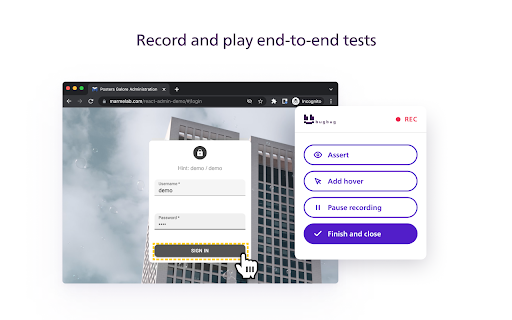


Automate your website testing without code. An easy alternative to Selenium, Cypress and Katalon. Create end-to-end tests for your web app in minutes. Regression testing has never been simpler. How it works? BugBug Tests Recorder allows you to record and play end-to-end browser tests directly in your Chrome browser. 1. Create an account on https://bugbug.io - it's free forever 2. Click "Start recording" and manually navigate on your website 3. BugBug records all your clicks and keyboard typing 4. Click "Run test" and BugBug automatically "plays" everything you recorded. It runs an automated test directly in your browser in incognito mode. Who is it good for? - startups that want to monitor if their product is working properly - software developers who want to save time on manual testing before each release - QA testers who want to automate their work - e-commerce companies that want to monitor if their platform works as it should Why choose BugBug over Cypress or Selenium? - faster implementation - reduced cost - less overall effort - more reliable tests - works out-of-the-box - no-code

Exploratory Tester
Get the Test Report Before You Start Testing - Automated exploratory & accessibility testing Exploratory Tester - A browser extension for automated smoke testing, exploratory testing and accessibility testing. How to use- 1. Just install it and pin it to tool bar. 2. Now open any url and click on the Exploratory Tester Logo from the toolbar 3. It will execute all test and generate the report. Features: Test Categories (Human Tester Focus) Category | What It Tests - 1. Spelling Mistakes- Detects typos in visible text using 100+ word dictionary 2. Email Field Validation- Can email fields accept invalid emails? Missing validation? 3. Phone Number Validation- Can phone fields accept alphabets? No numeric restriction? 4. Input Fields Status- Are inputs unexpectedly disabled or read-only? 5. Required Fields- Do required fields actually reject empty submissions? 6. Number Field Validation- Can number fields accept text? Missing min/max? 7. Password Fields- Minimum length, required, HTTPS security 8. Button Functionality- Are buttons clickable? Disabled? Too small? 9. Links Check- Empty hrefs, javascript:void links, missing text 10. Broken Links- Fetches all links and detects 404s, dead links, timeouts 11. Form Submission- Can forms be submitted? Submit button working? 12. Dropdown Fields- Empty dropdowns, single option, duplicates 13. Checkboxes & Radio- Missing labels, single radio option 14. Date Fields- Accepts invalid dates? Missing date picker? 15. Text Areas- No character limit? Read-only? 16. Images- Do images load successfully? 17. Input Placeholders- Missing placeholder or label text 18. Error Messages- Are there visible errors on the page? 19. Page Loading- Are loading spinners still showing? 🧠 Smart Test – Context-Aware Automated Testing Smart Test automatically detects the type of page you're on — login, registration, checkout, search, dashboard, and more — and runs the most relevant tests for that context. If you face any issue, write to us at support@selectorshub.com

Jam
Jam is the smart screen recorder for software teams. Use the Jam Chrome extension to capture bugs, feedback, feature ideas, and QA notes right from your browser. Every recording is automatically enriched with the visual and technical context engineers and AI agents need to understand what happened and move work forward. - Click the Jam extension to record your screen or take a screenshot - Get an AI summary of the issue with repro steps, plus the option to add voiceover, comments, or visual annotations - Share a link to the Jam with all the visual and technical context your team needs to understand and action the issue ➤ Reduce debugging back-and-forth - Automatically capture console logs, network requests, user actions, device details, and more - Give engineers the context they need to reproduce, triage, and resolve issues faster - Request a recording from customers and teammates with a link - Send Jams to Linear, Jira, GitHub, Asana, ClickUp, Azure DevOps, and more - Create developer-ready tickets with full dev context in one click - Easily share context with teammates in Slack, Notion, and other team workflows ➤ Give agents the full picture - Route Jam context to AI agents like Claude, Codex and Cursor with Jam MCP - Use agents to document issues, analyze what happened, and draft a PR with the fix - Turn Jam context into tickets, specs, docs, QA notes, or code changes Trusted by 200K+ users at teams like Ramp, Drata, Perplexity, ElevenLabs, and Autodesk.

Bugasura
Bugasura enables anyone who tests by automating test data and reporting. This is available for web, mobile web and native apps. Bugasura Chrome Extension is the easiest and most visual way to share website development and design feedback. Use this AI-enabled reporter that allows you to catch bugs super fast. ⚡ 📸 Automatic screenshot and video capture to explain steps to reproduce 🦾 Auto-generate bug descriptions, severity, and tags with integrated AI 👉 Built-in annotator to explain bugs and give more context to screenshots 📌 Designer mode to give pixel precise feedback to developers 📊 Collaborative test coverage reports so you know exactly what was tested 🤖 To push all bugs into an AI-powered issue tracker This is that one plugin that your developers, designers, and testers will all love. Catch bugs and close them faster with Bugasura Chrome Plugin. "Bugasura has made explaining bugs easy to our team and hence we close bugs faster" - Yash, Engineer at Stockal

TestCraft
Introducing TestCraft, a free and open-source browser extension with the power OpenAI LLMs, designed to be a companion to your software testing. AI-Powered Test Idea Generation: Leverage the power of OpenAI to generate comprehensive test ideas based on webpage elements. Automated Test Creation: Generate ready-to-run test scripts for popular automation frameworks, Playwright, Selenium, and Cypress, in your preferred programming language: JavaScript, TypeScript, Python, C#, and Java. TestCraft eases your test creation process and saves time. Accessibility Checks: Empower your web applications to be inclusive for all users. TestCraft identifies accessibility issues and provides actionable insights to improve. Test Idea to Automated Tests: Seamlessly convert your AI-generated test ideas into automated test scripts. Additionally, you can edit the test ideas to improve them before generating automation tests. Unlock the full potential of your testing process with TestCraft. Download it now and experience the future of software testing!
