
ohpkfhhopcepcgeljjdaiiebcigaanel
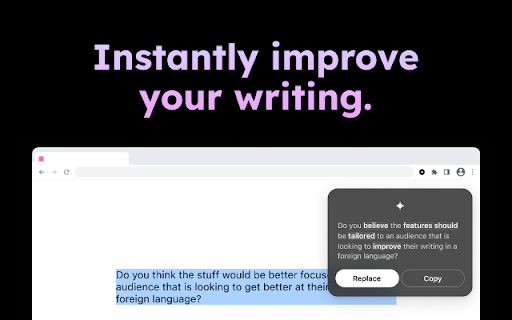
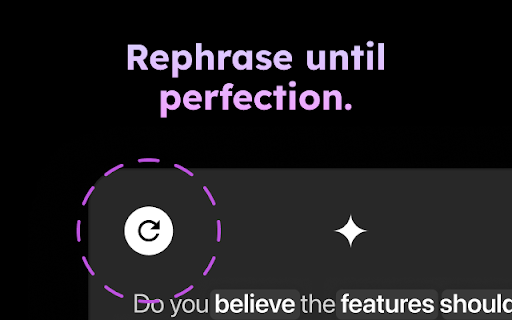


Phrases helps you sound smarter, clearer, and more professional. It's always available because Phrases is seamlessly integrated with your browser. Highlight any text, and Phrases uses our state-of-the-art artificial intelligence engine to transform your raw text into perfectly crafted, grammatically correct English with a consistent, confident, and professional tone. Your emails will shine. You can even write a series of bullet points and Phrases will write the email for you! ▶ How it works Using Phrases is dead simple: 1. Highlight text 2. Tap the Phrases icon to rephrase 3. View the rephrased text and tap to use ▶ Use cases Phrases can help you write better anywhere. Our users like Phrases for emails, marketing, sales, business documents, memos, stores listings, and more. ▶ Testimonials "Better than ChatGPT. ChatGPT made my life a lot easier but its responses were too formal and 'hostile'... Phrases.ai is very good, way smoother than ChatGPT." - Dustin, from the Netherlands "The rewrite is super good. Users will love it." - Lily, from Australia The above was written with the help of Phrases.ai.

Chat with Desksense AI Powered by GPT4
The Ultimate AI Assistant with GPT-4 powered responses. Answers any queries, summarize articles, create emails, content & AI images. Desksense ChatGPT AI app provides Free Chat GPT & GPT-4 access, AI writer for Email, Blogs, Articles, Tweets, Linkedin posts, Facebook Posts, Replies and more. Desksense AI uses OpenAI ChatGPT to summarize Youtube videos & Blog in one-click. Desksense AI app revolutionizes your online search experience by integrating Open AI ChatGPT alongside your Google search engine. With Desksense you can access instant AI-generated responses, providing valuable insights and information right alongside the search results you're browsing. With just a CMD+ I OR CTRL+ I Desksense makes it easy for you to access the ChatGPT on any website. Use "Shortcuts" for Advanced users. 👉👉 Save ANY ChatGPT, GPT-4, Claude3 OR Genini Pro response to your Desksense Account in one-click. 👉 [New Update] Desksense comes with new Chat GPT models like; GPT-4-o-mini and other LLM's like Claude3, Gemini Pro & Llama 3version. 👉 [New Update] Desksense comes AI Image Analyzer 👉 Desksense iOS App is now live in App Store. 👉 New AI Summarizer is now live with upload file feature. 👉 AI Writer for ANY content with ChatGPT-4, GPT-4-o-mini, Claude 3 & Gemini Pro option (Emoji, character limit included with a different lanuage model.) 👉 FREE AI Chatbot integrated with ChatGPT & GPT-4 in web app 👉 Get ChatGpt AI response or replies with 'Tone' and 'Emoji' 👉 Unlimited AI response on Google Search 👉 One-click AI summarizer for Youtube videos 👉 One-click AI summarizer for ANY website 👉 ChatGPT AI Image generator using Dall-E 👉 Save ChatGPT response in your account for later use. 👉 Save your frequently used prompt(s) 👉 List of 100+ preset prompts and option to edit and save in your account. 👉 Easy Access with CMD + I OR CTRL + I on ANY website 👉 Grow your Social Media presence using Desksense AI response in LinkedIn posts, Twitter & Facebook posts. 👉 Write faster and smarter emails on Gmail, Tweets, Linkedin Posts and Facebook posts 👉 Generate online content, video script, hashtags & keywords and topics for blog posts, articles and socials using Desksense AI ChatGPT App. 👉 Share your saved response to social media using our Desksense Web App 👉 Copy to clipboard, Save, Favorite and add tags to ChatGPT responses as Card. 👉 Desksense Chat GPT & GPT 4 Android Mobile App 👉 Auto Dark/light mode 👉 Change the Tone of your response and include emoji when needed. 👉 AI Chatroom Collaboration with your Team 👉 AI Chatbot in Extension 👉 AI Content Generator - AI Email Writer, AI Article Writer using ChatGPT, GPT-4, GPT-4-o-mini, Claude3 and Gemini Pro., AI Code Generator, AI Social Media Post Generator and more... Are you a busy professional juggling multiple tasks? A student striving for academic excellence? Or someone seeking to optimize their daily routines? Look no further! Desksense is here to revolutionize your digital experience. Desksense is a powerful chrome extension that leverages the ChatGPT API to enhance your productivity. It provides a range of AI applications, including ChatGPT & GPT-4 AI chatbot, summarizers, AI writers, and more, accessible on any website. Yes, Desksense is completely free to download and use. Every free user gets 5000 Word limit for month. No, you do not require a separate ChatGPT account. Simply sign up for free at Desksense.com to access the extension. Yes, Desksense chrome extension works seamlessly in all countries, ensuring that users worldwide can benefit from its features. To install Desksense on your browser, you will need to follow these steps: 1) In your browser open the browser's app store or extension store 2) Search for the Desksense in the browser's app store or extension store (or click for : Google Chrome | Edge) 3) Click on the "Add to Browser" or "Install" button to begin the installation process. 4) Follow the prompts to give the extension permission to access certain parts of your browser, if prompted. 5) Once the installation is complete, you will be redirected to our onboarding page 6) That’s it ! you are done :) Please pin the ext. on top bar to get on-time updates. If you have any questions, please feel free to reach us at support@desksense.com === VERSION 1.0.13 ==== * NEW FEATURE: AI Writer for ANY content with newest version of GPT models (Emoji, character limit included with a different lanuage model.) * NEW FEATURE: AI Image Analyzer that analyses any image and gives you response describing the image. * File Summarizer: Upload any file & summarize in one-click * Minor Bug fixes

TextGPT - Smarter Text Input by OpenAI
TextGPT: Your Virtual Co-Pilot for Smarter Text Input in the Browser, Powered by OpenAI's ChatGPT 🚀 The TextGPT Extension is your virtual co-pilot for smarter text input in the browser, powered by OpenAI's ChatGPT. Enhance your text editing experience with advanced AI capabilities directly within your favorite web applications and text editors. 💪 1️⃣ Smarter Text Input: Leverage the power of OpenAI's ChatGPT to generate intelligent and context-aware text right in your textarea. 🧠✍️ 2️⃣ Customizable Activation: Choose a unique keyword that activates the TextGPT Extension, allowing you to unleash your creativity and control when to engage with the AI assistance. 🎛️ 3️⃣ OpenAI API Integration: Seamlessly integrate your OpenAI API key to unlock the full potential of the TextGPT Extension. 🤝🔑 4️⃣ Automatic Key Generation: Generate an OpenAI API key with a single click for a hassle-free setup. 🔐🔢 5️⃣ User-Friendly Settings: Customize the extension's behavior and preferences using the intuitive options page. ⚙️🖥️ 6️⃣ Save and Sync Options: Save and sync your extension settings across devices using Chrome's storage. 💾🔄 Experience a new level of productivity and efficiency in your daily writing, content creation, coding, and communication tasks with the TextGPT Extension. Empower your text editors with AI assistance and elevate your writing game. 📈📚💡 💡 Important notes: 1️⃣ This extension requires an OpenAI API key to access the ChatGPT model. 🔐 2️⃣ Make sure to refresh the webpage after installing the extension to ensure its proper functionality. 🔄 3️⃣ For security reasons, the extension will not work on any pages within the Google Store. 🛡️🚫

ChatGPT, Bing & Bard For Chrome: Kursor
Discover an unparalleled web browsing experience with Kursor, the comprehensive solution for all your online communication needs. Summarize, translate, rephrase, correct grammar, and create content with just one click. Experience the future of web surfing with Kursor, powered by GPT-AI ! Kursor utilizes the power of OpenAI's GPT- AI to revolutionize your browsing, ensuring seamless integration and the latest technology. 💸 100% Free and Unlimited Use Kursor is entirely free to use, with no restrictions on the number of searches you can perform. 🖱️ One-Click Functionality Effortlessly select any text on the web and access Kursor's powerful features like summarizing, translating, rephrasing, and grammar correction with just one click. 🔎 ChatGPT for LinkedIn: Gain valuable insights into job opportunities by seamlessly integrating LinkedIn's job data, helping you stay informed and connected in the professional world. 🌐 50+ Language Translations Translate text into over 50 languages, breaking down language barriers and accessing content from around the globe. 🎭 10+ Tonalities for Rephrasing Rephrase text in more than 10 different tonalities, giving your content a unique and customized feel. 💬 AI-Driven Chat Ask questions and resolve queries instantly with our AI chat window powered by ChatGPT. 📝 Versatile Composition Functionality Compose emails, messages, paragraphs, tweets, articles, or blog posts with specified objectives, length, and tone. 🔥 Easy Access to Third Window Open the third window effortlessly using cmd + shift (for Mac) / ctrl + shift (for Windows). ⚡ Swift Response Time Enjoy smooth and timely responses with our seamless integration of GPT technology. 📧 Contact Us for Support Reach out to our team anytime at contact@kursor.in for any assistance or inquiries. Install Kursor now and elevate your web browsing experience with the power of ChatGPT!

ChatGPT for ElegantResume
Use ChatGPT in ElegantResume's resume builder to improve your resume content. With this extension, you can use ChatGPT in ElegantResume's resume builder web app. It can help you log in to your ChatGPT account, send your questions to ChatGPT, and get answers from ChatGPT. With the extension, you don't need to manually copy and paste your resume to ChatGPT.
