
inehfleiieafdkoidehlpkaccjbfgojk
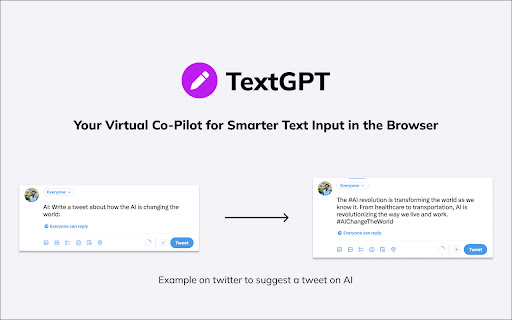
TextGPT: Your Virtual Co-Pilot for Smarter Text Input in the Browser, Powered by OpenAI's ChatGPT 🚀 The TextGPT Extension is your virtual co-pilot for smarter text input in the browser, powered by OpenAI's ChatGPT. Enhance your text editing experience with advanced AI capabilities directly within your favorite web applications and text editors. 💪 1️⃣ Smarter Text Input: Leverage the power of OpenAI's ChatGPT to generate intelligent and context-aware text right in your textarea. 🧠✍️ 2️⃣ Customizable Activation: Choose a unique keyword that activates the TextGPT Extension, allowing you to unleash your creativity and control when to engage with the AI assistance. 🎛️ 3️⃣ OpenAI API Integration: Seamlessly integrate your OpenAI API key to unlock the full potential of the TextGPT Extension. 🤝🔑 4️⃣ Automatic Key Generation: Generate an OpenAI API key with a single click for a hassle-free setup. 🔐🔢 5️⃣ User-Friendly Settings: Customize the extension's behavior and preferences using the intuitive options page. ⚙️🖥️ 6️⃣ Save and Sync Options: Save and sync your extension settings across devices using Chrome's storage. 💾🔄 Experience a new level of productivity and efficiency in your daily writing, content creation, coding, and communication tasks with the TextGPT Extension. Empower your text editors with AI assistance and elevate your writing game. 📈📚💡 💡 Important notes: 1️⃣ This extension requires an OpenAI API key to access the ChatGPT model. 🔐 2️⃣ Make sure to refresh the webpage after installing the extension to ensure its proper functionality. 🔄 3️⃣ For security reasons, the extension will not work on any pages within the Google Store. 🛡️🚫

MetaPrompt - AI Prompt Engineer & Optimizer for ChatGPT & Claude
Transform unclear questions into expert prompts. Get better AI responses from ChatGPT and Claude with one click. Metaprompt: Your AI Whisperer Transform how you interact with AI MetaPrompt transforms your ChatGPT and Claude experience by intelligently enhancing your prompts. Powered by advanced GPT 4.1 models, our Chrome extension analyzes your questions and refines them to generate clearer, more precise AI responses - saving you time and frustration. Simple, Powerful Workflow 1. Type your question as you normally would 2. Click the MetaPrompt button to apply expert prompt engineering 3. Watch as your request transform into an optimized prompt that gets real results What Sets MetaPrompt Apart - Instant Optimization: Turn unclear questions into structured prompts that deliver exactly what you need - Seamless Integration: Works naturally within ChatGPT's and Claude's interface with zero learning curve - Universal Compatibility: Use our popup anywhere you interact with AI tools Choose Your Perfect Plan MetaPrompt Pro ($5.99/month) - 5000 monthly prompt enhancements - Access to larger, more powerful models for even better results Who Needs MetaPrompt? - Students seeking deeper explanations and research assistance - Professionals requiring accurate information for critical tasks - Writers looking for better creative input - Developers needing precise code solutions - Researchers formulating complex queries - Anyone tired of wasting time on unhelpful AI responses Stop struggling with AI miscommunications. Download MetaPrompt today and start getting the quality responses you deserve.

GPT Reader/Transcriber: Free AI Text to Speech/Speech to Text (TTS/STT)
Free AI text to speech (tts) & speech to text (stt) with ChatGPT. Listen to natural voices or transcribe audio instantly. To use the extension: 1️⃣ Click the extension icon (or visit chatgpt.com) 2️⃣ Sign in with your ChatGPT account 3️⃣ Click the extension icon or the button on the ChatGPT page 4️⃣ You will notice an overlay open where you can choose either the text to speech or speech to text option 🔥 Key Features of ChatGPT Reader & Transcriber 🔥 ✅ Free to Use AI Text to Speech (TTS) ChatGPT Reader & Transcriber is completely free to use and includes a premium tier for more serious users ✅ Download AI-Generated Audio (NEW!) Save high-quality speech as an audio file for offline listening ✅ Read Aloud Any Text Instantly (WEB and FILE UPLOAD supported!) Convert Google Docs, PDFs, EPUB or custom text into natural-sounding speech with one click. ✅ Human-Like AI Voices Uses OpenAI's voices for clear, smooth, and natural narration ✅ New! Free Speech-to-Text (STT) Transcription • Live transcription – speak and see your words appear in real-time • File transcription – upload audio files and convert them to text • Download transcriptions – export as PDF or TXT for easy sharing • Unlimited & Free – no usage caps, enjoy all transcription features at no cost ✅ Supports Multiple Inputs Paste text or upload documents—ChatGPT Reader & Transcriber handles it all ✅ Customizable Playback Controls Adjust speed, pause, rewind, and play at your preferred pace ✅ Accessibility and Productivity • Students – Listen to notes and papers while studying • Professionals – Review reports and emails hands-free • Readers with Dyslexia & Vision Impairments – Improve comprehension with assistive speech • On-the-Go Listeners – Enjoy articles or documents while commuting, exercising, or multitasking ❗ Not affiliated with or endorsed by OpenAI or ChatGPT ❗ ❗ Free alternative to sites like ElevenLabs, Speechify, Rev, Otter.ai or other text to speech/transcription services❗ 🛠 Download ChatGPT Reader & Transcriber: Free AI Text to Speech & Speech to Text today and elevate your reading and transcription experience with free, high-quality AI voices and transcriptions. 🛠

Bettertext - chatGPT AI writing toolbox
Bettertext's uses the OpenAI Chatgpt API technology, it analyzes your text in real-time, providing instant suggestions for… Bettertext's uses the OpenAI Chatgpt API technology, it analyzes your text in real-time, providing instant suggestions for improvement as you type. Plus, with its user-friendly interface, you can easily customize its settings to match your writing style and select the appropriate tone to help you sound more professional or conversational. Simply highlight any text and a full set of writing functions will appear at your fingertips. Here are some of the app features: 🚀 Get started with our Free Plan - 5 free creations every day, no credit card required. ✏️ Improve and Rewrite Text: This tool helps you to improve the grammar and syntax of your text. It suggests changes that can help make your writing more clear, concise, and readable. 📝 Shorten Text: This function is perfect for when you need to reduce the length of your text. Simply highlight the text, use the "Shorten Text" tool, and the app will help you to remove unnecessary words and phrases while maintaining the original meaning of your text. 📖 Expand Text: Need to add more content to your text? The "Expand Text" feature is the solution you're looking for. This tool helps you to add new sentences or paragraphs to your text, providing suggestions to help you continue writing effortlessly. ✍️ Continue Writing: With the "Continue Writing" feature, you can easily pick up where you left off in your text. This tool provides suggestions for the next sentence or paragraph, helping you to keep the flow of your writing going. ✉️ Email Response: Replying to emails has never been easier. With Bettertext, you can highlight the text of an email and use the ruler toolbox to reply quickly and efficiently. 💬 Message Response: The same goes for messages on social media platforms like Facebook and Twitter. Simply highlight the text, use the ruler toolbox, and reply with ease. 🤔 Answer Questions: Have a question to answer on Quora or Reddit? Bettertext can help you respond quickly and accurately. Simply highlight the text of the question and use the app's editing tools to provide a well-written, informative response. 📄 Summarize: Summarizing large chunks of text can be a daunting task, but with Bettertext, it's a breeze. Simply highlight the text and use the "Summarize" tool, and the app will provide you with a concise summary of the main points in your text. 🌐 Translate: Need to translate your text to another language? Bettertext has got you covered. The app can translate your text to any language you choose, helping you to communicate with people from all around the world. 🎵 Tones: Bettertext's AI technology suggests personalized responses for any situation, whether it's a professional email or a casual conversation with a friend. Choose from a range of tones to make sure your response is just right. 🙋♀️ Personalized Input: Make your responses even more personal and accurate by adding your own input. Bettertext's personalized input feature allows you to customize your responses to make them more relevant and personalized to your specific situation. 💡 Prompt: With the new "Prompt" feature, you can highlight any text and run your own custom prompt on the selected text. This feature is perfect for brainstorming ideas, generating new content, or even creating writing prompts for yourself or others. Bettertext can be especially useful for non-native English speakers who want to improve their grammar and writing skills. The app provides personalized replies that use proper grammar and structure (avoid common mistakes such as misspelling words) and helping users to sound more professional. Bettertext is perfect for anyone who needs to write effectively and efficiently. Whether you're a student, professional, or content creator. At Bettertext, we offer a 3-day free trial with access to all features, allowing users to experience the full potential of our app. After the trial period, users can choose to upgrade to our Premium plan for continued access to all features, including an unlimited number of daily responses and all the advanced options. Is Bettertext compatible with languages other than English? Yes, Bettertext supports other languages besides English. When a user highlights text in a non-English language, Bettertext will detect the language and generate an English answer based on that text using its language translation feature. This makes Bettertext a valuable tool for non-native English speakers looking to improve their writing skills in English.

re:write - Your writing companion
Uplevel your writing with re:write powered by ChatGPT API Uplevel your writing with re:write, powered by ChatGPT API. Some of re:write capabilities include (and are not limited to): - Allow users to choose between four core tone parameters, as well as three length parameters to get the results they want. - Provide users with three variations of rewrites given the sample text and specified parameters, allowing users to choose which rewrite best suits their needs. - Perform quick grammar checks for inputted text, and deliver detailed and comprehensible explanations. No need for a OpenAI account to use re:write. We provide GPT-3.5-turbo for FREE so that users are able to increase the quality of their writing with the help of AI, and also learn how to improve their writing with our grammar check functionality. Email yulianokimm@gmail.com for any questions, and don't forget to write a review telling us about your experience with re:write!
