
anopodponloibekldiehmilbbbadncgf

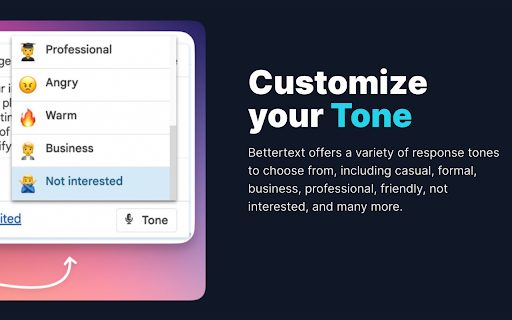
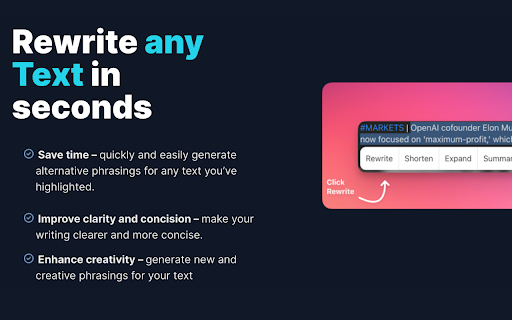

Bettertext's uses the OpenAI Chatgpt API technology, it analyzes your text in real-time, providing instant suggestions for… Bettertext's uses the OpenAI Chatgpt API technology, it analyzes your text in real-time, providing instant suggestions for improvement as you type. Plus, with its user-friendly interface, you can easily customize its settings to match your writing style and select the appropriate tone to help you sound more professional or conversational. Simply highlight any text and a full set of writing functions will appear at your fingertips. Here are some of the app features: 🚀 Get started with our Free Plan - 5 free creations every day, no credit card required. ✏️ Improve and Rewrite Text: This tool helps you to improve the grammar and syntax of your text. It suggests changes that can help make your writing more clear, concise, and readable. 📝 Shorten Text: This function is perfect for when you need to reduce the length of your text. Simply highlight the text, use the "Shorten Text" tool, and the app will help you to remove unnecessary words and phrases while maintaining the original meaning of your text. 📖 Expand Text: Need to add more content to your text? The "Expand Text" feature is the solution you're looking for. This tool helps you to add new sentences or paragraphs to your text, providing suggestions to help you continue writing effortlessly. ✍️ Continue Writing: With the "Continue Writing" feature, you can easily pick up where you left off in your text. This tool provides suggestions for the next sentence or paragraph, helping you to keep the flow of your writing going. ✉️ Email Response: Replying to emails has never been easier. With Bettertext, you can highlight the text of an email and use the ruler toolbox to reply quickly and efficiently. 💬 Message Response: The same goes for messages on social media platforms like Facebook and Twitter. Simply highlight the text, use the ruler toolbox, and reply with ease. 🤔 Answer Questions: Have a question to answer on Quora or Reddit? Bettertext can help you respond quickly and accurately. Simply highlight the text of the question and use the app's editing tools to provide a well-written, informative response. 📄 Summarize: Summarizing large chunks of text can be a daunting task, but with Bettertext, it's a breeze. Simply highlight the text and use the "Summarize" tool, and the app will provide you with a concise summary of the main points in your text. 🌐 Translate: Need to translate your text to another language? Bettertext has got you covered. The app can translate your text to any language you choose, helping you to communicate with people from all around the world. 🎵 Tones: Bettertext's AI technology suggests personalized responses for any situation, whether it's a professional email or a casual conversation with a friend. Choose from a range of tones to make sure your response is just right. 🙋♀️ Personalized Input: Make your responses even more personal and accurate by adding your own input. Bettertext's personalized input feature allows you to customize your responses to make them more relevant and personalized to your specific situation. 💡 Prompt: With the new "Prompt" feature, you can highlight any text and run your own custom prompt on the selected text. This feature is perfect for brainstorming ideas, generating new content, or even creating writing prompts for yourself or others. Bettertext can be especially useful for non-native English speakers who want to improve their grammar and writing skills. The app provides personalized replies that use proper grammar and structure (avoid common mistakes such as misspelling words) and helping users to sound more professional. Bettertext is perfect for anyone who needs to write effectively and efficiently. Whether you're a student, professional, or content creator. At Bettertext, we offer a 3-day free trial with access to all features, allowing users to experience the full potential of our app. After the trial period, users can choose to upgrade to our Premium plan for continued access to all features, including an unlimited number of daily responses and all the advanced options. Is Bettertext compatible with languages other than English? Yes, Bettertext supports other languages besides English. When a user highlights text in a non-English language, Bettertext will detect the language and generate an English answer based on that text using its language translation feature. This makes Bettertext a valuable tool for non-native English speakers looking to improve their writing skills in English.

ChatGPT Prompt List
A Chrome extension that allows you to create a list of prompts to feed to ChatGPT. Time saving extension where you can leave you computer and the prompts will still be asked. Go to the https://chatgpt.com/?model=gpt-4. Click on the icon C to open up the extension popup. Insert the prompt in the input field and click enter or add prompt button. Insert as many prompts as you need. Make the hhttps://chatgpt.com/?model=gpt-4 as the active window and click start in the extension popup. Wait for it to finish all the prompts. When it finishes the prompts click the button clear all prompts to start with new ones. (OPTIONAL) Switch between light and dark mode.

Writewiz: AI Content Creator & Writing Tool
Elevate your writing with a contextually-aware AI assistant tailored to your distinct persona. Explore seamless writing, wherever you are online, with Writewiz. Our AI-driven platform is meticulously designed for both individuals and enterprises, amplifying your distinct style or brand identity through the use of Personas. Experience the AI revolution now - no need for a credit card! Are You Part of Something Greater? Achieve unified organizational communication. Ensure that every department reflects the brand persona, be it in emails, social media, or detailed product descriptions. Move beyond the confines of standard style guides; Writewiz offers real-time writing guidance, driving consistent brand messaging. Writewiz’s state-of-the-art AI capabilities include: ➡️ Sentence Rewrite: Refresh your content using Writewiz's Rewriter. Transition smoothly between tones, from formal to casual, to match your desired expression – be it a single phrase or extensive paragraphs. ➡️ Idea Generation: Overcome writer’s block with unique, content-specific idea prompts. ➡️ AI Composition: Accelerate your writing with smart suggestions while preserving your unique flair. ➡️ Accuracy & Feedback: Showcase your professionalism with AI-guided corrections. Write freely without the worry of typos or grammatical errors. ➡️ Contextual Awareness: Keep your content pertinent with context-sensitive advice. ➡️ Unique Persona: Choose a preset persona or craft a distinctive writing persona to match your voice, ensuring that your identity remains at the forefront of your content. Whether you're penning a heartfelt personal story or a corporate announcement, the tool adapts, allowing your true voice to shine without compromise. With Writewiz for Chrome, everyone can find their groove: ★ Branding Experts: Every word defines your brand. Trust Writewiz to reflect your brand's excellence. ★ Content Specialists: Prioritize content consistency. Empower your team with high-quality, positive, and uniform writing. ★ Support & Success Teams: Combine empathy with brand voice for clear, compassionate responses. ★ UX Innovators: Ensure brand consistency, no matter the author, in tooltips or in-app communications. ★ HR & Development: Foster modern, unified communication, giving the organization a harmonized voice. Enhance every word with Writewiz for Chrome. We’re committed to refining and enhancing your Writewiz journey. For questions or feedback, reach out to us at https://writewiz.ai/support.

Chat with Desksense AI Powered by GPT4
The Ultimate AI Assistant with GPT-4 powered responses. Answers any queries, summarize articles, create emails, content & AI images. Desksense ChatGPT AI app provides Free Chat GPT & GPT-4 access, AI writer for Email, Blogs, Articles, Tweets, Linkedin posts, Facebook Posts, Replies and more. Desksense AI uses OpenAI ChatGPT to summarize Youtube videos & Blog in one-click. Desksense AI app revolutionizes your online search experience by integrating Open AI ChatGPT alongside your Google search engine. With Desksense you can access instant AI-generated responses, providing valuable insights and information right alongside the search results you're browsing. With just a CMD+ I OR CTRL+ I Desksense makes it easy for you to access the ChatGPT on any website. Use "Shortcuts" for Advanced users. 👉👉 Save ANY ChatGPT, GPT-4, Claude3 OR Genini Pro response to your Desksense Account in one-click. 👉 [New Update] Desksense comes with new Chat GPT models like; GPT-4-o-mini and other LLM's like Claude3, Gemini Pro & Llama 3version. 👉 [New Update] Desksense comes AI Image Analyzer 👉 Desksense iOS App is now live in App Store. 👉 New AI Summarizer is now live with upload file feature. 👉 AI Writer for ANY content with ChatGPT-4, GPT-4-o-mini, Claude 3 & Gemini Pro option (Emoji, character limit included with a different lanuage model.) 👉 FREE AI Chatbot integrated with ChatGPT & GPT-4 in web app 👉 Get ChatGpt AI response or replies with 'Tone' and 'Emoji' 👉 Unlimited AI response on Google Search 👉 One-click AI summarizer for Youtube videos 👉 One-click AI summarizer for ANY website 👉 ChatGPT AI Image generator using Dall-E 👉 Save ChatGPT response in your account for later use. 👉 Save your frequently used prompt(s) 👉 List of 100+ preset prompts and option to edit and save in your account. 👉 Easy Access with CMD + I OR CTRL + I on ANY website 👉 Grow your Social Media presence using Desksense AI response in LinkedIn posts, Twitter & Facebook posts. 👉 Write faster and smarter emails on Gmail, Tweets, Linkedin Posts and Facebook posts 👉 Generate online content, video script, hashtags & keywords and topics for blog posts, articles and socials using Desksense AI ChatGPT App. 👉 Share your saved response to social media using our Desksense Web App 👉 Copy to clipboard, Save, Favorite and add tags to ChatGPT responses as Card. 👉 Desksense Chat GPT & GPT 4 Android Mobile App 👉 Auto Dark/light mode 👉 Change the Tone of your response and include emoji when needed. 👉 AI Chatroom Collaboration with your Team 👉 AI Chatbot in Extension 👉 AI Content Generator - AI Email Writer, AI Article Writer using ChatGPT, GPT-4, GPT-4-o-mini, Claude3 and Gemini Pro., AI Code Generator, AI Social Media Post Generator and more... Are you a busy professional juggling multiple tasks? A student striving for academic excellence? Or someone seeking to optimize their daily routines? Look no further! Desksense is here to revolutionize your digital experience. Desksense is a powerful chrome extension that leverages the ChatGPT API to enhance your productivity. It provides a range of AI applications, including ChatGPT & GPT-4 AI chatbot, summarizers, AI writers, and more, accessible on any website. Yes, Desksense is completely free to download and use. Every free user gets 5000 Word limit for month. No, you do not require a separate ChatGPT account. Simply sign up for free at Desksense.com to access the extension. Yes, Desksense chrome extension works seamlessly in all countries, ensuring that users worldwide can benefit from its features. To install Desksense on your browser, you will need to follow these steps: 1) In your browser open the browser's app store or extension store 2) Search for the Desksense in the browser's app store or extension store (or click for : Google Chrome | Edge) 3) Click on the "Add to Browser" or "Install" button to begin the installation process. 4) Follow the prompts to give the extension permission to access certain parts of your browser, if prompted. 5) Once the installation is complete, you will be redirected to our onboarding page 6) That’s it ! you are done :) Please pin the ext. on top bar to get on-time updates. If you have any questions, please feel free to reach us at support@desksense.com === VERSION 1.0.13 ==== * NEW FEATURE: AI Writer for ANY content with newest version of GPT models (Emoji, character limit included with a different lanuage model.) * NEW FEATURE: AI Image Analyzer that analyses any image and gives you response describing the image. * File Summarizer: Upload any file & summarize in one-click * Minor Bug fixes

TextGPT - Smarter Text Input by OpenAI
TextGPT: Your Virtual Co-Pilot for Smarter Text Input in the Browser, Powered by OpenAI's ChatGPT 🚀 The TextGPT Extension is your virtual co-pilot for smarter text input in the browser, powered by OpenAI's ChatGPT. Enhance your text editing experience with advanced AI capabilities directly within your favorite web applications and text editors. 💪 1️⃣ Smarter Text Input: Leverage the power of OpenAI's ChatGPT to generate intelligent and context-aware text right in your textarea. 🧠✍️ 2️⃣ Customizable Activation: Choose a unique keyword that activates the TextGPT Extension, allowing you to unleash your creativity and control when to engage with the AI assistance. 🎛️ 3️⃣ OpenAI API Integration: Seamlessly integrate your OpenAI API key to unlock the full potential of the TextGPT Extension. 🤝🔑 4️⃣ Automatic Key Generation: Generate an OpenAI API key with a single click for a hassle-free setup. 🔐🔢 5️⃣ User-Friendly Settings: Customize the extension's behavior and preferences using the intuitive options page. ⚙️🖥️ 6️⃣ Save and Sync Options: Save and sync your extension settings across devices using Chrome's storage. 💾🔄 Experience a new level of productivity and efficiency in your daily writing, content creation, coding, and communication tasks with the TextGPT Extension. Empower your text editors with AI assistance and elevate your writing game. 📈📚💡 💡 Important notes: 1️⃣ This extension requires an OpenAI API key to access the ChatGPT model. 🔐 2️⃣ Make sure to refresh the webpage after installing the extension to ensure its proper functionality. 🔄 3️⃣ For security reasons, the extension will not work on any pages within the Google Store. 🛡️🚫
