
ohmkcnojelglgphmkgmofjlmpoelccjh




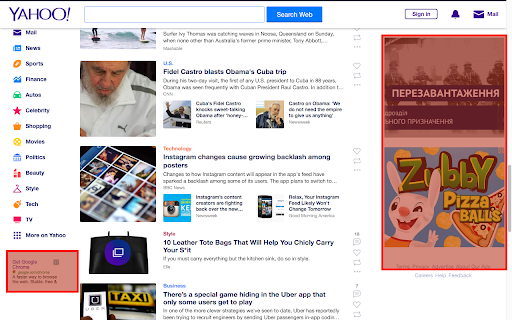
Get rid of ads for free! - blocking ads - deleting widgets of social networks - users anonymity is increased (deleting counters and analytics systems) - blocking 3rd party cookies - notifications for members regarding malware extensions - opportunity to send detailed reports - opportunity to block any element on web site - managing installed extensions - opportunity to disable the extension at all or on concrete web site - displaying statistics regarding blocked pages

AlionWeb - Block Malicious and Other Sites
We protect you and your children from pornographic and malicious sites Ensure a safe internet for your children. AlionWeb automatically protects against online threats by blocking pornography, phishing, cyberbullying, and dangerous sites. Our extension shields the vulnerable minds of children from harmful content that can cause stress, anxiety, and contribute to the development of addictions. Why you will love AlionWeb: Smart AI protection with full privacy: Our neural network detects online grooming attempts and other hidden threats. The model runs exclusively on our own secure servers. We strictly do not use third-party cloud services (such as OpenAI), so your personal data is never shared and remains absolutely safe. Adult content blocking: An effective 18+ content filter protects children from viewing material that could disrupt their psychological development and the formation of their values. Simple parental control: Intuitive restriction settings so you can be absolutely sure your children are safe. Invisible 24/7 operation: The extension works in the background, protecting your devices around the clock without unnecessary interference. AlionWeb is more than just a tool. It is your peace of mind for your children's future and your digital security. Install AlionWeb today and protect what matters most — your family!

Popup Blocker (Lite)
A fast, easy and secure way to block all unwanted popups and pop-unders! Popup Blocker (Lite) is a browser extension to block all annoying pop-ups and pop-unders. When the addon detects a popup, it will block it immediately and the badge icon will show the blocked item (number will increase). If you want to see notifications about the blocked popup, please enable desktop notifications from the options page. Some features: a. Allows you to block all unwanted popups and pop-unders. b. Has a built-in feature to whitelist the desired domain to show popups. c. Works fundamentally different than other popup blockers, therefore it works in almost all cases. d. Has a switch to turn the addon ON or OFF from toolbar popup UI. e. Several settings in the options page to adjust the addon's functionality to your need. f. Has badge icon text to show you the number of blocked popups. g. Very lite addon with no significant CPU and memory usage. When you first install the addon, some websites are added to the whitelist table by default (open the options page to see or edit the list). When a domain is whitelisted, the addon's toolbar button icon is green. When the addon is disabled or a website URL is invalid (i.e. chrome://) the icon is dark gray. In all other cases, the toolbar icon is red. So, while browsing with this addon, please be aware of the icon color to make sure it is set based on your desire. Note: to report bugs, please fill out the bug report form on the addon's homepage (https://mybrowseraddon.com/popup-blocking.html)

Privacy Manager
Manage privacy settings, browsing data deletion, quickly access page in incognito mode, manage cookies and monitor network traffic Privacy Manager is completely free and open source chrome extension for data transparency and control. Privacy Manager can help you with: * Privacy Management * Cookie Management * Browsing data deletion on browser start * Network monitoring Privacy Management - Extension provides ability to manage current privacy settings (Enable/Disable): * Blocks third-party sites from setting cookies. * Hyperlink auditing management. * Manage whether chrome must allow sending referrer headers with requests. * Show alternate error pages or not. * Automatically fill in forms settings management. * Enable or disable 'OK, Google' to start a voice search * Enable or disable password saving * Enable safe browsing in case if the option is disabled by another extension (if safe - --- - browsing is enabled Chrome does its best to protect you from phishing and malware). * Enable or disable safe browsing reporting * Search suggestion management. * Enable or disable correct spelling service. * Translate service switch. * Network prediction management. * Web RTC IP handling Cookie Management - is a tool for managing cookies (to use the tool you need to allow optional host permissions inside of the extension): * View cookies attached to domains * Filter cookies by domain * Add/create cookie * Modify cookie * Delete single cookie * Delete cookies from specific domain * Delete All cookies Network monitoring - User also can manage network traffic in popup window - collect http headers and also block user agent data to be sent via request, to use that feature you need to allow optional host permissions. Github: https://github.com/Privacy-Managers/Privacy-Manager Releases: https://github.com/Privacy-Managers/Privacy-Manager/releases Issues and feature requests: https://github.com/Privacy-Managers/Privacy-Manager#reporting-bugs-suggestions-and-questions Help me translate: https://github.com/Privacy-Managers/Privacy-Manager#translations

Weather
Extension shows the temperature and weather conditions for your current location
