
flkpkonhokophabdnmggfbdlbdknebel

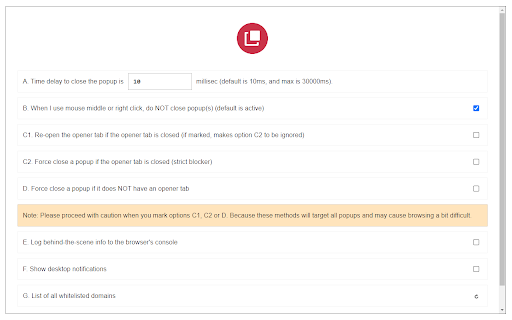
A fast, easy and secure way to block all unwanted popups and pop-unders! Popup Blocker (Lite) is a browser extension to block all annoying pop-ups and pop-unders. When the addon detects a popup, it will block it immediately and the badge icon will show the blocked item (number will increase). If you want to see notifications about the blocked popup, please enable desktop notifications from the options page. Some features: a. Allows you to block all unwanted popups and pop-unders. b. Has a built-in feature to whitelist the desired domain to show popups. c. Works fundamentally different than other popup blockers, therefore it works in almost all cases. d. Has a switch to turn the addon ON or OFF from toolbar popup UI. e. Several settings in the options page to adjust the addon's functionality to your need. f. Has badge icon text to show you the number of blocked popups. g. Very lite addon with no significant CPU and memory usage. When you first install the addon, some websites are added to the whitelist table by default (open the options page to see or edit the list). When a domain is whitelisted, the addon's toolbar button icon is green. When the addon is disabled or a website URL is invalid (i.e. chrome://) the icon is dark gray. In all other cases, the toolbar icon is red. So, while browsing with this addon, please be aware of the icon color to make sure it is set based on your desire. Note: to report bugs, please fill out the bug report form on the addon's homepage (https://mybrowseraddon.com/popup-blocking.html)

Host AdBlocker
The "Host AdBlocker" is an ad-blocking extension that uses host matching instead of RegExp matching to increase blocking performance and reduce memory footprint. How it works: This extension installs a static hostname list to the incoming filter to block advertisement, tracker, and analytic sources. If a hostname matches, the request gets blocked. If not, the request gets processed as usual. Extensions like "uBlock Origin" or "AdBlock Plus" use the RegExp matching method. Although this method is more powerful, it is computationally expensive. Features: 1. You can extend the default filtering list by adding your custom domain names in the backlist hostnames on the options page. 2. To completely ignore a hostname, add it to the whitelist 3. This extension runs on manifest v3. This means that blocking performance is native. 4. You can toggle the extension on and off with a single click on the action button.

Genius PRO : Adblocker +Total Web Security
Patilweb Adblocker blocks ads and trackers to make your web surfing faster and safer. Block ads, popups, malware, and trackers across the web — including YouTube, Facebook, and more. Browse faster, stay secure, and take full control of your online privacy. 🚫 Ad Blocking on All Websites – Remove banner ads, autoplay videos, Facebook ads, YouTube ads, and more. 🛡 Security Protection – Block malicious websites, phishing pages, and unwanted scripts. 🧩 Content Control – Hide or block unwanted page elements. ⚡ Ultra-Fast Performance – Optimized for minimal RAM & CPU usage. 🔧 Advanced Settings – Fine-tuned filter rules, whitelists, and custom blocking. 🔒 Enhanced Privacy – Prevent tracking, block fingerprinting, and protect your online identity. Privacy reports with protection indicators ✔ Blocks the most annoying ads (autoplay videos, overlays, interstitials, expanding ads) ✔ Faster & lighter than traditional ad blockers ✔ Works on You-Tube, Facebook, Search engines, and Webmail ✔ Full control – whitelist websites or allow certain ads if you choose ✔ 100% privacy-focused – we do not track you We take your privacy seriously. The extension requires “access to all websites” only to detect and block ads. Your private data always stays private. ⭐ Install now and enjoy a faster, cleaner, and safer web browsing experience with Advanced AdBlocker & Privacy Guard. Block annoying ads, popups, malware and tracking (even on Facebook & Youtube), browse faster, and protect your privacy. + The absolute BEST adware and popup protection on the web. Got popups and annoying ads you can’t get rid off? This is the AdBlock for you! + Our AdBlocker extension enables you to block many types of ads - you have full control. With our AdBlocker extension you can block annoying ads, pop-ups and malware and protect your device from any security threats and protect your privacy from online tracking. This will also enhance your browsing experience, start now to enjoy much faster, secure and private browsing! + Block the most annoying ads, including: autoplay video ads, youtube ads, expanding ads, interstitial page ads, overlay ads. + Block pop-up ads and pop-unders no matter where you click on the page. + More blocking options: you can use Fair AdBlocker to block Facebook ads, Webmail ads, Search ads, and more. + Control your experience: You can allow certain types of ads or whitelist the websites you wish to support. + Genius Ad blocking also YouTube ads, Video ads. This extension provides adGaurd tracking. =============================== PRIVACY: In one sentence: We don’t track you and we prevent others from tracking you! We take your privacy very seriously. Privacy is one of our core values and we’ve built Stands from the ground up with that in mind. The communication with our servers is encrypted and we don’t have any way to connect between you and your online activity. The only data we store is your preferences and statistical information about your impact and engagement so we can improve Stands for you. The notice you see about having access to “all website data” is automatically generated because Stands need to access the ads on the page to block them and replace them with donating ads. Rest assured we can’t look at your private data! ========================== To prevent any confusion, this extension was built from scratch using advanced security tools and is NOT based, associated, or affiliated with any other Ad Blocking tool such as ...

WebAPI Blocker
Easily block (nullify) undesired Web API(s) and improve your privacy. WebAPI Blocker is a lite addon that lets you easily block and nullify a desired web API. Simply open the toolbar popup UI and choose an API from the drop-down list (top left side). Then, click on the (+) button to add the item to the API list. Once you add an item, you can remove it from the list by clicking on the "remove" button next to each item. Moreover, you can deactivate an item by removing the checkmark from the list. There is also a "reload" button at the top toolbar to reload the active tab. On the right side, you can add desired domains to the whitelist table. Please enter a domain name in the input field and then click on the (+) sign to add it to the table. To remove a domain, please click on the cross sign next to each item. Note: please be careful when you block (nullify) a web API. Because certain API(s) may cause websites to not fully load or even make them unresponsive. Therefore, please do enough research before disabling an API. To report bugs, please fill the bug report form on the addon's homepage (https://mybrowseraddon.com/webapi-blocker.html).

Bib Bypasser
Bypass some annoying popups that beg you to turn your adblocker off! Ad Blockers are extremely common things. Unfortunately, sites like EasyBib, CitationMachine, and CiteThisForMe all detect the fact that you're using an adblocker. In our experience, they give off false-positives more often than not. While we do support sites who generate revenue from advertisements, it's safe to say that many sites have too many ads. With Bib Bypasser, you won't have to deal with their popups. This extension blocks requests to the website they host their anti-ad-blocker scripts on. So, when you load any of their websites, you won't see their annoying popup anymore. At the time of release, you also won't see Grammarly ads, either! Update 1.3: Added support for popular news websites
