
ohhejeocpggohheifpbjhikmlnmkccpe
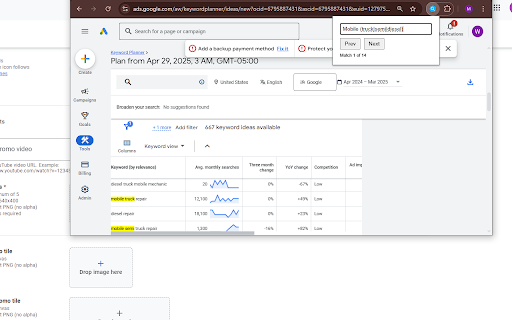
Find text on the current page using regular expressions. 🔍 Unlock Advanced In-Page Searching with Regular Expressions! 😫 Tired of the limitations of your browser's standard "Find" (Ctrl+F)? ✨ RegEx Page Finder empowers you to search webpages with the full precision and flexibility of Regular Expressions (RegEx). Locate complex patterns, specific data formats, or nuanced text variations that simple keyword searches miss. 👨💻 Whether you're a: This extension is for you! 🧩 Seamless Integration Simple popup from your toolbar, designed to feel like the native find function. 💡 Live Highlighting Matches are instantly highlighted on the page, with the current match clearly marked. 🔄 Dynamic Content Awareness Automatically re-scans and updates highlights when websites load content dynamically. 📌 Persistent Search Remembers your last used RegEx pattern between sessions. ⚡ Efficient Performance Optimized to search even large pages smoothly and quickly. 1️⃣ Click the RegEx Page Finder icon in your Chrome toolbar. 2️⃣ Enter your Regular Expression in the input field. 3️⃣ Matches will automatically highlight on the page. 4️⃣ Use "Next" and "Prev" buttons or press Enter to navigate. 🚫 Stop scrolling endlessly! ✅ Find exactly what you need, faster and smarter, with RegEx Page Finder.

find+ | Regex Find-in-Page Tool
A find-in-page extension with support for regular expressions. {find+} is a powerful Find-in-Page extension for Google Chrome allowing you to search a web page or document by regular expression. It has been designed to look and behave much like the native CTRL-F tool, but extended with various useful features. With {find+}, you can match any legal JavaScript regular expression against text in the page, use find-and-replace to replace text in the page, copy occurrences of a regex to your clipboard, store frequently used expressions, and configure the extension the way you like. As a software developer, looking through lengthy stack traces, continuous integration build history, or large text files is something we do very regularly. The Chrome Find-in-Page tool works well in most cases, but offers very little when looking for very specific (or very general) keywords. A few notes: - This tool was designed and built for developers. If you're not familiar with using regular expressions, this tool is not for you. - This tool does not support dynamic pages. The purpose of this tool is to search for patterns in structured text, not in pages like Google Sheets or similar sites. - This tool will struggle with significantly large pages. In these cases, using another tool might be more appropriate.

Regex Replace
Whether you want to consolidate your cloud-to-butt and your xkcd inspired s/keyboard/leopard extensions, or just do a simple regex replace on all pages, this extension is for you. With a quick engine that doesn't interrupt page display and an easy way to add new expressions, Regex Replace is what you need to do fast and easy regex replacements on every page you see.

Regular Expression Search
Search using Regular Expression. - instant search - case-sensitive/case-insensitive - select search history using up/down key - choice marker color

Text Rewriter
Replace specified phrases on a page Arbitrary substitution of any visible text on a page. Rewrite customizable patterns in a page. Created mostly for personal amusement, inspired by XKCD #1288 and "butt to butt." By default provides a sensible "mispell" -> "misspell" replacement. Supports any Yavascripp regular expressions, including backrefs and captures. I just visit the visible text nodes on the page and use nodeValue.replace for each provided pattern. This means if there is an overlapping pair of patterns A -> B and B -> C, then both A and B go to C. Clicking the icon in the taskbar disables the addon for that domain. For example maybe you went a little overzealous with the substitutions and want to disable it on Slack because of possible... misunderstandings. Also has an experimental live update feature that will perform replacements on any text that appears even after the page loaded (such as Youtube captions).
