
mjhoonbmfplgchoobbcjggndgdbomdhl
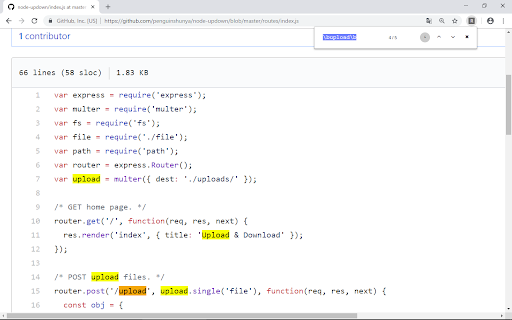
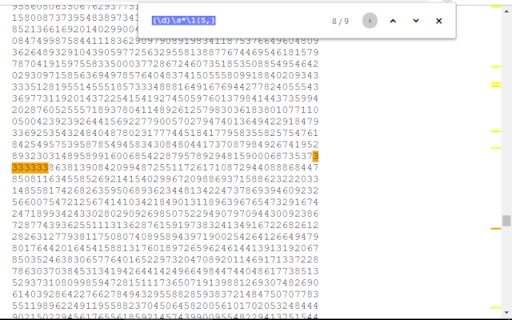
Search using Regular Expression. - instant search - case-sensitive/case-insensitive - select search history using up/down key - choice marker color

Regular Expression Tester
Use Regular Expression Tester as a regex validator to check regex patterns and for online regular expression matching on web pages. Test and debug regular expressions directly in Chrome. Regular Expression Tester is a fast regex tester and regex validator for developers, QA, analysts, and students—built to help you verify patterns, understand matches, and fix errors with immediate feedback. Perfect for: ✅ Developers (JavaScript regex, scraping, form validation, log parsing) ✅ QA / Localization (input validation, test cases, content checks) ✅ Data & SEO / Marketing (content analysis, pattern audits) ✅ Security-minded users (spotting sensitive data patterns) ✅ Learning (interactive practice and experimentation) Key features: - Regex validation with clear error messages - Test patterns in `/pattern/flags` format (e.g., `/\\d+/g`) - Highlight matches and navigate results - Find and highlight matches on the current page - Common built-in patterns (email, URL, phone, etc.) + save your own - Works without external websites; your text stays in your browser Why you’ll like it: Instead of guessing whether your pattern works, you can test it instantly, see exactly what matches, and iterate safely before using it in code or workflows. It’s lightweight, distraction-free, and always one click away. Common uses: ➤ Validate emails, phones, IDs, and form inputs ➤ Debug tricky quantifiers, groups, and lookaheads ➤ Check content rules and structured text ➤ Learn regex basics with live feedback 🤔 What is a regex? 👉 Regex (regular expression) is a pattern used to search, match, and validate text. 🖥️ I use it for JavaScript regex? 👉 The extension uses JavaScript’s regular expression engine, so it’s ideal for testing JavaScript regex behavior and flag. 📱 Does it work offline? 👉 Yes. Core regex testing and validation run locally in your browser. Some optional features may depend on the current page context, but you don’t need an external website to test patterns. ⚡ How does the regex validator work? 👉 The regex validator instantly checks if your regex pattern is valid. If there’s an error, it shows the issue, helping you verify regular expression syntax before using it in your project. 📚 Is this extension useful for beginners learning what is regex? 👉 Absolutely. If you’re asking what is a regex, this tool provides interactive learning. You can experiment with regular expression online tester features and see live results, making it easier to understand regex matching. 🔍 Can I use the extension for data validation tasks? 👉 Yes. Many users rely on it for checking form inputs, emails, phone numbers, or structured text. With the built-in online regex tester and matcher, you can confirm if data fits the rules you’ve created. 🚀 What makes this tool different from other regex testers? 👉 Unlike typical websites, this extension is always just one click away. It combines the speed of an online regular expression tester with the convenience of being built into Chrome. Plus, it’s lightweight, fast, and distraction-free. Install Regular Expression Tester and make regex testing faster, clearer, and easier—right inside Chrome.

Find whatever - regex & auto re-find
Enhance your browser's find capabilities.Case recognition、Word recognition、regular expressions、Listen for DOM changes in real time ## Core Capabilities - Piercing search: Able to directly enter Shadow-DOM, iFrame, and SVG internals. - Dynamic real-time monitoring: Optimized based on MutationObserver, it monitors the page in real-time. When you turn pages, switch Tabs, or trigger dynamically loaded Tooltips, new results will pop up automatically. - Hardcore regex support: Supports regular expressions (configurable Unicode mode), and built-in "regex blacklist" logic to prevent browser hangs caused by incorrect regex. - Status auto-alignment: Automatically refresh results when switching tabs, ensuring the search status is always up to date. - Support cross-tag search: Easily find corresponding text even in complex structures. ## Developer-friendly features - Highlighting fully controllable: Uses the browser's native ::highlight API with excellent performance. You can customize background color, text color, and underline styles in the settings page. - UI non-interference: The panel supports dragging, frosted glass effects, dark mode, and custom theme colors. -One-click extraction: All matched results support one-click copying to the clipboard, convenient for secondary processing. ———————————————————————————————————————————————— 浏览器查找增强工具,专注解决复杂网页搜索痛点。 github:https://github.com/ImSwordTooth/findwhatever 欢迎提 issue 😄

Find
An extension for Regex Find. Search for regular expressions within webpages Feature: - Blazing fast: achieves an overall time complexity of O(n), where n is the total content on the page. - Seamless integration: Adopts keyboard shortcuts consistent with Chrome's default settings. Limitations: - Due to limitations in ECMAScript regular expression implementations, certain features are not supported, such as positive lookbehind with `?

Super Highlight Search
In-page text search tool. High contrast highlighting makes it easy to find! KEYBOARD SHORTCUTS: ==================== ENTER or ↓(Down arrow): Finds the next match SHIFT+ENTER or ↑(Up arrow): Finds the previous match ESC on page: Clear the results UPDATES: ======== v1.0.6 - FIXED: The background not cropped if over 32000 pixels height. v1.0.5 - FIXED: Search for pages including IFRAME does not work. v1.0.4 - FIXED: When typing quickly, search results shown as hits even though it is not a hit sometimes. - UPDATE: Icon creation from canvas to svg for clearer display. v0.3.7.0 We've caught up with Chrome 61, finally. Selection follows document scrolling.
