
ohfjcimfaifmlbiogjnlpoonlickgcei

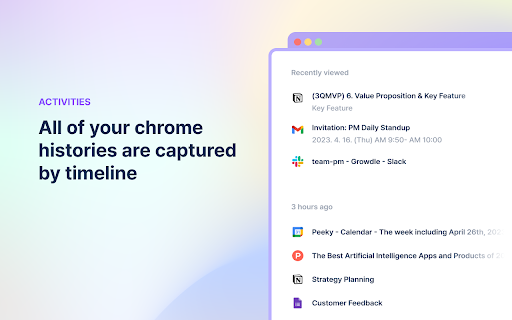
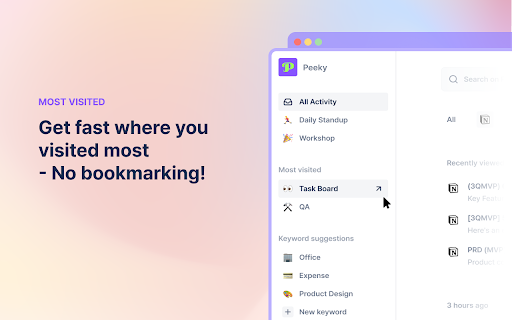

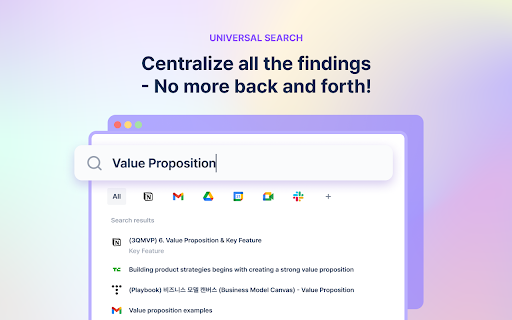
Peeky organizes your web history and helps you get to what you want. Close all the tabs. Peeky will bring you back to the point Introducing Peeky - No more sifting through numerous tabs to find your way back to where you left off. You can boost your productivity by remembering less and doing more. When you browse the internet or read an article, Peeky will organize the list where you visit. That way, you can power through interruptions and pick up right where you left off, without missing a beat. SELF-ORGANIZED Peeky automatically organizes the pages you visited, by keyword and app. No need for manual sorting. NO MANUAL INTEGRATION Peeky works with any app right after installation. Ready to use. UNIVERSAL SEARCH Centralize all the findings. No more back and forth. 👉 Check out our website for more information: https://getpeeky.app/ 👉 We’d love to hear about your questions or feedback: getpeeky@gmail.com

myReach Web Clipper
Save the things that matter on the web in an interconnected network Introducing myReach: Unleash Your Productivity with AI-Powered Superpowers Discover the browser extension that revolutionizes how you save, organize, and access your digital knowledge. myReach is your second brain, seamlessly integrating with your browser to empower you with AI-driven intelligence and effortless retrieval of information. 📚 Save Anything, Find Everything: Capture websites, files, images, notes, and contacts effortlessly, and connect them to relevant tags. No more struggling to remember where you saved that important document or the name of a website – myReach lets you search based on your personal context, empowering you to find what you need quickly and effortlessly. 💡 AI-Assistant at Your Fingertips: Meet your smart AI-Assistant powered by myReach. Simply ask any question about your saved items, and it will instantly provide answers. Whether you need contract details, summarized articles, or reminders from your past conversations, it has the knowledge to assist you effortlessly. No more tedious searching or reading through endless pages – just ask and get instant answers. 🗂️ Organize Your Way: Say goodbye to traditional folders and embrace the freedom of myReach’s flexible workspaces. Create customized workspaces to separate business and personal matters, ensuring efficient organization and effortless collaboration for teams. With myReach, everyone can find the same document using their own context, eliminating the need for extensive training or navigating complex folder structures. 🔍 Intelligent Search, Even in Images: Extracted text from images and files makes every piece of content searchable, delivering unparalleled convenience and efficiency. Locate information buried within images effortlessly, saving you time and frustration. ⚡️ Enhance and Integrate: Customize your saved items with properties like rating, description, cost, and more, allowing for deeper organization and personalization. Seamlessly integrate myReach with your favorite tools, including Evernote, Zapier, Twitter, Google Maps, and more, expanding its capabilities and streamlining your workflow. Welcome to your personal knowledge hub, designed to boost productivity and streamline information retrieval. With myReach, your browser gains superpowers, empowering you to save, connect, and access your digital world effortlessly. Embrace the future of intelligent organization and download myReach today. Get myReach, and unlock a world of limitless knowledge at your fingertips

Site History Express: Quick Navigate
Quickly access recently visited pages on the current site. When you're on a website, simply click the extension icon to view your browsing history for the current website. Pin the extension icon to your browser for quick and easy access. If you click the extension icon on a new tab, it will show your complete browsing history across all websites. Use the keyword search to quickly find specific pages in your history. Keyboard shortcuts for super-fast navigation: • Previous: ArrowUp • Next: ArrowDown • Jump Up: Shift + ArrowUp • Jump Down: Shift + ArrowDown • Open: Enter • Open in New Tab: Shift + Enter • Toggle Filter Scope: Tab Set a custom keyboard shortcut to instantly open your history: 1. Go to chrome://extensions/shortcuts 2. Find Site History Express 3. Set your shortcut (e.g., Ctrl + Shift + 8) "Site History Express" is the new name for "Fiteprint". This is an open source project: https://github.com/site-history-express/site-history-express

Markwise - Save, Organize & Find Anything Online
Save anything from the web—links and videos with timestamps—and find it instantly with AI. Your searchable knowledge base. Stop losing your bookmarks and ideas in a sea of open tabs. Markwise is your AI-powered second brain that helps you save, organize, and find anything on the web instantly. Markwise transforms your browser into a powerful knowledge base. Whether you're researching a project, saving tutorials, or curating resources, Markwise keeps everything organized and instantly accessible. 🧠 AI-POWERED ORGANIZATION Forget about manual tagging. Markwise uses advanced AI to automatically categorize and summarize every link you save. Your knowledge base stays organized effortlessly, so you can focus on reading and learning, not managing files. 🎥 YOUTUBE MOMENTS & TIMESTAMPS Never lose a key insight from a video again. With Markwise, you can snap timestamps on any YouTube video while you watch. Create a personal library of video highlights and jump back to the exact moment you need with a single click. Perfect for tutorials, lectures, and podcasts. ⚡ BRAINBAR COMMAND PALETTE (Cmd/Ctrl + Shift + K) Speed up your workflow with the BrainBar. Access your entire knowledge base from any tab. Search for saved pages, create new notes, or organize your spaces without ever touching your mouse. It’s the fastest way to navigate your digital memory. 🔍 SEMANTIC SEARCH & RECALL Find what you need, even if you forget the title. Markwise’s semantic search understands concepts and ideas. Searching for "coding tips for beginners" will find that article about "React Best Practices" you saved months ago. It feels like magic. 📂 SMART SPACES FOR PROJECTS Group your bookmarks, videos, and notes into dedicated Spaces. Keep all your research for a specific project, client, or hobby in one focused view. Switch contexts instantly without losing your flow. 📝 HIGHLIGHTS & SMART NOTES Don’t just save links—save insights. Highlight important text on any webpage and it automatically syncs to your Markwise dashboard. Add quick notes to give context to your bookmarks, linking your thoughts directly to the source. 🚀 PRIVACY & SECURITY FIRST Your knowledge is personal. Markwise is built with privacy at its core. Your data is encrypted, secure, and never sold to third parties. Only you have access to your second brain. Toggle Brain Bar: Cmd/Ctrl + Shift + K Save Focus Session: Alt + Shift + S Join thousands of users who are reclaiming their browsing history and building a smarter digital life with Markwise. Install Markwise today and turn your browser into a superpower.

Smart Web History
Uses the chrome.history API to display in a popup the user's most visited pages. Smart Web History is a small extension to get better and faster access to the browser history. It shows you all the domains you have visited, sorted per domain. In a second table you see all the pages/urls (or deep links) for the selected domain. So if you for example select the Youtube-domain, it shows you all the videos you have seen. Smart Web History is available as Chrome and Edge extension. The standard history function of chromium browsers saves all visits with 10 information fields per visit over a maximum period of 3 months. This app only saves the last visit with 4 information fields: the domain, title, url and date of the last visit. The resulting smaller database makes it possible to save urls over a much longer period of time (no limit). All the information is saved locally in the browser and can be exchanged with local data files (json-format). Features - Improved web browser history with the urls sorted per domain. - No restriction to the standard 3-month history, as visited domains/urls are saved in the browser. - Fast find your domain or url with the Quick Search tool. - Or find your url with the date picker. - Favicons for all domains (if available) for quick recognition. - Option to provide favorite domains (e.g. Wikipedia, Youtube) that will show up as icon in the toolbar. - Option to provide specific domains that will be hidden. - Export function: urls can be saved to a (json) file. - Import function: urls can be imported from a (json) file. - Keyboard support to navigate through the domains/pages or to select a url. - Free and open source software. - No ads, banners, popups or cookies.
