
ohenjepamgpkndgpnidhfncncabjempn
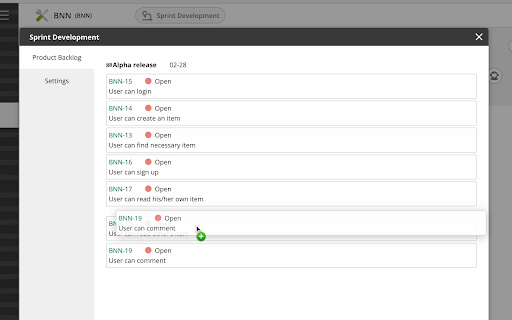

This helps your sprint development on Backlog. This provides features for sprint development on Backlog. [Feature 1. Product Backlog Management] 1. Choose a issue type to express "product backlog". 2. You can arrange product backlog items by drag and drop. * Requirement - This uses "custom attribute" function to store the order of product backlog items. So this needs "Premium" plan or higher. - At the first time you start this extension on your project, project admin authority is needed to make a custom field on this extension. [Feature 2. Useful Milestone Creation] You can create a new milestone for a sprint with start date and end date. This feature automate the following steps 1. create a milestone with a start and end date 2. move uncompleted issues from the currently selected milestone to a new milestone 3. archive the old milestone (set it to not appear on the home screen) [Releases] # 2.0.6 Updated dependencies # 2.0.5 Small bug fix # 2.0.4 Subtle styling fix # 2.0.3 Small bug fix # 2.0.2 Display closed / total estimated value of product backlog items # 2.0.1 Subtle design fix # 2.0.0 Integrated milestone update functionality into the main screen. Added "Hide completed product backlog items" functionality to the settings screen. Added the ability to display the total estimated value of product backlog items. Changed the position of "Add Milestone" button. # 1.2.18 small refactoring # 1.2.17 OAuth flows can be used even in companies with strict security requirements. # 1.2.16 Fixed incorrect data when saving velocity for projects containing "_". # 1.2.15 small fix on stat layout # 1.2.14 GUI to set API keys of Backlog (only for users who cannot authenticate via OAuth2) # 1.2.13 bug fix # 1.2.12 Record Issue-Key on velocity wiki # 1.2.11 Tiny fix # 1.2.10 Layout fix # 1.2.9 New feature to archive milestone # 1.2.8 Submit content on blur on input box # 1.2.6 Subtle refactoring # 1.2.4, 1.2.5: Bug fix: velocity recording was wrong # 1.2.3: Subtle fix: number format on tooltip on chart # 1.2.2: Apply issue template on create issue # 1.2.1: Subtle bug fix # 1.2.0: Added features to show/record velocity of PBI and other tasks # 1.1.0: Added features to edit/add milestone and a new issue type for pruduct backlog # 1.0.8: Added a feature to create a new product backlog item (issue) # 1.0.7: Added a feature to edit status and actualHours only at completed issue # 1.0.6: Added a feature to view and edit estimatedHours as story point # 1.0.5: Added a feature to view and edit issue title and detail # 1.0.4: Bug fixes # 1.0.3: Added a feature to arrange product backlog # 1.0.2: Fixed subtle issues # 1.0.1: Fixed subtle issues # 1.0.0: First release

Validation Rule Extractor - Salesforce
This extension helps you to extract salesforce object Validation Rule.

Smiley Ogame
Smiley for Ogame Chat EN ______________________________ This Chrome extension adds the ability to use emojis in Ogame's chat. It provides a selection of emojis to enhance your chat experience in the game. With an easy-to-use interface, you simply click on the desired emoji to insert it directly into your message. Try it now to make your conversations more fun and expressive! FR ______________________________ Cette extension pour Chrome ajoute la possibilité d'utiliser des smileys dans le chat de Ogame. Elle offre une sélection de smileys pour améliorer votre expérience de chat dans le jeu. Avec une interface facile à utiliser, il vous suffit de cliquer sur le smiley souhaité pour l'insérer directement dans votre message. Essayez-le maintenant pour rendre vos conversations plus amusantes et expressives !

NTUCal
Add your NTU modules to your favourite calendar today! Say goodbye to calendar chaos and hello to organised academic bliss! Introducing our delightful Chrome extension that effortlessly imports your NTU courses and exam dates into any calendar of your choice. From lecture halls to study sessions, stay on top of your academic journey with a touch of whimsy. No more frantic manual entries or missed deadlines! Embrace the fun side of productivity and download our extension now to unlock a seamless scheduling experience. Let's turn your calendar into a colourful canvas of educational adventures!

Sports Social Feed
This extension makes your web browsing much easier and comfortable by helping you simply read sports social feeds in your city. By clicking “ADD TO CHROME”, you accept and agree to install the Sports Social Feeds Chrome Extension, set the Chrome™ New Tab search to Yahoo, and to the Terms of Use, and Privacy Policy. The extension requests the following permission: - Can read and change your data on sites: http://sports-newz.com/ Terms of Use: http://sports-newz.com/pages/terms-of-use.html Privacy Policy: https://sports-newz.com/pages/privacy-policy.html About us: https://sports-newz.com/pages/about-us.html Contact us: https://sports-newz.com/pages/contact.html Get the latest sports social feed and updates right at your homepage! Enjoy an easy-to-use sports-oriented homepage that keeps you connected and up to date with access to top sports social feeds from all over the world right from your browser homepage. Stay up to date with sports news while enjoying a rich search experience and social networks shortcuts. For easy access, we recommend pinning the extension to your browser toolbar. You may uninstall the extension at any time. To remove our extension from Google Chrome: 1) Click on the three vertical dots icon in the upper right-hand corner of your Chrome browser. 2) Go to "Settings.” 3) In the left menu that appears, click on "Extensions.” 4) From the list of installed Extensions, locate the extension you would like to uninstall.
