
ekdeikfpcgmiejhmjmkjjmhkgnokhogk
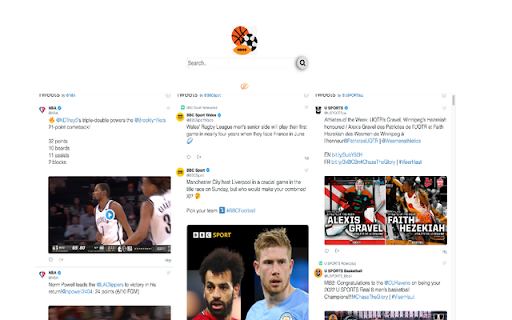
This extension makes your web browsing much easier and comfortable by helping you simply read sports social feeds in your city. By clicking “ADD TO CHROME”, you accept and agree to install the Sports Social Feeds Chrome Extension, set the Chrome™ New Tab search to Yahoo, and to the Terms of Use, and Privacy Policy. The extension requests the following permission: - Can read and change your data on sites: http://sports-newz.com/ Terms of Use: http://sports-newz.com/pages/terms-of-use.html Privacy Policy: https://sports-newz.com/pages/privacy-policy.html About us: https://sports-newz.com/pages/about-us.html Contact us: https://sports-newz.com/pages/contact.html Get the latest sports social feed and updates right at your homepage! Enjoy an easy-to-use sports-oriented homepage that keeps you connected and up to date with access to top sports social feeds from all over the world right from your browser homepage. Stay up to date with sports news while enjoying a rich search experience and social networks shortcuts. For easy access, we recommend pinning the extension to your browser toolbar. You may uninstall the extension at any time. To remove our extension from Google Chrome: 1) Click on the three vertical dots icon in the upper right-hand corner of your Chrome browser. 2) Go to "Settings.” 3) In the left menu that appears, click on "Extensions.” 4) From the list of installed Extensions, locate the extension you would like to uninstall.

Asana Multi Filter
Allows multiple filters to be used on an Asana List page Asana task lists are wonderful, but only allow one filter at a time. This plugin reads data from an Asana list and allows you to keep only tasks that fulfill the filter criteria. Run it multiple times to filter all the way down. How it works: Reads Asana Spreadsheet data columns and deletes HTML rows on the front end. This does not change Asana data in any way. Refreshing the page brings everything back. Known Issues: Version 0.2.0 - Shift clicking remaining tasks will select hidden tasks. Ctrl + Click works fine. - Only works on List view. I will eventually get it working on Board view, but my current needs are satisfied. - Sometimes "Column" dropdown doesn't populate. Click "Refresh Lists" to have plugin pull data from Asana. - Custom columns are fully supported. Assignee, Due Date, and other Asana native column names operate differently than custom columns and I don't necessarily need them to work at the moment.

Twitter Intro Finder
Getting the perfect intro from followers of people that are also following you. When I see someone on Twitter that I want to reach out to (the 'target') you usually want to do so via a great intro. But how do I know who to ask? Currently, the only way to see how you're connected to someone on Twitter is through which people you follow also follow that person. But what you actually want is to get an intro from: (1) someone who the target follows and (2) someone who's following you If someone is following me that means I easily can ask for a good intro. And if the target is following that person that means that they’ll be very likely to take the intro. This extension tells you exactly who to reach out to for a maximally successful intro!

Urban Abodes Posting Tool
Extension that allows for an effortless and rapid method to post apartments to various websites. This extension allows Urban Abodes Agents to rapidly post attractive apartment ads complete with pictures.

Active Group Users
Identify active group members and become the familiar face people reply to — in less time. Are you spending hours on Facebook… and still getting ignored? You’re doing what you were taught: Posting consistently. Commenting on people’s posts. Trying to “be visible.” But the replies never come. Not because you’re doing it wrong — but because people don’t reply to strangers. 🔥 Meet Active Group Users (AGU) — the smarter way to become recognizable on Facebook on purpose. AGU helps you stop guessing who to engage with and start nurturing the right people — consistently, intentionally, and in a fraction of the time. Instead of scrolling endlessly, AGU shows you who’s actually active inside the Facebook groups you’re already part of — so every comment you leave builds familiarity that compounds. With Active Group Users, you can: ✅ Identify the most active members in any Facebook group Focus only on people who are already posting and commenting — not inactive members. ✅ Get a daily list of 20–30 people to engage with So you always know exactly who to visit today — no randomness. ✅ See what they commented on (and where) Engage naturally on posts they already care about. ✅ Track your engagement over time Know when you last visited someone’s profile and how often you’ve interacted — so you space your visibility strategically. ✅ Know who’s becoming “hot” After enough intentional exposure, you’ll clearly see who’s warmed up and ready for a conversation. ✅ Add private notes for smarter follow-ups Keep context without relying on memory or spreadsheets. 💡 Yes — you could do all this manually. But it would mean spreadsheets, reminders, and constant guessing. AGU turns a proven familiarity-based strategy into a simple, manageable system — so you spend less time thinking and more time building real connections. Whether you’re: Active Group Users helps you turn everyday Facebook engagement into real conversations — without wasting hours in the feed. 👉 Install Active Group Users and start building familiarity that actually leads to replies.
