
ohdidajmhgjaeineikmdnninbfjjnihd
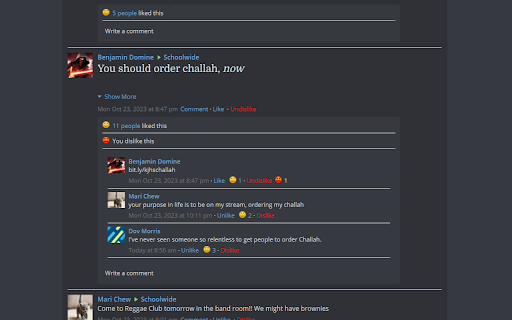
Schoology is an education platform used by many schools to track assignments, classes, and provide announcements. Schoology also contains a number of text channels for communication between students and teachers. These posts and comments have a like button already, which allows users to provide positive feedback on those posts. However, noticeably absent is a button to provide negative feedback, or a dislike button. If a user wants to provide such feedback, their only recourse is to reply with a comment, which is in many cases subject to stigma and is not anonymous. This makes it very difficult, and uncommon, for users to provide any sort of constructive criticism. This extension rectifies this issue by adding a dislike button to all posts and comments. It's anonymous, but still secure. The extension allows users a risk-free way to provide their constructive, negative feedback while preventing the hurtful speech necessarily found when users are forced to comment on posts instead of simply pressing the dislike button.

Dislike Reborn
Dislike Reborn – Bring Back Your Voice on YouTube Tired of not knowing how the audience truly feels about a video? With YouTube's removal of public dislike counts, it's become harder to gauge content quality and authenticity. That’s where "Dislike Reborn" comes in. "Dislike Reborn" is a lightweight browser extension that restores the visibility of dislike counts on YouTube. It empowers users with transparent feedback by displaying accurate like-to-dislike ratios, helping you make informed decisions about the content you watch and support. Key Features: - Reinstates Dislike Counts: See the true dislike count on every YouTube video. - Like/Dislike Ratio Bars: Visualize the balance between likes and dislikes with intuitive progress bars. - Customizable Display: Choose how you want the dislike information to appear—compact, detailed, or color-coded. - Privacy-Friendly: No tracking or unnecessary permissions. Your data stays yours. - Developer Tools: Advanced settings for power users, including API status checks and logging options. Why Use Dislike Reborn? YouTube's decision to hide dislike counts was meant to reduce harassment, but it also removed an essential tool for transparency. "Dislike Reborn" brings back accountability, ensuring creators and viewers alike can engage in a more informed community. Whether you're a casual viewer, a content creator, or someone who values honest feedback, "Dislike Reborn" gives you the tools to navigate YouTube with confidence. How It Works: 1. Install the "Dislike Reborn" extension from your browser's web store. 2. Open any YouTube video, and the dislike count will automatically appear alongside the likes. 3. Customize the display and settings to suit your preferences via the popup menu. Join the Movement: With "Dislike Reborn", you’re not just restoring a feature—you’re supporting transparency and accountability on one of the world’s largest platforms. Reclaim your voice today!

Schoology Course Icon Remover
Join the discord: https://discord.gg/J29mPxpnRF

YouTube Music Dislike Button
An extension that ensures the dislike button is always visible on YouTube Music, even in smaller windows. An extension that ensures the dislike button is always visible on YouTube Music, even in smaller windows.

YouTube Like/Dislike Extension
Displays official like count and Return YouTube Dislike count with a ratio on YouTube videos. Displays Youtube official Like and Dislike count with a ratio on YouTube videos.
